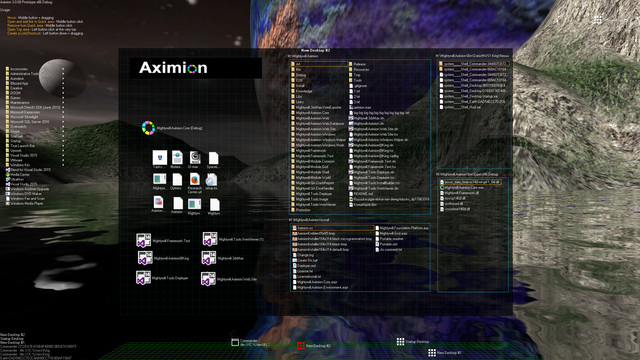
Aximion is a prototype of future desktop and virtual reality user interface environment.

Melden Sie sich an, um dieses Produkt zu Ihrer Wunschliste hinzuzufügen, zu abonnieren oder als „Ignoriert“ zu markieren.

Early Access-Software

Bringen Sie sich in die Entwicklung ein.

Hinweis: Diese Early Access-Software ist noch nicht fertig und könnte sich in Zukunft verändern. Wenn Ihnen die Software im aktuellen Zustand nicht gefällt, sollten Sie abwarten und sehen, ob sich die Software weiterentwickelt. Mehr erfahren

Hinweis: Das letzte Update der Entwickler ist mehr als 7 Jahre her. Die hier von den Entwicklern angegebenen Informationen und der Zeitplan sind möglicherweise nicht mehr aktuell.
Was die Entwickler zu sagen haben:

Wozu Early Access?

„This project is still under development and subject to further research“

Wie lange wird diese Software ungefähr den Early Access-Status haben?

„Roughly by the end of 2018 year“

Wie soll sich die Vollversion von der Early Access-Version unterscheiden?

„Deep user feedback analyzis
Polishing of UX
Several applications, like Commander
More file types supported for Links
New themes and Theme SDK
Item groups manipulations“

Was ist der derzeitige Stand der Early Access-Version?

„Please refer to "About This" section for details“

Wird diese Software während und nach Early Access unterschiedlich viel kosten?

„It's planned to be free“

Wie werden Sie versuchen die Community in den Entwicklungsprozess miteinzubeziehen?

„The whole point of publishing here is to involve and build the Community“
Weiterlesen
Hinweis: Aximion ist nicht mehr im Steam-Shop verfügbar.
 
Alle Diskussionen anzeigen

In den Diskussionsforen können Sie Fehler melden und Feedback zur Software abgeben

Über diese Software

Aximion is a prototype of future desktop and virtual reality user interface environment.

Several UI concepts introduced in the Aximion to help users personalize and organize their environments.

The Aximion rethinks the idea of the Desktop. In the Aximion Desktop is a place where different aspects of a single project/context/interest can be grouped into a single visual entity. For example, if you have some project you may want to gather all related files, links, remote and other resources in one place and organize them accordingly to your preferences. The Aximion Desktops look similar to regular desktops but contain special elements - Avatars. Each type of Avatar represents some aspect of your particular project/context/interest. Their important feature is to change their look accordingly to its importance for the user or to other needs and this look may vary from simple icons to mini-applications with rich functionality. The user can create as many desktops as he needs.

Any application UI can be attached to another. For example, if a top-level UI element of application A is attached to a top-level UI element of application B then if a user opens B, A will show up automatically. The user then can create various application unions which reflect some corresponding contexts. For example, if the user is a software developer then he can create an individual desktop for each of his projects and also create several other desktops that would contain shared tools and resources required for all of his projects. Once any of these project desktops is open all attached desktops with shared tools will appear together with that.

The Quick Area is used to place links to needed objects for the current session, much the same way tabs are used in browsers. Middle button click helps the user to place avatars in the form of a link to that area automatically. They do not disappear when the user closes the object so when needed the object is available for reopening.

All avatars placed to the Head Area are always available for the user and always stay on top of other objects. Using VR gear this area acts as a Heads-up display, i.e., always in a field of view whenever a user’s head moves.

History Area this is a history of user navigation. This function similar to browser history and together with Quick Area effectively replaces a standard Desktop Taskbar behaviour.

The Events Area stands for showing events and progress reports, similar to the Windows system tray but with advanced functions. It can show simple notifications about events that require user attention. Also, any user-initiated long time operations should place representation items in this area, so the user has a continuous report about current time-consuming processes.

Systemanforderungen

    Mindestanforderungen:
    • Betriebssystem *: Windows 7
    • Prozessor: any
    • Arbeitsspeicher: 1 GB RAM
    • DirectX: Version 9.0
    • Speicherplatz: 50 MB verfügbarer Speicherplatz
    Empfohlen:
    • Betriebssystem *: Windows 7
    • Prozessor: any
    • Arbeitsspeicher: 1 GB RAM
    • DirectX: Version 9.0
    • Speicherplatz: 50 MB verfügbarer Speicherplatz
* Ab dem 1. Januar 2024 unterstützt der Steam-Client nur noch Windows 10 und neuere Versionen.

Nutzerrezensionen für Aximion Über Nutzerrezensionen Ihre Einstellungen

Alle Rezensionen:
3 Nutzerrezensionen (3 Rezensionen)


Zum Anzeigen von Rezensionen in einem bestimmten Zeitraum, markieren Sie diesen bitte in einem der obigen Graphen oder klicken Sie auf einen einzelnen Balken.


Filtern Sie Rezensionen nach der Spielzeit des Spielers zum Zeitpunkt der Rezension:


Kein Minimum bis Kein Maximum

Rezensionen in ausgewählter Reihenfolge anzeigen


Weitere Informationen
Filter
Rezensionen ohne Themenbezug ausschließen
Spielzeit:
Zumeist auf dem Steam Deck gespielt
Es gibt keine weiteren Rezensionen, die Ihren Filterkriterien entsprechen
Passen Sie oben die Filter an, um andere Rezensionen anzuzeigen
Rezensionen werden geladen …