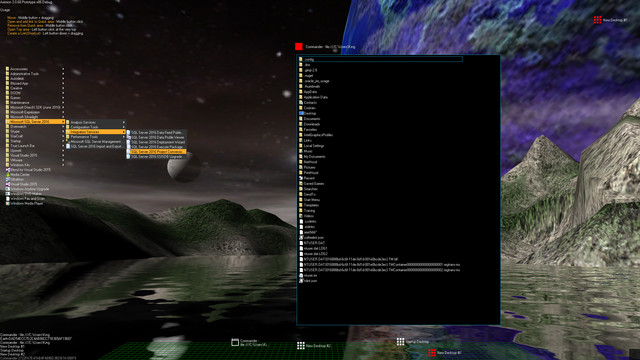
Aximion is a prototype of future desktop and virtual reality user interface environment.

Kirjautumalla sisään voit lisätä tämän tuotteen toivelistallesi, seurata sitä tai merkitä sen ohitetuksi

Early Access -sovellus

Osallistu sovelluksen kehitykseen.

Huomio: Tämä Early Access -sovellus on keskeneräinen ja se saattaa vielä muuttua. Jos sinua ei kiinnosta käyttää tätä sovellusta tällä hetkellä saatavilla olevassa muodossa, odota ja tarkista sovellus myöhemmin uudelleen. Lue lisää

Huomaa: viimeisin kehittäjien tekemä päivitys tapahtui yli 7 vuotta sitten. Kehittäjien tässä kuvaamat tiedot ja aikajana eivät välttämättä ole enää ajan tasalla.
Kehittäjien kertomaa:

Miksi Early Access?

This project is still under development and subject to further research

Miten kauan Early Access -vaihe suunnilleen kestää?

Roughly by the end of 2018 year

Millä tavoin lopullinen versio tulee eroamaan Early Access -versiosta?

Deep user feedback analyzis
Polishing of UX
Several applications, like Commander
More file types supported for Links
New themes and Theme SDK
Item groups manipulations

Mikä on Early Access -version tila tällä hetkellä?

Please refer to "About This" section for details

Hinnoitellaanko sovellus toisin Early Accessin aikana ja sen jälkeen?

It's planned to be free

Miten yhteisö otetaan mukaan kehitysprosessiin?

The whole point of publishing here is to involve and build the Community
Lue lisää
Huomio: Aximion ei ole enää saatavilla Steam-kaupassa.
 
Katso kaikki keskustelut

Ilmoita bugeista ja anna tälle sovellukselle palautetta keskustelupalstalla

Tietoa ohjelmistosta

Aximion is a prototype of future desktop and virtual reality user interface environment.

Several UI concepts introduced in the Aximion to help users personalize and organize their environments.

The Aximion rethinks the idea of the Desktop. In the Aximion Desktop is a place where different aspects of a single project/context/interest can be grouped into a single visual entity. For example, if you have some project you may want to gather all related files, links, remote and other resources in one place and organize them accordingly to your preferences. The Aximion Desktops look similar to regular desktops but contain special elements - Avatars. Each type of Avatar represents some aspect of your particular project/context/interest. Their important feature is to change their look accordingly to its importance for the user or to other needs and this look may vary from simple icons to mini-applications with rich functionality. The user can create as many desktops as he needs.

Any application UI can be attached to another. For example, if a top-level UI element of application A is attached to a top-level UI element of application B then if a user opens B, A will show up automatically. The user then can create various application unions which reflect some corresponding contexts. For example, if the user is a software developer then he can create an individual desktop for each of his projects and also create several other desktops that would contain shared tools and resources required for all of his projects. Once any of these project desktops is open all attached desktops with shared tools will appear together with that.

The Quick Area is used to place links to needed objects for the current session, much the same way tabs are used in browsers. Middle button click helps the user to place avatars in the form of a link to that area automatically. They do not disappear when the user closes the object so when needed the object is available for reopening.

All avatars placed to the Head Area are always available for the user and always stay on top of other objects. Using VR gear this area acts as a Heads-up display, i.e., always in a field of view whenever a user’s head moves.

History Area this is a history of user navigation. This function similar to browser history and together with Quick Area effectively replaces a standard Desktop Taskbar behaviour.

The Events Area stands for showing events and progress reports, similar to the Windows system tray but with advanced functions. It can show simple notifications about events that require user attention. Also, any user-initiated long time operations should place representation items in this area, so the user has a continuous report about current time-consuming processes.

Järjestelmävaatimukset

    Vähintään:
    • Käyttöjärjestelmä *: Windows 7
    • Suoritin: any
    • Muisti: 1 GB RAM
    • DirectX: Versio 9.0
    • Tallennus: 50 MB kiintolevytilaa
    Suositus:
    • Käyttöjärjestelmä *: Windows 7
    • Suoritin: any
    • Muisti: 1 GB RAM
    • DirectX: Versio 9.0
    • Tallennus: 50 MB kiintolevytilaa
* 1.1.24 alkaen Steam-asiakasohjelma tukee vain Windows 10:tä ja uudempia versioita.

Sovelluksen Aximion arvostelut Tietoa käyttäjäarvosteluista Asetukset

Kaikki arvostelut:
3 käyttäjäarvostelua (3 arvostelua)


Nähdäksesi arvostelut tietyltä aikaväliltä, klikkaa ja maalaa valinta yllä olevassa kaaviossa tai valitse haluamasi palkki.


Suodata arvostelut käyttäjän peliajan perusteella sillä hetkellä kun arvostelu on kirjoitettu:


Ei alarajaa / Ei ylärajaa

Näytä arvostelut valitussa järjestyksessä


Lisätietoja
Suodattimet
Epäolennaiset arvostelut suljetaan pois arvostelupisteistä
Peliaika:
Pelattu enimmäkseen Steam Deckillä
Operating System:
CPU:
GPU:
Device Type: