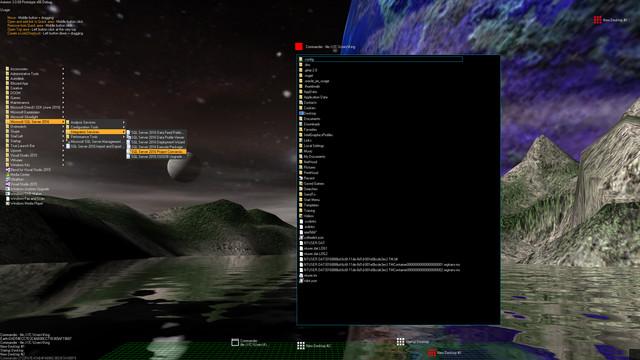
Aximion is a prototype of future desktop and virtual reality user interface environment.

Registrera dig för att lägga till denna artikel i din önskelista eller ignorera den.

Early Access-program

Bli involverad i det här programmet medan det utvecklas.

Notera: Detta Early Access-program är inte färdigt och skulle kunna ändras ytterligare. Om du inte känner för att använda det i sin nuvarande form bör du vänta för att se om det fortsätter utvecklas mer. Läs mer

Obs! Den senaste uppdateringen som gjordes av utvecklarna var för över 7 år sedan. Informationen och tidslinjen som beskrivs av utvecklarna här kanske inte längre är aktuell.
Vad utvecklarna har att säga:

Varför Early Access?

“This project is still under development and subject to further research”

Ungefär hur länge kommer det här programmet att vara i Early Access?

“Roughly by the end of 2018 year”

Hur är det tänkt att den fullständiga versionen ska skilja sig från versionen i Early Access?

“Deep user feedback analyzis
Polishing of UX
Several applications, like Commander
More file types supported for Links
New themes and Theme SDK
Item groups manipulations”

Hur är det nuvarande läget i versionen med Early Access?

“Please refer to "About This" section for details”

Kommer det här programmet att prissättas annorlunda under och efter Early Access?

“It's planned to be free”

Hur planerar ni att involvera gemenskapen i er utvecklingsprocess?

“The whole point of publishing here is to involve and build the Community”
Läs mer
Notis: Aximion är inte längre tillgängligt i Steam-butiken.
 
Se alla diskussioner

Rapportera buggar och lämna feedback för det här programmet på forumet

Om detta program

Aximion is a prototype of future desktop and virtual reality user interface environment.

Several UI concepts introduced in the Aximion to help users personalize and organize their environments.

The Aximion rethinks the idea of the Desktop. In the Aximion Desktop is a place where different aspects of a single project/context/interest can be grouped into a single visual entity. For example, if you have some project you may want to gather all related files, links, remote and other resources in one place and organize them accordingly to your preferences. The Aximion Desktops look similar to regular desktops but contain special elements - Avatars. Each type of Avatar represents some aspect of your particular project/context/interest. Their important feature is to change their look accordingly to its importance for the user or to other needs and this look may vary from simple icons to mini-applications with rich functionality. The user can create as many desktops as he needs.

Any application UI can be attached to another. For example, if a top-level UI element of application A is attached to a top-level UI element of application B then if a user opens B, A will show up automatically. The user then can create various application unions which reflect some corresponding contexts. For example, if the user is a software developer then he can create an individual desktop for each of his projects and also create several other desktops that would contain shared tools and resources required for all of his projects. Once any of these project desktops is open all attached desktops with shared tools will appear together with that.

The Quick Area is used to place links to needed objects for the current session, much the same way tabs are used in browsers. Middle button click helps the user to place avatars in the form of a link to that area automatically. They do not disappear when the user closes the object so when needed the object is available for reopening.

All avatars placed to the Head Area are always available for the user and always stay on top of other objects. Using VR gear this area acts as a Heads-up display, i.e., always in a field of view whenever a user’s head moves.

History Area this is a history of user navigation. This function similar to browser history and together with Quick Area effectively replaces a standard Desktop Taskbar behaviour.

The Events Area stands for showing events and progress reports, similar to the Windows system tray but with advanced functions. It can show simple notifications about events that require user attention. Also, any user-initiated long time operations should place representation items in this area, so the user has a continuous report about current time-consuming processes.

Systemkrav

    Minimum:
    • OS *: Windows 7
    • Processor: any
    • Minne: 1 GB RAM
    • DirectX: Version 9.0
    • Lagring: 50 MB ledigt utrymme
    Rekommenderade:
    • OS *: Windows 7
    • Processor: any
    • Minne: 1 GB RAM
    • DirectX: Version 9.0
    • Lagring: 50 MB ledigt utrymme
* Från och med den 1 januari 2024 kommer Steam-klienten endast att ha stöd för Windows 10 och senare versioner.

Kundrecensioner om Aximion Om användarrecensioner Dina preferenser

Recensioner:
3 användarrecensioner (3 recensioner)


För att se recensioner inom ett visst datumintervall, klicka och dra ett urval på en graf ovan eller klicka på en specifik stapel.


Filtrera recensioner utifrån användarens speltid när recensionen skrevs:


Inget minimum till Inget maximum

Visa recensioner i vald visningsordning


Läs mer
Filter
Exklusive irrelevant recensionsaktivitet
Speltid:
Spelat mest på Steam Deck
Operativsystem:
CPU:
GPU:
Enhetstyp:
Det finns inga ytterligare recensioner som matchar filtren du angav ovan
Justera filtren ovan för att se andra recensioner
Läser in recensioner ...