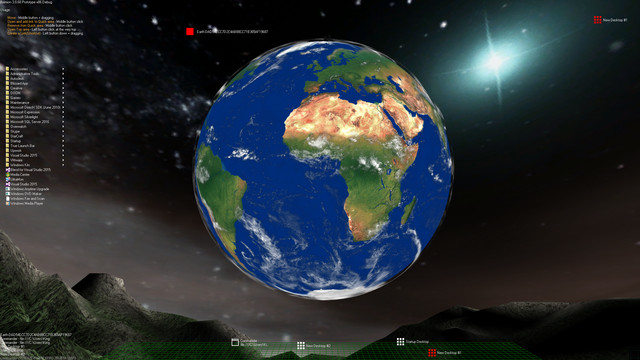
Aximion is a prototype of future desktop and virtual reality user interface environment.

Zaloguj się, aby dodać tę pozycję do listy życzeń, zacząć ją obserwować lub oznaczyć jako ignorowaną

Program z wczesnym dostępem

Zaangażuj się w powstawanie programu.

Uwaga: ten program oferowany w formie wczesnego dostępu nie został jeszcze ukończony i może (choć nie musi) ulec dalszym zmianom. Jeśli program w jego obecnym stanie nie interesuje cię, sugerujemy poczekać, by zobaczyć, czy prace nad nim będą kontynuowane. Dowiedz się więcej.

Uwaga: producenci nie wydali żadnej aktualizacji od ponad 7 lat. Informacje i terminarz opisane w tym miejscu przez producentów mogą nie być już aktualne.
Od twórców:

Dlaczego wczesny dostęp?

„This project is still under development and subject to further research”

Mniej więcej jak długo program będzie w fazie wczesnego dostępu?

„Roughly by the end of 2018 year”

Czym różni się zaplanowana pełna wersja od tej z wczesnego dostępu?

„Deep user feedback analyzis
Polishing of UX
Several applications, like Commander
More file types supported for Links
New themes and Theme SDK
Item groups manipulations”

Jaki jest obecny stan wersji z wczesnego dostępu?

„Please refer to "About This" section for details”

Czy cena programu ulegnie zmianie podczas i po wczesnym dostępie?

„It's planned to be free”

Jak zamierzacie włączyć społeczność w wasz proces tworzenia?

„The whole point of publishing here is to involve and build the Community”
Więcej
Polski język nie jest obsługiwany

Ten produkt nie obsługuje twojego lokalnego języka. Przed zakupem zapoznaj się z listą obsługiwanych języków, która znajduje się poniżej.

Uwaga: Produkt Aximion nie jest już dostępny w Sklepie Steam.
 
Zobacz wszystkie dyskusje

Zgłoś błędy i zostaw swoją opinię o tym programie na forach dyskusyjnych

O tym programie

Aximion is a prototype of future desktop and virtual reality user interface environment.

Several UI concepts introduced in the Aximion to help users personalize and organize their environments.

The Aximion rethinks the idea of the Desktop. In the Aximion Desktop is a place where different aspects of a single project/context/interest can be grouped into a single visual entity. For example, if you have some project you may want to gather all related files, links, remote and other resources in one place and organize them accordingly to your preferences. The Aximion Desktops look similar to regular desktops but contain special elements - Avatars. Each type of Avatar represents some aspect of your particular project/context/interest. Their important feature is to change their look accordingly to its importance for the user or to other needs and this look may vary from simple icons to mini-applications with rich functionality. The user can create as many desktops as he needs.

Any application UI can be attached to another. For example, if a top-level UI element of application A is attached to a top-level UI element of application B then if a user opens B, A will show up automatically. The user then can create various application unions which reflect some corresponding contexts. For example, if the user is a software developer then he can create an individual desktop for each of his projects and also create several other desktops that would contain shared tools and resources required for all of his projects. Once any of these project desktops is open all attached desktops with shared tools will appear together with that.

The Quick Area is used to place links to needed objects for the current session, much the same way tabs are used in browsers. Middle button click helps the user to place avatars in the form of a link to that area automatically. They do not disappear when the user closes the object so when needed the object is available for reopening.

All avatars placed to the Head Area are always available for the user and always stay on top of other objects. Using VR gear this area acts as a Heads-up display, i.e., always in a field of view whenever a user’s head moves.

History Area this is a history of user navigation. This function similar to browser history and together with Quick Area effectively replaces a standard Desktop Taskbar behaviour.

The Events Area stands for showing events and progress reports, similar to the Windows system tray but with advanced functions. It can show simple notifications about events that require user attention. Also, any user-initiated long time operations should place representation items in this area, so the user has a continuous report about current time-consuming processes.

Wymagania systemowe

    Konfiguracja minimalna:
    • System operacyjny *: Windows 7
    • Procesor: any
    • Pamięć: 1 GB RAM
    • DirectX: Wersja 9.0
    • Miejsce na dysku: 50 MB dostępnej przestrzeni
    Konfiguracja zalecana:
    • System operacyjny *: Windows 7
    • Procesor: any
    • Pamięć: 1 GB RAM
    • DirectX: Wersja 9.0
    • Miejsce na dysku: 50 MB dostępnej przestrzeni
* Począwszy od 1 stycznia 2024, klient Steam będzie obsługiwał wyłącznie system Windows 10 i jego nowsze wersje.

Recenzje klientów dla produktu Aximion O recenzjach użytkowników Twoje preferencje

Ogólne recenzje:
Recenzje użytkowników: 3 (3)


Aby zobaczyć recenzje w wybranym zakresie dat, kliknij i przeciągnij zaznaczenie na powyższym wykresie lub kliknij na wybrany słupek.


Filtruj recenzje według czasu gry użytkownika w momencie publikacji recenzji:


Bez minimum do Bez maksimum

Pokaż recenzje w wybranej kolejności wyświetlania


Dowiedz się więcej
Filtry
Wyłączanie okresów występowania recenzji nie na temat
Czas gry:
Głównie Steam Deck
Brak recenzji pasujących do filtrów ustawionych powyżej
Dostosuj filtry powyżej, by zobaczyć inne recenzje
Wczytywanie recenzji…