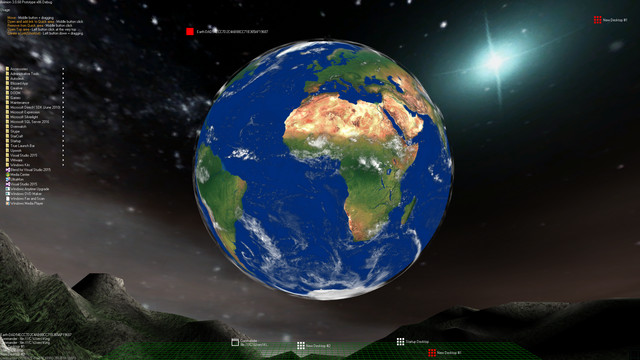
Aximion is a prototype of future desktop and virtual reality user interface environment.

Bu öğeyi istek listenize eklemek, takip etmek veya yok sayıldı olarak işaretlemek için giriş yapın

Erken Erişim Yazılımı

Bu yazılımın geliştirilme sürecinde yer alın.

Not: Erken Erişim aşamasında olan bu yazılım geliştirme boyunca önemli ölçüde değişebilir ya da değişmeyebilir. Eğer yazılımı bu aşamada kullanmak için çok hevesli değilseniz yazılımın geliştirilme sürecinde ilerlemesini beklemek isteyebilirsiniz. Daha fazla bilgi edinin.

Not: Geliştiriciler tarafından yapılan son güncelleme 7 yıl önceydi. Geliştiricilerin burada belirttiği bilgiler ve zaman çizelgesi güncel olmayabilir.
Geliştirici ürün hakkında ne diyor:

Neden Erken Erişim?

"This project is still under development and subject to further research"

Bu yazılım ne kadar süre için Erken Erişim'de olacak?

"Roughly by the end of 2018 year"

Erken Erişim versiyonunun tam versiyonundan ne kadar farklı olması planlanıyor?

"Deep user feedback analyzis
Polishing of UX
Several applications, like Commander
More file types supported for Links
New themes and Theme SDK
Item groups manipulations"

Erken Erişim sürümünün şu anki durumu nedir?

"Please refer to "About This" section for details"

Erken Erişim sırasında ve sonrasında yazılımın fiyatı değişecek mi?

"It's planned to be free"

Topluluğu, geliştirme sürecine nasıl dahil etmeyi düşünüyorsunuz?

"The whole point of publishing here is to involve and build the Community"
Daha fazlasını oku
Türkçe desteklenmemektedir

Bu ürün sizin dilinizi desteklememektedir. Lütfen satın almadan önce aşağıdaki desteklenen diller listesini gözden geçirin.

Bildiri: Aximion artık Steam mağazasında mevcut değil.
 
Tüm tartışmalara bak

Tartışma forumlarında bu yazılım ile ilgili geri bildirim bırakın ve oyunun hatalarını paylaşın

Bu Yazılım Hakkında

Aximion is a prototype of future desktop and virtual reality user interface environment.

Several UI concepts introduced in the Aximion to help users personalize and organize their environments.

The Aximion rethinks the idea of the Desktop. In the Aximion Desktop is a place where different aspects of a single project/context/interest can be grouped into a single visual entity. For example, if you have some project you may want to gather all related files, links, remote and other resources in one place and organize them accordingly to your preferences. The Aximion Desktops look similar to regular desktops but contain special elements - Avatars. Each type of Avatar represents some aspect of your particular project/context/interest. Their important feature is to change their look accordingly to its importance for the user or to other needs and this look may vary from simple icons to mini-applications with rich functionality. The user can create as many desktops as he needs.

Any application UI can be attached to another. For example, if a top-level UI element of application A is attached to a top-level UI element of application B then if a user opens B, A will show up automatically. The user then can create various application unions which reflect some corresponding contexts. For example, if the user is a software developer then he can create an individual desktop for each of his projects and also create several other desktops that would contain shared tools and resources required for all of his projects. Once any of these project desktops is open all attached desktops with shared tools will appear together with that.

The Quick Area is used to place links to needed objects for the current session, much the same way tabs are used in browsers. Middle button click helps the user to place avatars in the form of a link to that area automatically. They do not disappear when the user closes the object so when needed the object is available for reopening.

All avatars placed to the Head Area are always available for the user and always stay on top of other objects. Using VR gear this area acts as a Heads-up display, i.e., always in a field of view whenever a user’s head moves.

History Area this is a history of user navigation. This function similar to browser history and together with Quick Area effectively replaces a standard Desktop Taskbar behaviour.

The Events Area stands for showing events and progress reports, similar to the Windows system tray but with advanced functions. It can show simple notifications about events that require user attention. Also, any user-initiated long time operations should place representation items in this area, so the user has a continuous report about current time-consuming processes.

Sistem Gereksinimleri

    Minimum:
    • İşletim Sistemi *: Windows 7
    • İşlemci: any
    • Bellek: 1 GB RAM
    • DirectX: Sürüm 9.0
    • Depolama: 50 MB kullanılabilir alan
    Önerilen:
    • İşletim Sistemi *: Windows 7
    • İşlemci: any
    • Bellek: 1 GB RAM
    • DirectX: Sürüm 9.0
    • Depolama: 50 MB kullanılabilir alan
* Steam istemcisi, 1 Ocak 2024'ten itibaren yalnızca Windows 10 ve üstünü destekleyecektir.

Aximion için müşteri incelemeleri Kullanıcı incelemeleri hakkında Tercihleriniz

Toplam İnceleme:
3 kullanıcı incelemesi (3 inceleme)


Belirli bir tarih aralığındaki incelemeleri görebilmek için lütfen yukarıdaki grafikten istediğiniz tarih aralığını sürükleyerek seçin veya bir çubuğa tıklayın.


İncelemeleri, oyuncuların inceleme gönderdiği tarihteki oynama sürelerine göre filtrele:


Minimum yok - Maksimum yok

İncelemeleri seçili görüntüleme sırasına göre göster


Daha Fazlasını Öğrenin
Filtreler
Konu Dışı İnceleme Etkinliği Dahil Edilmiyor
Oynama Süresi:
Çoğunlukla Steam Deck'te Oynayanlar
İşletim Sistemi:
İşlemci:
Ekran Kartı:
Aygıt Türü:
Yukarıdaki seçili filtreler ile eşleşen başka inceleme bulunmuyor
Diğer incelemeleri görmek için yukarıdaki filtreyi ayarlayın
İncelemeler yükleniyor...