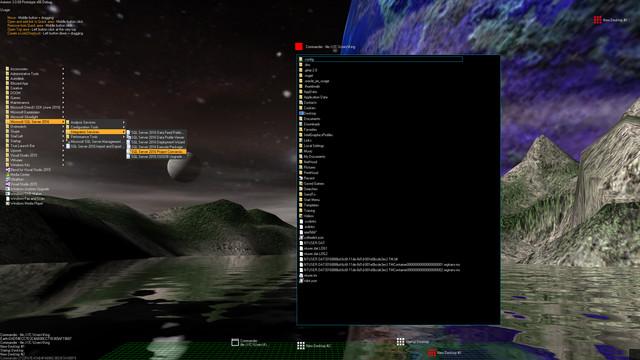
Aximion is a prototype of future desktop and virtual reality user interface environment.

想要将此项目添加至您的愿望单、关注它或标记为已忽略,请先登录

抢先体验软件

随着软件的发展参与其中。

注意:该抢先体验的软件内容尚不完整且也许会发生变化。如果您目前不是特别想使用这款软件,那么您 应该等待一段时间来观察软件的开发进度。了解更多

注意:开发者最后一次更新是在 7 年前。 开发者在此处描述的信息和时间表可能不再是最新的。
开发者的话:

为何要采用抢先体验这种模式?

“This project is still under development and subject to further research”

这款软件的抢先体验状态大约持续多久?

“Roughly by the end of 2018 year”

计划中的完整版本和抢先体验版本到底有多少不同?

“Deep user feedback analyzis
Polishing of UX
Several applications, like Commander
More file types supported for Links
New themes and Theme SDK
Item groups manipulations”

抢先体验版本的现状如何?

“Please refer to "About This" section for details”

在抢先体验期间和结束之后,这款软件的价格会有所不同吗?

“It's planned to be free”

在开发过程中,你们是如何计划让玩家社区参与进来的?

“The whole point of publishing here is to involve and build the Community”
了解更多
不支持简体中文

本产品尚未对您目前所在的地区语言提供支持。在购买请先行确认目前所支持的语言。

注意: Aximion 已在 Steam 停售。
 
查看所有讨论

在讨论版中为这款软件汇报 BUG,并留下反馈

关于此软件

Aximion is a prototype of future desktop and virtual reality user interface environment.

Several UI concepts introduced in the Aximion to help users personalize and organize their environments.

The Aximion rethinks the idea of the Desktop. In the Aximion Desktop is a place where different aspects of a single project/context/interest can be grouped into a single visual entity. For example, if you have some project you may want to gather all related files, links, remote and other resources in one place and organize them accordingly to your preferences. The Aximion Desktops look similar to regular desktops but contain special elements - Avatars. Each type of Avatar represents some aspect of your particular project/context/interest. Their important feature is to change their look accordingly to its importance for the user or to other needs and this look may vary from simple icons to mini-applications with rich functionality. The user can create as many desktops as he needs.

Any application UI can be attached to another. For example, if a top-level UI element of application A is attached to a top-level UI element of application B then if a user opens B, A will show up automatically. The user then can create various application unions which reflect some corresponding contexts. For example, if the user is a software developer then he can create an individual desktop for each of his projects and also create several other desktops that would contain shared tools and resources required for all of his projects. Once any of these project desktops is open all attached desktops with shared tools will appear together with that.

The Quick Area is used to place links to needed objects for the current session, much the same way tabs are used in browsers. Middle button click helps the user to place avatars in the form of a link to that area automatically. They do not disappear when the user closes the object so when needed the object is available for reopening.

All avatars placed to the Head Area are always available for the user and always stay on top of other objects. Using VR gear this area acts as a Heads-up display, i.e., always in a field of view whenever a user’s head moves.

History Area this is a history of user navigation. This function similar to browser history and together with Quick Area effectively replaces a standard Desktop Taskbar behaviour.

The Events Area stands for showing events and progress reports, similar to the Windows system tray but with advanced functions. It can show simple notifications about events that require user attention. Also, any user-initiated long time operations should place representation items in this area, so the user has a continuous report about current time-consuming processes.

系统需求

    最低配置:
    • 操作系统 *: Windows 7
    • 处理器: any
    • 内存: 1 GB RAM
    • DirectX 版本: 9.0
    • 存储空间: 需要 50 MB 可用空间
    推荐配置:
    • 操作系统 *: Windows 7
    • 处理器: any
    • 内存: 1 GB RAM
    • DirectX 版本: 9.0
    • 存储空间: 需要 50 MB 可用空间
* 2024 年 1 月 1 日(PT)起,Steam 客户端将仅支持 Windows 10 及更新版本。

Aximion 的顾客评测 关于用户评测 您的偏好

总体评测:
3 篇用户评测 (3 篇评测)


要查看某个日期范围内的评测,请在上方图表中点击并拖动选定的范围或是点击某特定时间柱。


按用户的游戏时间筛选此评测撰写时的评测:


无最低限制无最高限制

按选择的显示顺序显示评测


了解更多
筛选条件
排除跑题评测活动
游戏时间:
大部分在 Steam Deck 上
Operating System:
CPU:
GPU:
Device Type: