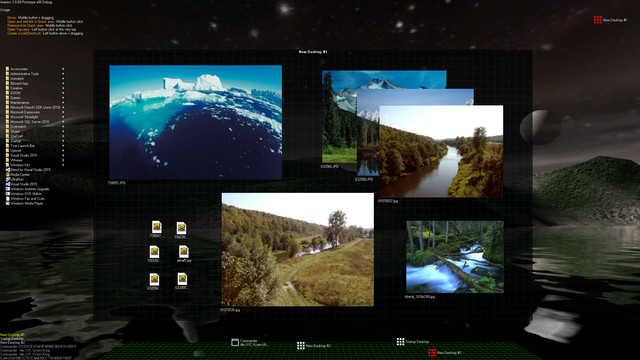
Aximion is a prototype of future desktop and virtual reality user interface environment.
Позначки

Увійдіть до акаунта, щоби додати цей продукт до списку бажаного чи позначити як ігнорований.

Програми з дочасним доступом

Впливайте на розвиток цієї програми під час її розробки.

Увага: ця програма з дочасним доступом не дороблена, і надалі може як істотно змінюватися, так і ні. Якщо вам не дуже кортить користуватися нею в її поточному стані, то радше зачекайте, доки програма не прийме більш завершений вигляд. Докладніше

Увага: остання зміна, яку внесли розробники, була понад 7 р. тому. Інформація та хронологія від розробників може бути не актуальна.
Що бажають сказати розробники:

Чому дочасний доступ?

«This project is still under development and subject to further research»

Приблизно, як довго ця програма буде у дочасному доступі?

«Roughly by the end of 2018 year»

Чим повна версія гри буде відрізнятися від версії для дочасного доступу?

«Deep user feedback analyzis
Polishing of UX
Several applications, like Commander
More file types supported for Links
New themes and Theme SDK
Item groups manipulations»

Який поточний стан версії для дочасного доступу?

«Please refer to "About This" section for details»

Чи буде відрізнятися ціна програми протягом дочасного доступу та після його завершення?

«It's planned to be free»

Як ви плануєте залучати спільноту до розробки гри?

«The whole point of publishing here is to involve and build the Community»
Читати далі
українська мова недоступна

Цей продукт не підтримує вашу мову. Будь ласка, перегляньте список підтримуваних мов перед купівлею.

Увага: Застосунок Aximion більше не доступний у крамниці Steam.
 
Переглянути всі обговорення

Повідомляйте про помилки та залишайте свої відгуки на цю програму в обговореннях

Про цю програму

Aximion is a prototype of future desktop and virtual reality user interface environment.

Several UI concepts introduced in the Aximion to help users personalize and organize their environments.

The Aximion rethinks the idea of the Desktop. In the Aximion Desktop is a place where different aspects of a single project/context/interest can be grouped into a single visual entity. For example, if you have some project you may want to gather all related files, links, remote and other resources in one place and organize them accordingly to your preferences. The Aximion Desktops look similar to regular desktops but contain special elements - Avatars. Each type of Avatar represents some aspect of your particular project/context/interest. Their important feature is to change their look accordingly to its importance for the user or to other needs and this look may vary from simple icons to mini-applications with rich functionality. The user can create as many desktops as he needs.

Any application UI can be attached to another. For example, if a top-level UI element of application A is attached to a top-level UI element of application B then if a user opens B, A will show up automatically. The user then can create various application unions which reflect some corresponding contexts. For example, if the user is a software developer then he can create an individual desktop for each of his projects and also create several other desktops that would contain shared tools and resources required for all of his projects. Once any of these project desktops is open all attached desktops with shared tools will appear together with that.

The Quick Area is used to place links to needed objects for the current session, much the same way tabs are used in browsers. Middle button click helps the user to place avatars in the form of a link to that area automatically. They do not disappear when the user closes the object so when needed the object is available for reopening.

All avatars placed to the Head Area are always available for the user and always stay on top of other objects. Using VR gear this area acts as a Heads-up display, i.e., always in a field of view whenever a user’s head moves.

History Area this is a history of user navigation. This function similar to browser history and together with Quick Area effectively replaces a standard Desktop Taskbar behaviour.

The Events Area stands for showing events and progress reports, similar to the Windows system tray but with advanced functions. It can show simple notifications about events that require user attention. Also, any user-initiated long time operations should place representation items in this area, so the user has a continuous report about current time-consuming processes.

Системні вимоги

    Мінімальні:
    • ОС *: Windows 7
    • Процесор: any
    • Оперативна пам’ять: 1 GB ОП
    • DirectX: версії 9.0
    • Місце на диску: 50 MB доступного місця
    Рекомендовані:
    • ОС *: Windows 7
    • Процесор: any
    • Оперативна пам’ять: 1 GB ОП
    • DirectX: версії 9.0
    • Місце на диску: 50 MB доступного місця
* З 1 січня 2024 року клієнт Steam буде підтримувати лише Windows 10 чи новіші версії цієї ОС.

Користувацькі рецензії на Aximion Про рецензії користувачів Ваші вподобання

Усі рецензії:
Рецензій: 3 (усього 3)


Щоб переглянути рецензії за певний проміжок часу, виберіть його на графіку вище або клацніть відповідний стовпчик.


Сортуйте рецензії за показником награного часу на момент написання рецензії:


Без мінімуму до Без максимуму

Показувати рецензії у вибраній послідовності


Дізнатися більше
Фільтри
Виключення рецензійної активності «не за темою»
Ігровий час:
Переважно на Steam Deck
Операційна система:
ЦП:
ГП:
Тип пристрою:
Більше немає рецензій, що збігаються із фільтрами вище
Скоригуйте фільтри вгорі, щоби бачити більше рецензій
Завантаження рецензій…