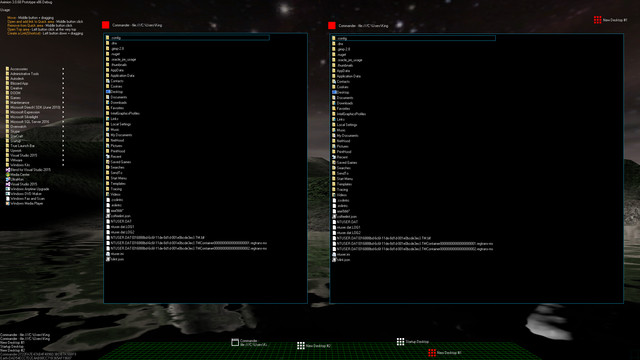
Aximion is a prototype of future desktop and virtual reality user interface environment.
Theo nhãn

Đăng nhập để thêm sản phẩm này vào danh sách ước, theo dõi, hoặc đánh dấu nó thành "đã phớt lờ"

Phần mềm truy cập sớm

Hãy đóng góp vào quá trình phát triển của phần mềm này khi nó đang hoàn thiện.

Lưu ý: Phần mềm truy cập sớm này chưa hoàn thiện và có thể thay đổi trong tương lai. Nếu bạn không thích phần mềm này ở trạng thái hiện tại của nó, điều bạn nên làm là đợi xem nó có phát triển hơn nữa trong tương lai hay không. Tìm hiểu thêm

Lưu ý: Cập nhật lần cuối bởi nhà phát triển là hơn 8 năm trước. Thông tin và thời gian mô tả ở đây bởi nhà phát triển có thể không còn đúng với hiện tại.
Điều nhà phát triển muốn nói:

Tại sao Truy cập sớm?

“This project is still under development and subject to further research”

Phần mềm này sẽ ở trạng thái truy cập sớm trong khoảng bao lâu?

“Roughly by the end of 2018 year”

Phiên bản đầy đủ sẽ có sự khác biệt thế nào so với phiên bản truy cập sớm?

“Deep user feedback analyzis
Polishing of UX
Several applications, like Commander
More file types supported for Links
New themes and Theme SDK
Item groups manipulations”

Tình trạng hiện tại của phiên bản truy cập sớm là gì?

“Please refer to "About This" section for details”

Liệu giá phần mềm này có thay đổi trong hoặc sau khoảng thời gian truy cập sớm không?

“It's planned to be free”

Bạn có kế hoạch tương tác với cộng đồng trong quá trình phát triển của mình như thế nào?

“The whole point of publishing here is to involve and build the Community”
Đọc thêm
Không hỗ trợ ngôn ngữ Tiếng Việt

Sản phẩm này không hỗ trợ ngôn ngữ địa phương của bạn. Vui lòng xem lại danh sách ngôn ngữ được hỗ trợ dưới đây trước khi mua.

Chú ý: Aximion không còn trên cửa hàng Steam.
 
Xem toàn bộ thảo luận

Báo cáo lỗi và để lại phản hồi cho phầm mềm này trên bảng thảo luận

Về phần mềm này

Aximion is a prototype of future desktop and virtual reality user interface environment.

Several UI concepts introduced in the Aximion to help users personalize and organize their environments.

The Aximion rethinks the idea of the Desktop. In the Aximion Desktop is a place where different aspects of a single project/context/interest can be grouped into a single visual entity. For example, if you have some project you may want to gather all related files, links, remote and other resources in one place and organize them accordingly to your preferences. The Aximion Desktops look similar to regular desktops but contain special elements - Avatars. Each type of Avatar represents some aspect of your particular project/context/interest. Their important feature is to change their look accordingly to its importance for the user or to other needs and this look may vary from simple icons to mini-applications with rich functionality. The user can create as many desktops as he needs.

Any application UI can be attached to another. For example, if a top-level UI element of application A is attached to a top-level UI element of application B then if a user opens B, A will show up automatically. The user then can create various application unions which reflect some corresponding contexts. For example, if the user is a software developer then he can create an individual desktop for each of his projects and also create several other desktops that would contain shared tools and resources required for all of his projects. Once any of these project desktops is open all attached desktops with shared tools will appear together with that.

The Quick Area is used to place links to needed objects for the current session, much the same way tabs are used in browsers. Middle button click helps the user to place avatars in the form of a link to that area automatically. They do not disappear when the user closes the object so when needed the object is available for reopening.

All avatars placed to the Head Area are always available for the user and always stay on top of other objects. Using VR gear this area acts as a Heads-up display, i.e., always in a field of view whenever a user’s head moves.

History Area this is a history of user navigation. This function similar to browser history and together with Quick Area effectively replaces a standard Desktop Taskbar behaviour.

The Events Area stands for showing events and progress reports, similar to the Windows system tray but with advanced functions. It can show simple notifications about events that require user attention. Also, any user-initiated long time operations should place representation items in this area, so the user has a continuous report about current time-consuming processes.

Yêu cầu hệ thống

    Tối thiểu:
    • HĐH *: Windows 7
    • Bộ xử lý: any
    • Bộ nhớ: 1 GB RAM
    • DirectX: Phiên bản 9.0
    • Lưu trữ: 50 MB chỗ trống khả dụng
    Khuyến nghị:
    • HĐH *: Windows 7
    • Bộ xử lý: any
    • Bộ nhớ: 1 GB RAM
    • DirectX: Phiên bản 9.0
    • Lưu trữ: 50 MB chỗ trống khả dụng
* Bắt đầu từ 01/01/2024, phần mềm Steam chỉ hỗ trợ từ Windows 10 trở lên.

Đánh giá của khách hàng cho Aximion Giới thiệu về đánh giá người dùng Tùy chỉnh của bạn

Đánh giá tổng thể:
3 đánh giá người dùng (3 đánh giá)


Để xem các đánh giá trong một khoảng thời gian, vui lòng nhấp và kéo lựa chọn trên đồ thị hoặc nhấp vào một thanh cụ thể.


Lọc theo thời gian chơi của người dùng khi đánh giá được viết:


Không có tối thiểu đến Không có tối đa

Hiện bài đánh giá theo thứ tự hiển thị đã chọn


Tìm hiểu thêm
Bộ lọc
Loại trừ hoạt động đánh giá lạc đề
Thời gian chơi:
Chơi chủ yếu trên Steam Deck
Hệ điều hành:
CPU:
GPU:
Loại thiết bị: