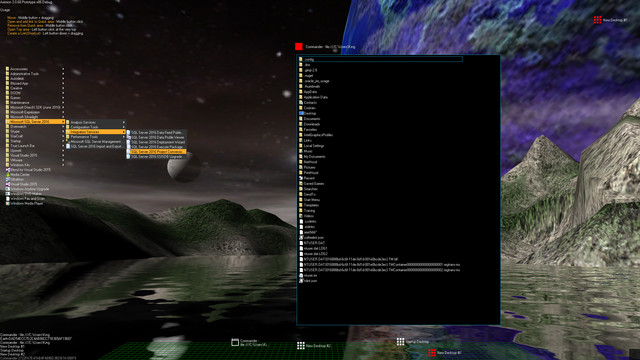
Aximion is a prototype of future desktop and virtual reality user interface environment.

登入以將此項目新增至您的願望清單、關注它,或標記為已忽略

搶先體驗軟體

立即開始使用,並參與軟體開發過程。

備註:這款搶先體驗軟體尚未開發完成,且內容可能會有所變動。如果目前的開發進度未使您產生興趣,建議您等待本軟體開發至下一階段再決定是否購買。了解更多

注意:開發者所做的最後一次更新是在 7 年之前。 開發者在此處說明的資訊與時程可能不再是最新內容。
開發者的話:

為何採用搶先體驗模式?

「This project is still under development and subject to further research」

這款軟體的搶先體驗時間大約會持續多久?

「Roughly by the end of 2018 year」

正式版預計會與搶先體驗版有何不同?

「Deep user feedback analyzis
Polishing of UX
Several applications, like Commander
More file types supported for Links
New themes and Theme SDK
Item groups manipulations」

搶先體驗版目前的開發進度如何?

「Please refer to "About This" section for details」

軟體售價在搶先體驗期間前後會有所變動嗎?

「It's planned to be free」

在開發過程中,您打算如何與社群互動?

「The whole point of publishing here is to involve and build the Community」
繼續閱讀
不支援繁體中文

本產品尚不支援您的目前所在地的語言。購買前請先確認語言支援清單。

注意: 「Aximion」已不再於 Steam 商店中提供。
 
查看所有討論

在討論區回報錯誤並留下對於此軟體的意見

關於此軟體

Aximion is a prototype of future desktop and virtual reality user interface environment.

Several UI concepts introduced in the Aximion to help users personalize and organize their environments.

The Aximion rethinks the idea of the Desktop. In the Aximion Desktop is a place where different aspects of a single project/context/interest can be grouped into a single visual entity. For example, if you have some project you may want to gather all related files, links, remote and other resources in one place and organize them accordingly to your preferences. The Aximion Desktops look similar to regular desktops but contain special elements - Avatars. Each type of Avatar represents some aspect of your particular project/context/interest. Their important feature is to change their look accordingly to its importance for the user or to other needs and this look may vary from simple icons to mini-applications with rich functionality. The user can create as many desktops as he needs.

Any application UI can be attached to another. For example, if a top-level UI element of application A is attached to a top-level UI element of application B then if a user opens B, A will show up automatically. The user then can create various application unions which reflect some corresponding contexts. For example, if the user is a software developer then he can create an individual desktop for each of his projects and also create several other desktops that would contain shared tools and resources required for all of his projects. Once any of these project desktops is open all attached desktops with shared tools will appear together with that.

The Quick Area is used to place links to needed objects for the current session, much the same way tabs are used in browsers. Middle button click helps the user to place avatars in the form of a link to that area automatically. They do not disappear when the user closes the object so when needed the object is available for reopening.

All avatars placed to the Head Area are always available for the user and always stay on top of other objects. Using VR gear this area acts as a Heads-up display, i.e., always in a field of view whenever a user’s head moves.

History Area this is a history of user navigation. This function similar to browser history and together with Quick Area effectively replaces a standard Desktop Taskbar behaviour.

The Events Area stands for showing events and progress reports, similar to the Windows system tray but with advanced functions. It can show simple notifications about events that require user attention. Also, any user-initiated long time operations should place representation items in this area, so the user has a continuous report about current time-consuming processes.

系統需求

    最低配備:
    • 作業系統 *: Windows 7
    • 處理器: any
    • 記憶體: 1 GB 記憶體
    • DirectX: 版本:9.0
    • 儲存空間: 50 MB 可用空間
    建議配備:
    • 作業系統 *: Windows 7
    • 處理器: any
    • 記憶體: 1 GB 記憶體
    • DirectX: 版本:9.0
    • 儲存空間: 50 MB 可用空間
* 自 2024 年 1 月 1 日(PT)起,Steam 用戶端僅支援 Windows 10 及更新版本。

Aximion 的顧客評論 關於使用者評論 您的偏好設定

整體評論:
3 篇使用者評論 (3 篇評論)


如欲檢視特定日期範圍內的評論,請在上方圖表框選一段日期範圍,或點擊直條。


依照使用者撰寫評論當時的遊戲時數篩選:


不限最低時數不限最高時數

以所選顯示順序顯示評論


進一步了解
篩選條件
排除離題評論活動
遊戲時數:
主要在 Steam Deck 上遊玩
作業系統:
CPU:
GPU:
裝置類型:
無其它評論符合上述篩選條件
調整上方的篩選條件以檢視其它評論
評論讀取中…