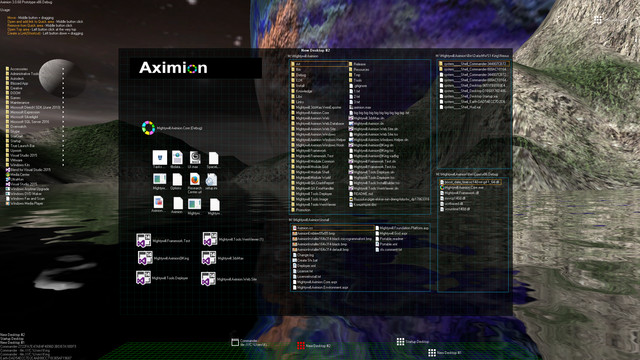
Aximion is a prototype of future desktop and virtual reality user interface environment.

Abyste mohli tento produkt přidat do svého seznamu přání, začít ho sledovat nebo ho zařadit mezi ignorované, musíte se nejprve přihlásit.

Software s předběžným přístupem

Vyzkoušejte tento software již během jeho vývoje.

Poznámka: Tento software ještě není dokončen a během vývoje se může výrazně změnit. Pokud Vás nyní nezaujal, zkuste počkat, než se dostane do další fáze vývoje. Více informací zde

Poznámka: K poslední aktualizaci došlo před více než 7 lety. Informace a plány zde popisované vývojáři už nemusí být aktuální.
Zpráva od vývojářů:

Proč předběžný přístup?

„This project is still under development and subject to further research“

Přibližně jak dlouho bude tento software v předběžném přístupu?

„Roughly by the end of 2018 year“

Jak se bude plná verze lišit od předběžného přístupu?

„Deep user feedback analyzis
Polishing of UX
Several applications, like Commander
More file types supported for Links
New themes and Theme SDK
Item groups manipulations“

V jaké fázi vývoje se hra nachází?

„Please refer to "About This" section for details“

Změní se cena softwaru po skončení předběžného přístupu?

„It's planned to be free“

Jak plánujete zapojit komunitu do vývoje této hry?

„The whole point of publishing here is to involve and build the Community“
Zjistit více
Čeština není podporována

Tento produkt nepodporuje Váš místní jazyk. Seznam podporovaných jazyků je k dispozici níže na této stránce.

Poznámka: Produkt Aximion již není dostupný v obchodu služby Steam.
 
Zobrazit všechny diskuze

Pro nahlášení chyb či podání zpětné vazby navštivte diskuze k tomuto produktu

Informace o softwaru

Aximion is a prototype of future desktop and virtual reality user interface environment.

Several UI concepts introduced in the Aximion to help users personalize and organize their environments.

The Aximion rethinks the idea of the Desktop. In the Aximion Desktop is a place where different aspects of a single project/context/interest can be grouped into a single visual entity. For example, if you have some project you may want to gather all related files, links, remote and other resources in one place and organize them accordingly to your preferences. The Aximion Desktops look similar to regular desktops but contain special elements - Avatars. Each type of Avatar represents some aspect of your particular project/context/interest. Their important feature is to change their look accordingly to its importance for the user or to other needs and this look may vary from simple icons to mini-applications with rich functionality. The user can create as many desktops as he needs.

Any application UI can be attached to another. For example, if a top-level UI element of application A is attached to a top-level UI element of application B then if a user opens B, A will show up automatically. The user then can create various application unions which reflect some corresponding contexts. For example, if the user is a software developer then he can create an individual desktop for each of his projects and also create several other desktops that would contain shared tools and resources required for all of his projects. Once any of these project desktops is open all attached desktops with shared tools will appear together with that.

The Quick Area is used to place links to needed objects for the current session, much the same way tabs are used in browsers. Middle button click helps the user to place avatars in the form of a link to that area automatically. They do not disappear when the user closes the object so when needed the object is available for reopening.

All avatars placed to the Head Area are always available for the user and always stay on top of other objects. Using VR gear this area acts as a Heads-up display, i.e., always in a field of view whenever a user’s head moves.

History Area this is a history of user navigation. This function similar to browser history and together with Quick Area effectively replaces a standard Desktop Taskbar behaviour.

The Events Area stands for showing events and progress reports, similar to the Windows system tray but with advanced functions. It can show simple notifications about events that require user attention. Also, any user-initiated long time operations should place representation items in this area, so the user has a continuous report about current time-consuming processes.

Systémové požadavky

    Minimální:
    • OS *: Windows 7
    • Procesor: any
    • Paměť: 1 GB RAM
    • DirectX: Verze 9.0
    • Pevný disk: 50 MB volného místa
    Doporučené:
    • OS *: Windows 7
    • Procesor: any
    • Paměť: 1 GB RAM
    • DirectX: Verze 9.0
    • Pevný disk: 50 MB volného místa
* Od 1. ledna 2024 podporuje klient služby Steam pouze systém Windows 10 a novější.

Uživatelské recenze produktu Aximion Informace o recenzích Vaše předvolby

Všechny recenze:
3 uživatelských recenzí (3 recenzí)


Pro zobrazení recenzí z daného časového rozmezí ho tažením vyberte v grafu výše nebo přímo klikněte na určitý sloupec.


Recenze budou filtrovány dle odehraného času uživatelů v době jejich psaní.


Žádné minimumŽádné maximum

Recenze budou zobrazeny ve vybraném pořadí.


Více informací
Filtry
Nesouvisející recenze jsou vyloučeny
Odehraný čas:
Recenze primárně ze zařízení Steam Deck
Filtrům neodpovídají žádné další recenze
Abyste viděli všechny recenze, upravte filtry výše
Načítání recenzí...