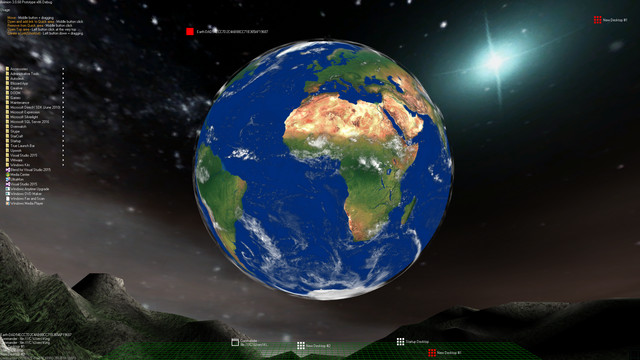
Aximion is a prototype of future desktop and virtual reality user interface environment.

Inicia sesión para añadir este artículo a tu lista de deseados, seguirlo o marcarlo como ignorado.

Software con acceso anticipado

Involúcrate con este software mientras se desarrolla.

Aviso: Este software con acceso anticipado no está terminado y puede o no cambiar más adelante. Si no te entusiasma usar este software en su estado actual, entonces deberías esperar a ver si avanza más en su desarrollo. Más información

Nota: La última actualización que realizaron los desarrolladores fue hace más de 7 años. Es posible que la información y el cronograma que describen aquí los desarrolladores ya no estén actualizados.
Lo que dicen los desarrolladores:

¿Por qué ofreces acceso anticipado?

«This project is still under development and subject to further research»

¿Cuánto tiempo va a estar este software en acceso anticipado aproximadamente?

«Roughly by the end of 2018 year»

¿Qué diferencias habrá entre la versión completa y la versión de acceso anticipado?

«Deep user feedback analyzis
Polishing of UX
Several applications, like Commander
More file types supported for Links
New themes and Theme SDK
Item groups manipulations»

¿Cuál es el estado actual de la versión de acceso anticipado?

«Please refer to "About This" section for details»

¿Variará el precio del software durante el periodo previo y posterior al acceso anticipado?

«It's planned to be free»

¿Cómo tienes planeado involucrar a la comunidad en tu proceso de desarrollo?

«The whole point of publishing here is to involve and build the Community»
Leer más
No disponible en Español de España

Este artículo no está disponible en tu idioma. Por favor, consulta la lista de idiomas disponibles antes de realizar la compra.

Aviso: Aximion ya no está disponible en la tienda de Steam.
 
Ver todas las discusiones

Informa de errores y deja opiniones sobre este software en los foros de discusión

Acerca de este software

Aximion is a prototype of future desktop and virtual reality user interface environment.

Several UI concepts introduced in the Aximion to help users personalize and organize their environments.

The Aximion rethinks the idea of the Desktop. In the Aximion Desktop is a place where different aspects of a single project/context/interest can be grouped into a single visual entity. For example, if you have some project you may want to gather all related files, links, remote and other resources in one place and organize them accordingly to your preferences. The Aximion Desktops look similar to regular desktops but contain special elements - Avatars. Each type of Avatar represents some aspect of your particular project/context/interest. Their important feature is to change their look accordingly to its importance for the user or to other needs and this look may vary from simple icons to mini-applications with rich functionality. The user can create as many desktops as he needs.

Any application UI can be attached to another. For example, if a top-level UI element of application A is attached to a top-level UI element of application B then if a user opens B, A will show up automatically. The user then can create various application unions which reflect some corresponding contexts. For example, if the user is a software developer then he can create an individual desktop for each of his projects and also create several other desktops that would contain shared tools and resources required for all of his projects. Once any of these project desktops is open all attached desktops with shared tools will appear together with that.

The Quick Area is used to place links to needed objects for the current session, much the same way tabs are used in browsers. Middle button click helps the user to place avatars in the form of a link to that area automatically. They do not disappear when the user closes the object so when needed the object is available for reopening.

All avatars placed to the Head Area are always available for the user and always stay on top of other objects. Using VR gear this area acts as a Heads-up display, i.e., always in a field of view whenever a user’s head moves.

History Area this is a history of user navigation. This function similar to browser history and together with Quick Area effectively replaces a standard Desktop Taskbar behaviour.

The Events Area stands for showing events and progress reports, similar to the Windows system tray but with advanced functions. It can show simple notifications about events that require user attention. Also, any user-initiated long time operations should place representation items in this area, so the user has a continuous report about current time-consuming processes.

Requisitos del sistema

    Mínimo:
    • SO *: Windows 7
    • Procesador: any
    • Memoria: 1 GB de RAM
    • DirectX: Versión 9.0
    • Almacenamiento: 50 MB de espacio disponible
    Recomendado:
    • SO *: Windows 7
    • Procesador: any
    • Memoria: 1 GB de RAM
    • DirectX: Versión 9.0
    • Almacenamiento: 50 MB de espacio disponible
* A partir del 1 de enero de 2024, el cliente de Steam solo será compatible con Windows 10 y versiones posteriores.

Reseñas de usuarios para «Aximion» Acerca de las reseñas de usuarios Tus preferencias

Reseñas generales:
3 reseña(s) de usuario(s) (3 reseñas)


Para ver las reseñas correspondientes a un intervalo de fechas, haz clic y arrastra en uno de los gráficos de arriba para crear una selección o haz clic en una barra específica.


Filtrar las reseñas según el tiempo de juego del usuario cuando se escribió la reseña:


Sin mínimo a sin máximo

Mostrar las reseñas en el orden seleccionado


Más información
Filtros
Excluir actividad de reseñas no relacionadas con el tema
Tiempo de juego:
Partidas principalmente en Steam Deck
Sistema operativo:
CPU:
GPU:
Tipo de dispositivo:
No hay más reseñas que coincidan con los filtros establecidos arriba.
Ajusta los filtros de arriba para ver otras reseñas.
Cargando reseñas...