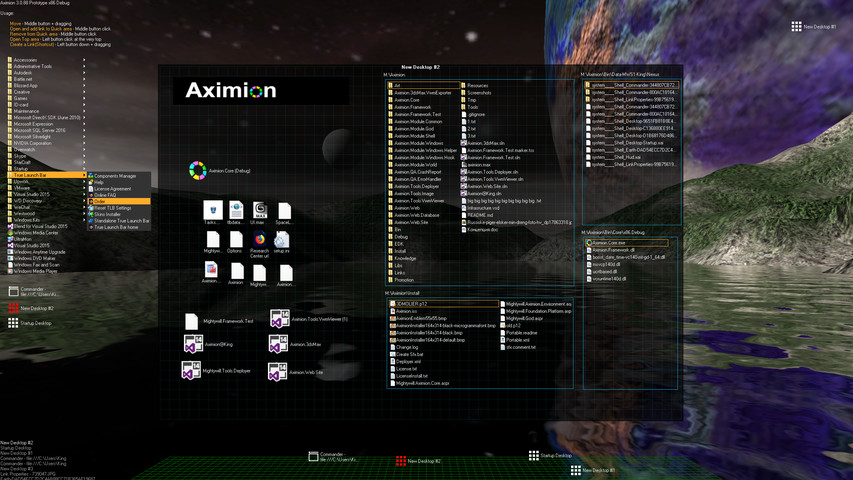
Aximion is a prototype of future desktop and virtual reality user interface environment.

Conectează-te pentru a adăuga acest articol în lista ta de dorințe, a-l urmări sau a-l marca drept ignorat.

Software cu Acces Timpuriu

Implică-te în acest software pe măsură ce se dezvoltă.

Notă: acest software aflat în acces timpuriu nu este complet și se poate schimba sau nu pe viitor. Dacă nu ești dornic să-l utilizezi în stadiul său actual, atunci ar trebui să aștepți pentru a vedea dacă software-ul va ajunge într-un stadiu mai avansat al dezvoltării. Află mai multe

Notă: ultima actualizare realizată de dezvoltatori a fost cu peste 7 ani în urmă. Este posibil ca informațiile și planul de dezvoltare descris de dezvoltatori să nu mai fie de actualitate.
Ce au de spus producătorii:

De ce acces timpuriu?

„This project is still under development and subject to further research”

Aproximativ cât timp se va afla acest software în Acces Timpuriu?

„Roughly by the end of 2018 year”

Cum se va diferenția versiunea completă de cea disponibilă în acces timpuriu?

„Deep user feedback analyzis
Polishing of UX
Several applications, like Commander
More file types supported for Links
New themes and Theme SDK
Item groups manipulations”

Care este starea actuală a versiunii aflate în acces timpuriu?

„Please refer to "About This" section for details”

Va avea jocul aflat în Acces Timpuriu un preț diferit față de versiunea finală?

„It's planned to be free”

Cum intenționezi să implici comunitatea în procesul tău de dezvoltare?

„The whole point of publishing here is to involve and build the Community”
Află mai multe
Nu este disponibil în limba: Română

Acest produs nu este disponibil în limba ta locală. Te rugăm să consulți lista de mai jos cu limbile în care jocul este disponibil înainte de achiziționare

Anunț: Aximion nu mai este disponibil în magazinul Steam.
 
Citește toate discuțiile

Raportează problemele tehnice și spune-ți părerea despre acest software pe forum

Despre acest Software

Aximion is a prototype of future desktop and virtual reality user interface environment.

Several UI concepts introduced in the Aximion to help users personalize and organize their environments.

The Aximion rethinks the idea of the Desktop. In the Aximion Desktop is a place where different aspects of a single project/context/interest can be grouped into a single visual entity. For example, if you have some project you may want to gather all related files, links, remote and other resources in one place and organize them accordingly to your preferences. The Aximion Desktops look similar to regular desktops but contain special elements - Avatars. Each type of Avatar represents some aspect of your particular project/context/interest. Their important feature is to change their look accordingly to its importance for the user or to other needs and this look may vary from simple icons to mini-applications with rich functionality. The user can create as many desktops as he needs.

Any application UI can be attached to another. For example, if a top-level UI element of application A is attached to a top-level UI element of application B then if a user opens B, A will show up automatically. The user then can create various application unions which reflect some corresponding contexts. For example, if the user is a software developer then he can create an individual desktop for each of his projects and also create several other desktops that would contain shared tools and resources required for all of his projects. Once any of these project desktops is open all attached desktops with shared tools will appear together with that.

The Quick Area is used to place links to needed objects for the current session, much the same way tabs are used in browsers. Middle button click helps the user to place avatars in the form of a link to that area automatically. They do not disappear when the user closes the object so when needed the object is available for reopening.

All avatars placed to the Head Area are always available for the user and always stay on top of other objects. Using VR gear this area acts as a Heads-up display, i.e., always in a field of view whenever a user’s head moves.

History Area this is a history of user navigation. This function similar to browser history and together with Quick Area effectively replaces a standard Desktop Taskbar behaviour.

The Events Area stands for showing events and progress reports, similar to the Windows system tray but with advanced functions. It can show simple notifications about events that require user attention. Also, any user-initiated long time operations should place representation items in this area, so the user has a continuous report about current time-consuming processes.

Cerințe de sistem

    Minim:
    • SO *: Windows 7
    • Procesor: any
    • Memorie: 1 GB RAM
    • DirectX: Versiune 9.0
    • Stocare: 50 MB spațiu disponibil
    Recomandat:
    • SO *: Windows 7
    • Procesor: any
    • Memorie: 1 GB RAM
    • DirectX: Versiune 9.0
    • Stocare: 50 MB spațiu disponibil
* Începând cu 1 ianuarie 2024, clientul Steam va fi compatibil numai cu Windows 10 și versiunile ulterioare.

Recenziile clienților pentru Aximion Despre recenziile utilizatorilor Preferințele tale

Recenzii generale:
3 recenzii ale utilizatorilor (3 recenzii)


Pentru a vedea recenziile dintr-un anumit interval calendaristic, te rugăm să faci clic și să tragi o selecție pe un grafic de mai sus sau apasă pe o bară specifică.


Filtrează recenziile în funcție de timpul petrecut de recenzor în joc până la momentul scrierii acestora:


Niciun minimNiciun maxim

Arată recenziile în ordinea de afișare selectată


Află mai multe
Filtre
Se exclude activitatea cu recenzii irelevante
Timp petrecut:
Jucat în principal pe Steam Deck
Sistem de operare:
Procesor:
Placă video:
Tipul dispozitivului:
Nu mai există recenzii care să se potrivească cu filtrele setate mai sus
Ajustează filtrele de mai sus pentru a vedea alte recenzii
Se încarcă recenzii...