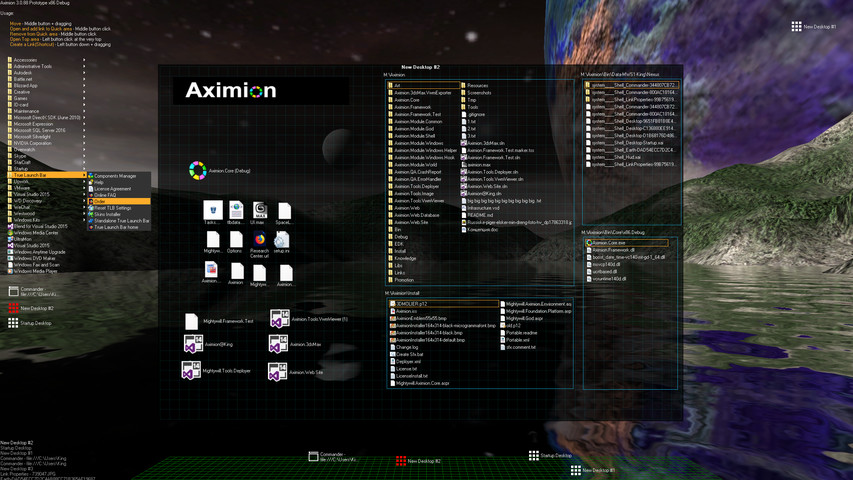
Aximion is a prototype of future desktop and virtual reality user interface environment.

로그인하셔서 게임을 찜 목록에 추가하거나, 팔로우하거나 또는 제외로 지정하세요.

앞서 해보는 소프트웨어

이 소프트웨어가 개발되는 과정에 참여하세요.

주의 사항: 이 앞서 해보기 소프트웨어는 완성되지 않았으며 앞으로 더 변하거나 변하지 않을 수 있습니다. 현재 상태의 소프트웨어가 흥미롭지 않다면 이 소프트웨어가 개발을 거치며 발전하는지 살펴보는게 좋습니다. 앞서 해보기에 대해 더 알아보세요.

참고: 개발사에서 7년 전에 마지막으로 업데이트했습니다. 개발사에서 제공한 게임 정보 및 개발 일정은 최신 정보가 아닐 수 있습니다.
개발자의 한마디:

왜 앞서 해보기를 진행하나요?

“This project is still under development and subject to further research”

이 소프트웨어는 대략 얼마간 앞서 해볼 수 있나요?

“Roughly by the end of 2018 year”

정식 버전은 앞서 해보기 버전과 어떻게 달라지나요?

“Deep user feedback analyzis
Polishing of UX
Several applications, like Commander
More file types supported for Links
New themes and Theme SDK
Item groups manipulations”

앞서 해보기 버전은 현재 어떤 상태인가요?

“Please refer to "About This" section for details”

이 소프트웨어는 앞서해보기 기간동안 가격이 달라질 수도 있습니까?

“It's planned to be free”

개발 과정에서 어떻게 커뮤니티와 소통할 계획인가요?

“The whole point of publishing here is to involve and build the Community”
더 읽어보기
한국어(을)를 지원하지 않습니다

이 제품은 귀하의 로컬 언어를 지원하지 않습니다. 구매하기 전에 아래에 있는 지원하는 언어 목록을 확인해주세요.

주의: Aximion 제품은 더 이상 Steam 상점에서 이용할 수 없습니다.
 
모든 토론 보기

이 소프트웨어의 버그를 신고하고 피드백을 토론 게시판에 남겨주세요

소프트웨어 정보

Aximion is a prototype of future desktop and virtual reality user interface environment.

Several UI concepts introduced in the Aximion to help users personalize and organize their environments.

The Aximion rethinks the idea of the Desktop. In the Aximion Desktop is a place where different aspects of a single project/context/interest can be grouped into a single visual entity. For example, if you have some project you may want to gather all related files, links, remote and other resources in one place and organize them accordingly to your preferences. The Aximion Desktops look similar to regular desktops but contain special elements - Avatars. Each type of Avatar represents some aspect of your particular project/context/interest. Their important feature is to change their look accordingly to its importance for the user or to other needs and this look may vary from simple icons to mini-applications with rich functionality. The user can create as many desktops as he needs.

Any application UI can be attached to another. For example, if a top-level UI element of application A is attached to a top-level UI element of application B then if a user opens B, A will show up automatically. The user then can create various application unions which reflect some corresponding contexts. For example, if the user is a software developer then he can create an individual desktop for each of his projects and also create several other desktops that would contain shared tools and resources required for all of his projects. Once any of these project desktops is open all attached desktops with shared tools will appear together with that.

The Quick Area is used to place links to needed objects for the current session, much the same way tabs are used in browsers. Middle button click helps the user to place avatars in the form of a link to that area automatically. They do not disappear when the user closes the object so when needed the object is available for reopening.

All avatars placed to the Head Area are always available for the user and always stay on top of other objects. Using VR gear this area acts as a Heads-up display, i.e., always in a field of view whenever a user’s head moves.

History Area this is a history of user navigation. This function similar to browser history and together with Quick Area effectively replaces a standard Desktop Taskbar behaviour.

The Events Area stands for showing events and progress reports, similar to the Windows system tray but with advanced functions. It can show simple notifications about events that require user attention. Also, any user-initiated long time operations should place representation items in this area, so the user has a continuous report about current time-consuming processes.

시스템 요구 사항

    최소:
    • 운영 체제 *: Windows 7
    • 프로세서: any
    • 메모리: 1 GB RAM
    • DirectX: 버전 9.0
    • 저장 공간: 50 MB 사용 가능 공간
    권장:
    • 운영 체제 *: Windows 7
    • 프로세서: any
    • 메모리: 1 GB RAM
    • DirectX: 버전 9.0
    • 저장 공간: 50 MB 사용 가능 공간
* 2024년 1월 1일부터 Steam 클라이언트는 Windows 10 이상 버전만 지원합니다.

Aximion에 대한 사용자 평가 사용자 평가 정보 환경 설정

종합 평가:
사용자 평가 3개 (평가 3개)


특정 날짜 범위에 속하는 평가를 보려면, 위의 그래프에서 선택 항목을 클릭한 후 드래그하거나 원하는 바를 클릭하세요.


평가를 작성한 시점의 사용자 플레이 시간을 기준으로 평가를 필터링:


최소 시간 없음 ~ 최대 시간 없음

선택한 표시 순서로 평가 보기


자세한 정보
필터
게임과 관련없는 평가 활동 제외
플레이 시간:
주로 Steam Deck에서 플레이
운영 체제:
CPU:
GPU:
기기 유형:
위에서 설정한 필터 조건에 맞는 평가가 없습니다
다른 평가를 보려면 위에서 필터를 조정해주세요
평가 불러오는 중...