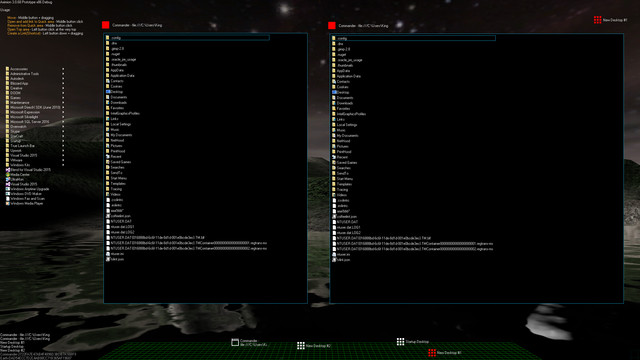
Aximion is a prototype of future desktop and virtual reality user interface environment.

Войдите, чтобы добавить этот продукт в список желаемого или скрыть его

Программы с ранним доступом

Примите участие в развитии этой программы.

Примечание: данная программа в раннем доступе находится на стадии разработки. Она может измениться в будущем, а может остаться в текущем состоянии, так что если вам не по вкусу то, что программа может предложить сейчас, рекомендуем дождаться ее дальнейшего развития. Узнать больше

Обратите внимание: разработчики выпустили последнее обновление более 7 лет назад. Информация и сроки, указанные разработчиками, могут больше не соответствовать действительности.
Сообщение от разработчиков

Почему ранний доступ?

«This project is still under development and subject to further research»

Сколько примерно эта программа будет в раннем доступе?

«Roughly by the end of 2018 year»

Чем планируемая полная версия будет отличаться от версии в раннем доступе?

«Deep user feedback analyzis
Polishing of UX
Several applications, like Commander
More file types supported for Links
New themes and Theme SDK
Item groups manipulations»

Каково текущее состояние версии в раннем доступе?

«Please refer to "About This" section for details»

Будет ли разница в цене до и после раннего доступа?

«It's planned to be free»

Как вы планируете вовлекать сообщество в разработку игры?

«The whole point of publishing here is to involve and build the Community»
Подробнее
Не поддерживается русский язык

Этот продукт не поддерживает ваш язык. Пожалуйста, перед покупкой ознакомьтесь со списком поддерживаемых языков.

Внимание: Aximion больше не доступна в магазине Steam.
 
Просмотреть обсуждения

Сообщайте об ошибках этой программы и оставляйте отзывы на ее странице обсуждений

Об этом ПО

Aximion is a prototype of future desktop and virtual reality user interface environment.

Several UI concepts introduced in the Aximion to help users personalize and organize their environments.

The Aximion rethinks the idea of the Desktop. In the Aximion Desktop is a place where different aspects of a single project/context/interest can be grouped into a single visual entity. For example, if you have some project you may want to gather all related files, links, remote and other resources in one place and organize them accordingly to your preferences. The Aximion Desktops look similar to regular desktops but contain special elements - Avatars. Each type of Avatar represents some aspect of your particular project/context/interest. Their important feature is to change their look accordingly to its importance for the user or to other needs and this look may vary from simple icons to mini-applications with rich functionality. The user can create as many desktops as he needs.

Any application UI can be attached to another. For example, if a top-level UI element of application A is attached to a top-level UI element of application B then if a user opens B, A will show up automatically. The user then can create various application unions which reflect some corresponding contexts. For example, if the user is a software developer then he can create an individual desktop for each of his projects and also create several other desktops that would contain shared tools and resources required for all of his projects. Once any of these project desktops is open all attached desktops with shared tools will appear together with that.

The Quick Area is used to place links to needed objects for the current session, much the same way tabs are used in browsers. Middle button click helps the user to place avatars in the form of a link to that area automatically. They do not disappear when the user closes the object so when needed the object is available for reopening.

All avatars placed to the Head Area are always available for the user and always stay on top of other objects. Using VR gear this area acts as a Heads-up display, i.e., always in a field of view whenever a user’s head moves.

History Area this is a history of user navigation. This function similar to browser history and together with Quick Area effectively replaces a standard Desktop Taskbar behaviour.

The Events Area stands for showing events and progress reports, similar to the Windows system tray but with advanced functions. It can show simple notifications about events that require user attention. Also, any user-initiated long time operations should place representation items in this area, so the user has a continuous report about current time-consuming processes.

Системные требования

    Минимальные:
    • ОС *: Windows 7
    • Процессор: any
    • Оперативная память: 1 GB ОЗУ
    • DirectX: версии 9.0
    • Место на диске: 50 MB
    Рекомендованные:
    • ОС *: Windows 7
    • Процессор: any
    • Оперативная память: 1 GB ОЗУ
    • DirectX: версии 9.0
    • Место на диске: 50 MB
* С 1 января 2024 года клиент Steam будет поддерживать только Windows 10 и более поздние версии.

Обзоры пользователей: Aximion О пользовательских обзорах Ваши настройки

Все обзоры:
Обзоров пользователей: 3 (всего 3)


Чтобы посмотреть обзоры за определённое время, отметьте промежуток на графике или выберите одну из колонок.


Фильтр обзоров пользователей по их времени в игре в момент написания обзора:


Без минимумаБез максимума

Показать обзоры в выбранном порядке


Подробнее
Фильтры
Исключать обзоры не по теме
Время в игре:
В основном на Steam Deck
Под выбранные фильтры не подходит ни один обзор
Измените фильтры, чтобы увидеть другие обзоры
Загрузка обзоров…