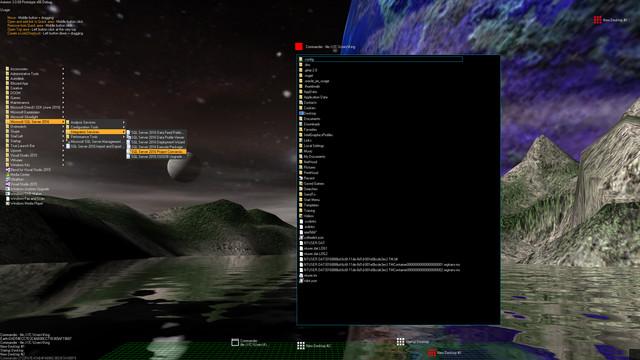
Aximion is a prototype of future desktop and virtual reality user interface environment.

Log in om dit item aan je verlanglijst toe te voegen, het te volgen of te negeren

Vroegtijdige toegang

Raak betrokken bij deze software terwijl het zich ontwikkelt.

Opmerking: Deze software in vroegtijdige toegang is nog niet voltooid en kan mogelijk wel of niet veranderen. Als je niet staat te springen om deze software in de huidige staat te spelen, kun je beter afwachten hoe het zich verder ontwikkelt. Meer informatie

Opmerking: De laatste update door de ontwikkelaars was meer dan 7 jaar geleden. De informatie en tijdlijn die de ontwikkelaars hier beschrijven, zijn mogelijk niet meer up-to-date.
Wat de ontwikkelaars zeggen:

Waarom vroegtijdige toegang?

'This project is still under development and subject to further research'

Hoelang blijft deze software ongeveer in vroegtijdige toegang?

'Roughly by the end of 2018 year'

Hoe gaat de volledige versie verschillen van de versie met vroegtijdige toegang?

'Deep user feedback analyzis
Polishing of UX
Several applications, like Commander
More file types supported for Links
New themes and Theme SDK
Item groups manipulations'

Wat is de huidige staat van de versie met vroegtijdige toegang?

'Please refer to "About This" section for details'

Zal deze software anders geprijsd worden tijdens en na vroegtijdige toegang?

'It's planned to be free'

Hoe zijn jullie van plan de community te betrekken bij het ontwikkelproces?

'The whole point of publishing here is to involve and build the Community'
Meer informatie
Opmerking: Aximion is niet meer beschikbaar in de Steam-winkel.
 
Alle discussies weergeven

Meld bugs en laat feedback voor deze software achter op de discussiefora

Over deze software

Aximion is a prototype of future desktop and virtual reality user interface environment.

Several UI concepts introduced in the Aximion to help users personalize and organize their environments.

The Aximion rethinks the idea of the Desktop. In the Aximion Desktop is a place where different aspects of a single project/context/interest can be grouped into a single visual entity. For example, if you have some project you may want to gather all related files, links, remote and other resources in one place and organize them accordingly to your preferences. The Aximion Desktops look similar to regular desktops but contain special elements - Avatars. Each type of Avatar represents some aspect of your particular project/context/interest. Their important feature is to change their look accordingly to its importance for the user or to other needs and this look may vary from simple icons to mini-applications with rich functionality. The user can create as many desktops as he needs.

Any application UI can be attached to another. For example, if a top-level UI element of application A is attached to a top-level UI element of application B then if a user opens B, A will show up automatically. The user then can create various application unions which reflect some corresponding contexts. For example, if the user is a software developer then he can create an individual desktop for each of his projects and also create several other desktops that would contain shared tools and resources required for all of his projects. Once any of these project desktops is open all attached desktops with shared tools will appear together with that.

The Quick Area is used to place links to needed objects for the current session, much the same way tabs are used in browsers. Middle button click helps the user to place avatars in the form of a link to that area automatically. They do not disappear when the user closes the object so when needed the object is available for reopening.

All avatars placed to the Head Area are always available for the user and always stay on top of other objects. Using VR gear this area acts as a Heads-up display, i.e., always in a field of view whenever a user’s head moves.

History Area this is a history of user navigation. This function similar to browser history and together with Quick Area effectively replaces a standard Desktop Taskbar behaviour.

The Events Area stands for showing events and progress reports, similar to the Windows system tray but with advanced functions. It can show simple notifications about events that require user attention. Also, any user-initiated long time operations should place representation items in this area, so the user has a continuous report about current time-consuming processes.

Systeemeisen

    Minimum:
    • Besturingssysteem *: Windows 7
    • Processor: any
    • Geheugen: 1 GB RAM
    • DirectX: Versie 9.0
    • Opslagruimte: 50 MB beschikbare ruimte
    Aanbevolen:
    • Besturingssysteem *: Windows 7
    • Processor: any
    • Geheugen: 1 GB RAM
    • DirectX: Versie 9.0
    • Opslagruimte: 50 MB beschikbare ruimte
* Vanaf 1 januari 2024 ondersteunt de Steam-client alleen Windows 10 en latere versies.

Klantenrecensies voor Aximion Over gebruikersrecensies Je voorkeuren

Algemene recensies:
3 gebruikersrecensies (3 recensies)


Om recensies in een datumbereik te bekijken, klik en sleep je een selectie op een grafiek hierboven of klik je op een specifieke balk.


Filter recensies op speeltijden van gebruikers toen ze geschreven werden:


Geen minimum tot Geen maximum

Recensies weergeven in de geselecteerde volgorde


Meer informatie
Filters
Irrelevante recensieactiviteit uitgesloten
Speeltijd:
Vooral gespeeld op de Steam Deck
Besturingssysteem:
CPU:
GPU:
Soort apparaat:
Er zijn geen recensies meer die met bovenstaande filters overeenkomen
Pas de filters hierboven aan om andere recensies te zien
Recensies laden ...