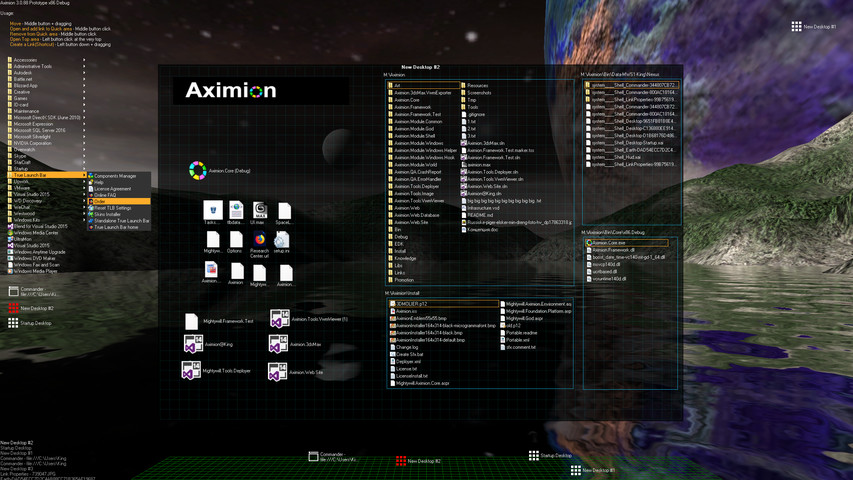
Aximion is a prototype of future desktop and virtual reality user interface environment.

Login untuk menambahkan item ini ke wishlist-mu, mengikutinya, atau mengabaikannya

Software Akses Dini

Bergabung dengan software ini seiring perkembangannya.

Catatan: Software Akses Dini ini belum selesai dan mungkin tidak ada perubahan lebih lanjut. Jika kamu tidak berminat untuk menggunakan software ini dalam statusnya saat ini, kamu harus menunggu untuk melihat jika software tersebut terus dikembangkan. Pelajari lebih lanjut

Catatan: Pembaruan terakhir oleh pengembang sudah lebih dari 7 tahun yang lalu. Informasi dan alur waktu yang dijelaskan oleh pengembang di sini mungkin sudah tidak relevan.
Prakata dari pengembang:

Kenapa harus Akses Dini?

“This project is still under development and subject to further research”

Berapa lama software ini akan berada dalam Akses Dini?

“Roughly by the end of 2018 year”

Apa perbedaan antara versi penuh dan versi Akses Dini?

“Deep user feedback analyzis
Polishing of UX
Several applications, like Commander
More file types supported for Links
New themes and Theme SDK
Item groups manipulations”

Apa status saat ini dari versi Akses Dini ini?

“Please refer to "About This" section for details”

Apakah harga software akan berbeda selama dan setelah Akses Dini?

“It's planned to be free”

Seperti apakah rencana untuk melibatkan Komunitas dalam proses pengembangan?

“The whole point of publishing here is to involve and build the Community”
Baca Selengkapnya
Bhs. Indonesia tidak didukung

Produk ini tidak didukung dalam bahasamu. Silakan tinjau daftar bahasa yang didukung di bawah ini sebelum melakukan pembelian.

Pemberitahuan: Aximion tidak lagi tersedia di Toko Steam.
 
Lihat semua diskusi

Laporkan bug dan berikan masukan untuk software ini di papan diskusi

Tentang Software Ini

Aximion is a prototype of future desktop and virtual reality user interface environment.

Several UI concepts introduced in the Aximion to help users personalize and organize their environments.

The Aximion rethinks the idea of the Desktop. In the Aximion Desktop is a place where different aspects of a single project/context/interest can be grouped into a single visual entity. For example, if you have some project you may want to gather all related files, links, remote and other resources in one place and organize them accordingly to your preferences. The Aximion Desktops look similar to regular desktops but contain special elements - Avatars. Each type of Avatar represents some aspect of your particular project/context/interest. Their important feature is to change their look accordingly to its importance for the user or to other needs and this look may vary from simple icons to mini-applications with rich functionality. The user can create as many desktops as he needs.

Any application UI can be attached to another. For example, if a top-level UI element of application A is attached to a top-level UI element of application B then if a user opens B, A will show up automatically. The user then can create various application unions which reflect some corresponding contexts. For example, if the user is a software developer then he can create an individual desktop for each of his projects and also create several other desktops that would contain shared tools and resources required for all of his projects. Once any of these project desktops is open all attached desktops with shared tools will appear together with that.

The Quick Area is used to place links to needed objects for the current session, much the same way tabs are used in browsers. Middle button click helps the user to place avatars in the form of a link to that area automatically. They do not disappear when the user closes the object so when needed the object is available for reopening.

All avatars placed to the Head Area are always available for the user and always stay on top of other objects. Using VR gear this area acts as a Heads-up display, i.e., always in a field of view whenever a user’s head moves.

History Area this is a history of user navigation. This function similar to browser history and together with Quick Area effectively replaces a standard Desktop Taskbar behaviour.

The Events Area stands for showing events and progress reports, similar to the Windows system tray but with advanced functions. It can show simple notifications about events that require user attention. Also, any user-initiated long time operations should place representation items in this area, so the user has a continuous report about current time-consuming processes.

Persyaratan Sistem

    Minimum:
    • OS *: Windows 7
    • Prosesor: any
    • Memori: 1 GB RAM
    • DirectX: Versi 9.0
    • Penyimpanan: 50 MB ruang tersedia
    Direkomendasikan:
    • OS *: Windows 7
    • Prosesor: any
    • Memori: 1 GB RAM
    • DirectX: Versi 9.0
    • Penyimpanan: 50 MB ruang tersedia
* Mulai 1 Januari 2024, Steam Client hanya akan mendukung Windows 10 dan versi yang lebih baru.

Ulasan pelanggan untuk Aximion Tentang ulasan pengguna Preferensimu

Ulasan Umum:
3 ulasan pengguna (3 ulasan)


Untuk melihat ulasan dalam rentang tanggal tertentu, klik dan seret pilihan pada grafik di atas atau klik bilah spesifik.


Ulasan filter berdasarkan waktu bermain pengguna saat ulasan ditulis:


Tidak ada minimum sampai Tidak ada maksimum

Tampilkan ulasan dalam urutan tampilan yang dipilih


Pelajari Lebih Lanjut
Filter
Tidak Termasuk Aktivitas Ulasan Keluar Topik
Waktu bermain:
Seringnya Dimainkan di Steam Deck
OS:
CPU:
GPU:
Jenis Perangkat:
Tidak ada ulasan lainnya yang cocok dengan filter di atas
Sesuaikan filter di atas untuk melihat ulasan lainnya
Memuat ulasan...