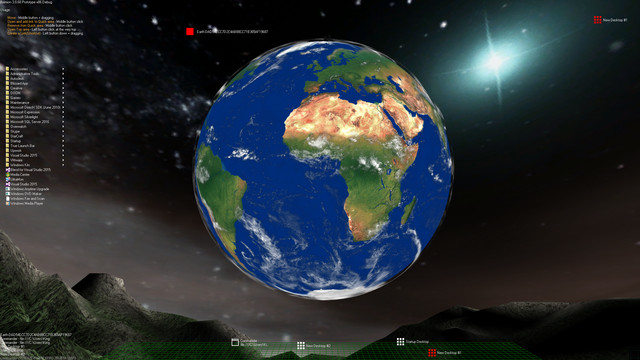
Aximion is a prototype of future desktop and virtual reality user interface environment.

Συνδεθείτε για να προσθέσετε αυτό το αντικείμενο στη Λίστα Επιθυμιών σας, να το ακολουθήσετε ή να το αγνοήσετε

Λογισμικό πρόωρης πρόσβασης

Ασχοληθείτε με αυτό το λογισμικό καθώς αναπτύσσεται.

Σημείωση: πρόωρης πρόσβασης δεν έχει ολοκληρωθεί και μπορεί να αλλάξει σημαντικά κατά τη διάρκεια της ανάπτυξής του. Αν δεν επιθυμείτε να χρησιμοποιήσετε αυτό το λογισμικό στην παρούσα του μορφή, μπορείτε να περιμένετε μέχρι να αναπτυχθεί περαιτέρω. Μάθετε περισσότερα

Σημείωση: Η τελευταία ενημέρωση που έγινε από τους δημιουργούς ήταν πριν από 7 χρόνια. Οι πληροφορίες και το χρονοδιάγραμμα που περιγράφονται εδώ από τους δημιουργούς μπορεί να μην είναι πλέον ενημερωμένα.
ΤΙ ΕΧΟΥΝ ΝΑ ΠΟΥΝ ΟΙ ΔΗΜΙΟΥΡΓΟΙ:

Γιατί Πρόωρη πρόσβαση;

«This project is still under development and subject to further research»

Για πόσο περίπου θα είναι αυτό το λογισμικό σε πρόωρη πρόσβαση;

«Roughly by the end of 2018 year»

Σε τι θα διαφέρει η τελική έκδοση από την έκδοση Πρόωρης Πρόσβασης;

«Deep user feedback analyzis
Polishing of UX
Several applications, like Commander
More file types supported for Links
New themes and Theme SDK
Item groups manipulations»

Ποια είναι η τρέχουσα κατάσταση της έκδοσης Πρόωρης Πρόσβασης;

«Please refer to "About This" section for details»

Αυτό το λογισμικό θα κοστολογείται διαφορετικά κατά τη διάρκεια και μετά την πρόωρη πρόσβαση;

«It's planned to be free»

Πώς σκοπεύετε να συμπεριλάβετε την Κοινότητα στην ανάπτυξη του παιχνιδιού σας;

«The whole point of publishing here is to involve and build the Community»
Περισσότερα
Σημείωση: Το Aximion δεν είναι πλέον διαθέσιμο στο Κατάστημα Steam.
 
Προβολή όλων των συζητήσεων

Αναφέρετε προβλήματα και αφήστε σχόλια για αυτό το λογισμικό στους πίνακες συζητήσεων

Σχετικά με αυτό το λογισμικό

Aximion is a prototype of future desktop and virtual reality user interface environment.

Several UI concepts introduced in the Aximion to help users personalize and organize their environments.

The Aximion rethinks the idea of the Desktop. In the Aximion Desktop is a place where different aspects of a single project/context/interest can be grouped into a single visual entity. For example, if you have some project you may want to gather all related files, links, remote and other resources in one place and organize them accordingly to your preferences. The Aximion Desktops look similar to regular desktops but contain special elements - Avatars. Each type of Avatar represents some aspect of your particular project/context/interest. Their important feature is to change their look accordingly to its importance for the user or to other needs and this look may vary from simple icons to mini-applications with rich functionality. The user can create as many desktops as he needs.

Any application UI can be attached to another. For example, if a top-level UI element of application A is attached to a top-level UI element of application B then if a user opens B, A will show up automatically. The user then can create various application unions which reflect some corresponding contexts. For example, if the user is a software developer then he can create an individual desktop for each of his projects and also create several other desktops that would contain shared tools and resources required for all of his projects. Once any of these project desktops is open all attached desktops with shared tools will appear together with that.

The Quick Area is used to place links to needed objects for the current session, much the same way tabs are used in browsers. Middle button click helps the user to place avatars in the form of a link to that area automatically. They do not disappear when the user closes the object so when needed the object is available for reopening.

All avatars placed to the Head Area are always available for the user and always stay on top of other objects. Using VR gear this area acts as a Heads-up display, i.e., always in a field of view whenever a user’s head moves.

History Area this is a history of user navigation. This function similar to browser history and together with Quick Area effectively replaces a standard Desktop Taskbar behaviour.

The Events Area stands for showing events and progress reports, similar to the Windows system tray but with advanced functions. It can show simple notifications about events that require user attention. Also, any user-initiated long time operations should place representation items in this area, so the user has a continuous report about current time-consuming processes.

Απαιτήσεις συστήματος

    Ελάχιστες:
    • Λειτουργικό σύστημα *: Windows 7
    • Επεξεργαστής: any
    • Μνήμη: 1 GB RAM
    • DirectX: Έκδοση 9.0
    • Αποθήκευση: 50 MB διαθέσιμος χώρος
    Προτεινόμενες:
    • Λειτουργικό σύστημα *: Windows 7
    • Επεξεργαστής: any
    • Μνήμη: 1 GB RAM
    • DirectX: Έκδοση 9.0
    • Αποθήκευση: 50 MB διαθέσιμος χώρος
* Από την 1η Ιανουαρίου 2024, η εφαρμογή Steam θα υποστηρίζει μόνο Windows 10 και νεότερες εκδόσεις.

Κριτικές πελατών για το Aximion Σχετικά με τις κριτικές χρηστών Οι προτιμήσεις σας

Συνολικές κριτικές:
3 κριτικές χρηστών (3 κριτικές)


Για προβολή κριτικών εντός ενός εύρους ημερομηνιών, πατήστε και σύρετε μια επιλογή στο γράφημα ή πατήστε πάνω σε μια συγκεκριμένη μπάρα.


Φιλτράρισμα κριτικών βάσει του χρόνου παιχνιδιού του χρήστη όταν γράφτηκε η κριτική:


Χωρίς ελάχιστο έως χωρίς μέγιστο

Εμφάνιση κριτικών με την επιλεγμένη σειρά προβολής


Μάθετε περισσότερα
Φίλτρα
Αποκλεισμός κριτικών εκτός θέματος
Χρόνος παιχνιδιού:
Έπαιξε κυρίως σε Steam Deck
Λειτουργικό σύστημα:
CPU:
GPU:
Τύπος συσκευής:
Δεν υπάρχουν άλλες κριτικές που να ταιριάζουν με τα παραπάνω φίλτρα
Ρυθμίστε τα φίλτρα για να δείτε άλλες κριτικές
Γίνεται φόρτωση κριτικών…