Angels Fall First - Valve
Angels Fall First is Now Available on Steam and is 10% off!*

From commanding the battle standing on the bridge of your flagship all the way down to tactical infantry firefights - AFF brings together all the combat you ever loved in a rich science fiction setting. Boarding, pilotable capital ships, deep weapon customization and full Bot support included!

*Offer ends July 18 at 10AM Pacific Time
Team Fortress 2 - Valve
An update to Team Fortress 2 has been released. The update will be applied automatically when you restart Team Fortress 2. The major changes include:

  • Updated the Beachcomber's Brim to fix an incorrect material
  • Updated Taunt: The Circuit Breaker
    • Fixed incorrect team color on prop
    • Fixed orphaned particles
  • Updated the Inglorious Patriot
    • Adjusted the normal map and refined the colors
    • Improved the weighting on the bottom pockets
    • Updated the backpack icon
  • Updated pl_redwood
    • Fixed various lighting issues
    • Zipline dismount jump speed now ramps up from 1.1x base class speed to 1.8x
    • Decreased delay before a player can dismount a zipline by jumping from 0.6s to 0.25s
    • Decreased delay before a player can dismount a zipline by crouching from 0.3s to 0.1s
    • Fixed players who dismount a zipline in mid-air not receiving mini-crits from the Direct Hit and Reserve Shooter
    • Fixed the B.A.S.E. Jumper's parachute deploying while using a zipline
  • Updated koth_camp_saxton
    • Vastly improved optimization. Further investigation is ongoing.
    • Tweaked log-and-netting walls along the central shore for clearer definition
    • Fixed several instances of minor prop clipping
    • Fixed players getting stuck on the wood-carved Saxtons
    • Improved clipping throughout
Team Fortress 2 - Valve
An update to Team Fortress 2 has been released. The update will be applied automatically when you restart Team Fortress 2. The major changes include:

  • Updated the Beachcomber's Brim to add a second style that was originally missed
  • Updated the Northern Nights, Umbral Lights, and Solar Singed Unusual effects to fix a naming conflict
  • Updated the Blissful Butterflies and Wispful Wings Unusual effects to fix visibility issues
  • Updated the Hard Hearing to fix truncated style names
  • Updated backpack image for the Pyro's Overalls to fix the alpha channel
  • Updated the Sandwich Diner and Sideshow war paints to fix the alpha channels
  • Updated the Team Union war paint to remove a few rogue pixels
Team Fortress 2 - Valve
An update to Team Fortress 2 has been released. The update will be applied automatically when you restart Team Fortress 2. The major changes include:


Summer 2026!
  • Featuring 6 new community maps: Dryfield, Camp Saxton, Shorelight, Redwood, Premuda, and Mojave
  • Added the Summer 2026 Cosmetic Case
    • Contains 24 new community-contributed items
    • Has a chance to give a taunt Unusualifier as a bonus item
  • Added 4 new community-contributed taunts to the Mann Co. Store
    • Taunt: The Circuit Breaker
    • Taunt: Buffoon's Bivouac
    • Taunt: Faux-calization
    • Taunt: Friendly Fire
  • Added 12 new community-created Unusual effects
    • 7 new effects for Unusual hats
    • 5 new effects for Unusual taunts
  • Added the Summer 2026 War Paint Case
    • Contains 10 new community-created War Paints that make-up the Summer 2026 Collection
    • Has a chance to give a taunt Unusualifier as a bonus item
  • All cosmetic and taunt cases will grant Summer 2026 Unusual effects instead of their normal Unusual effects during the Summer event. This does not include crates.
  • The Summer event runs through September 15th, 2026
General
  • Security and stability improvements
  • Fixed bad alpha channel for The Creature's Grin, Rocket Operator, The Bountiful Bow, The Alternative Medicine Mann, and The Candyman's Cap (community fix from Chickenman456)
  • Fixed the "Neo Tokyo" warpaint on the BLU team not matching the RED team because the alpha channel was incorrect (community fix from Whurrhurr)
  • Fixed bad alpha channel for the Pile of End of the Line Key Gifts' backpack icon (community fix from Grampa Swood)
  • Fixed Stat Clock model attaching incorrectly on dropped weapons (community fix from rabscootle)
  • Fixed Stat Clock values always displaying '0' on world models (community fix from rabscootle)
  • Fixed intel carrier glow disappearing when Spy cloaks (community fix from shockpast)
  • Fixed bad alpha channel for Voodoo Juju's backpack icon (community fix from DiskIntegrity)
  • Fixed Silver Botkiller Mk.I having cubemapping in the wrong area due to a VMT error (community fix from Whurrhurr)
  • Fixed misspelling on cp_well's BLU rocket clamp texture (community fix from DiskIntegrity)
  • Fixed wrong paths in soundscript events for some taunts (community fix from robbilookatme)
  • Fixed Spy control point response rules lines playing when disguised/invisible (community fix from Churkinator)
  • Fixed weapon Unusual effects (community fix from Cipherlock and rune)
    • Fixed particles being orphaned after death
    • Fixed the Energy Orb Unusual effect desyncing from the weapon when the player moves too sharply
  • Fixed effects flooding the screen when spectating a dead teammate in first person with an unusual weapon (community fix from RGBACatlord)
  • Fixed missing coin effect for HOUWAR's second style (community fix from DiskIntegrity)
  • Fixed outdated description for the Splendid Screen (community fix from Grampa Swood)
  • Trimmed delay at the start of the sound file for the Panic Attack's shooting sound
  • Fixed the Engineer not being able to move for a few seconds after using Taunt: Cheers!
  • Updated cp_powerhouse to fix collision problem with crates on final control points
  • Updated cp_fortezza
    • Reworked interior of shack building next to Point A
    • Rebalanced ammo packs around Point A
    • Improved visuals across the map
    • Made rotation for shortcut path shorter
  • Updated koth_blowout
    • Prevent sentry guns from being built inside a prop under the stairs in the maintenance room
    • Visual changes to improve clarity and consistency
Новости Steam - kaci

Greetings to everyone who loves good deals on great games (everyone, we hope?)!

The Steam Summer Sale means the entire Steam Store is filled with deals upon deals upon deals, as our official trailer above will attest. From now through July 9th at 10 a.m. Pacific (it's a long one, friends) you can pick literally any genre of gaming you love and find all sorts of sales.

Cooking battles, universe exploration, fighting with swords/guns/your fists, cozy games, football and basketball games, zombies, and more. Wait, we should list the "more", it's so good: there are even all-time greats that are on deep discounts throughout the sale.

The Steam Summer Sale is yours to explore in the shade of the summer (or in the warmth of the winter for our southern hemisphere friends): Now through July 9th at 10 a.m. Pacific. See you there!

Новости Steam - kaci

The June edition of Steam Next Fest is live, with developers all over the world sharing their upcoming releases with you before they even launch! Peep our trailer (above) for a taste.

All week you'll find free demos to play across all genres, plus livestreams and developer chats throughout the week. Don't forget to wishlist your favorites to stay in-the-know as those games get ready for their official debut.

Steam Next Fest is on now through June 22nd at 10 a.m. Pacific. See you there!

Новости Steam - jennyj

Steam Bullet Fest is on now through June 15th at 10 am PT. As you can see from our trailer, there are all kinds of shoot-'em-ups offering discounts all week long!

You'll find hack-n-slashes, anime side scrollers, incremental bullet hells, and more. Join us now for Steam Bullet Fest, on through June 15th at 10 am Pacific!

Новости Steam - Jacob

Today we are excited to announce the release of the refreshed Steam Store home page. Thank you to everyone who opted into the Steam Client beta and provided feedback during the beta period. The updated design is a continuation of recent improvements across the Steam store, like the game page updates we made a few months ago.

Read on for details of the update:

Overall Design Refresh

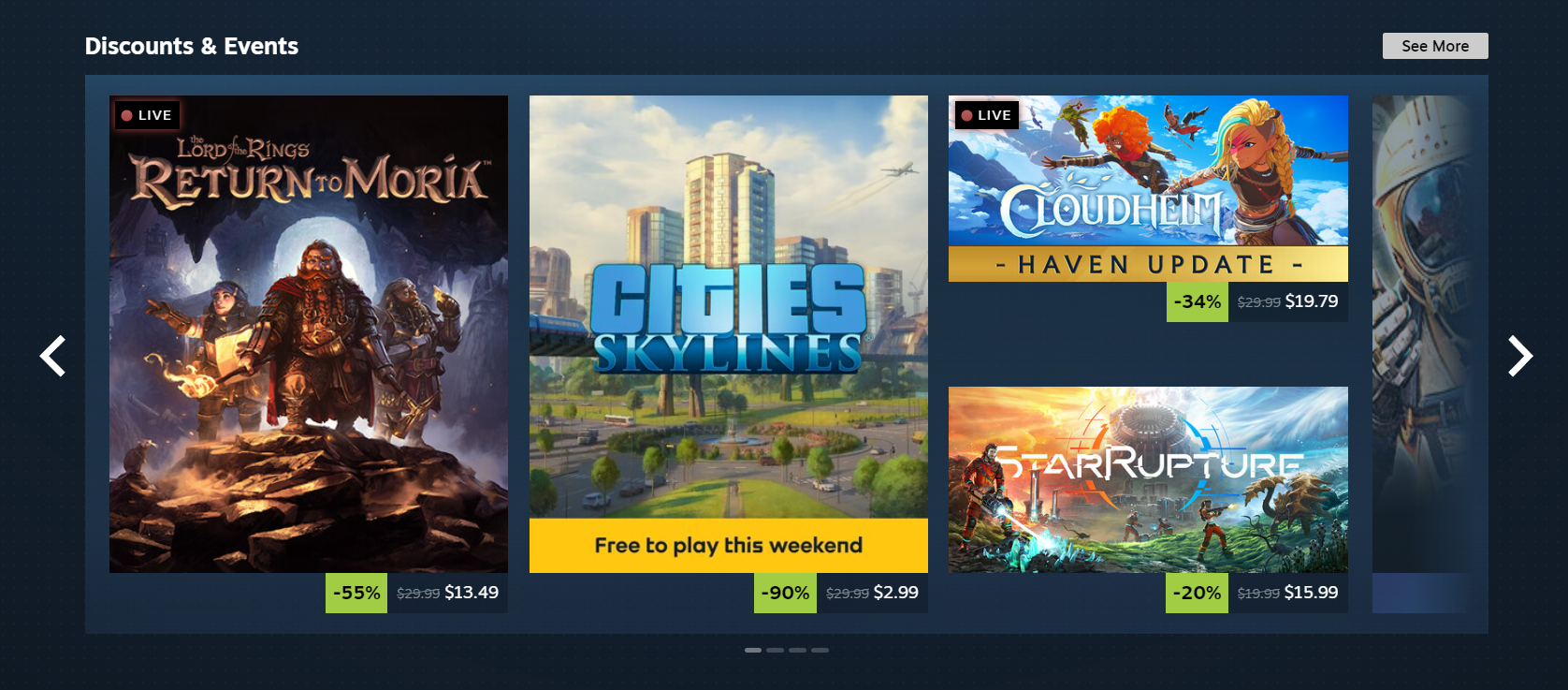
Over the years we've introduced new sections and added more ways for you to discover and learn about games, and this update aims to make the store home feel more cohesive. Each section has a distinct set of tools and information to give users many ways to explore the diverse catalog of games on Steam. A goal of this visual refresh is to strike a balance between providing more consistency in UI elements, while allowing the unique nature of each section to show through.

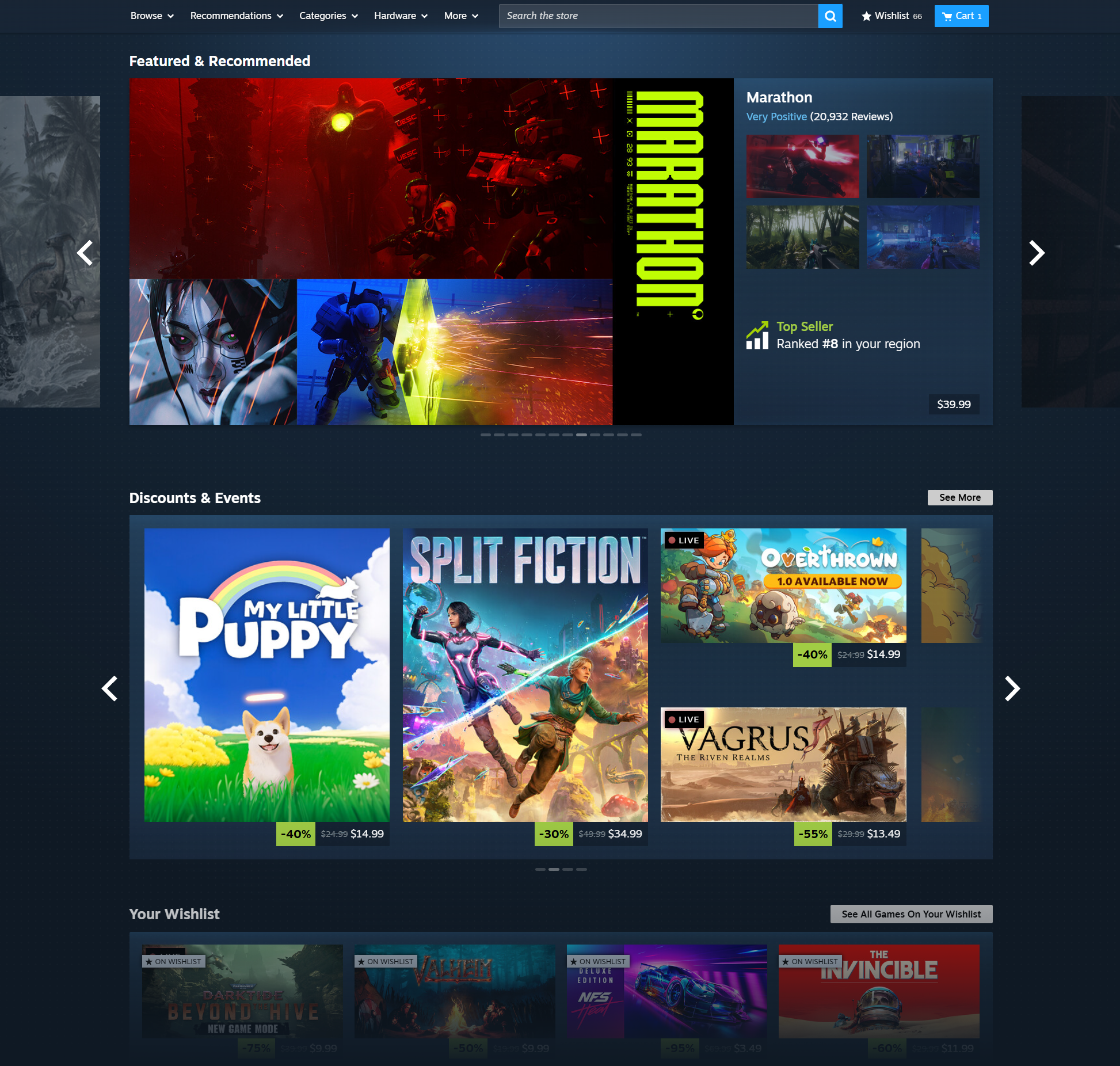
Featured & Recommended

There is now more detailed information highlighting the reason a game is being recommended to you; plus a user review round-up. When hovering over a game's cover art, the game's micro-trailer will play for a quick peek at the action. We also added a sneak-peek of the adjacent games in the carousel.

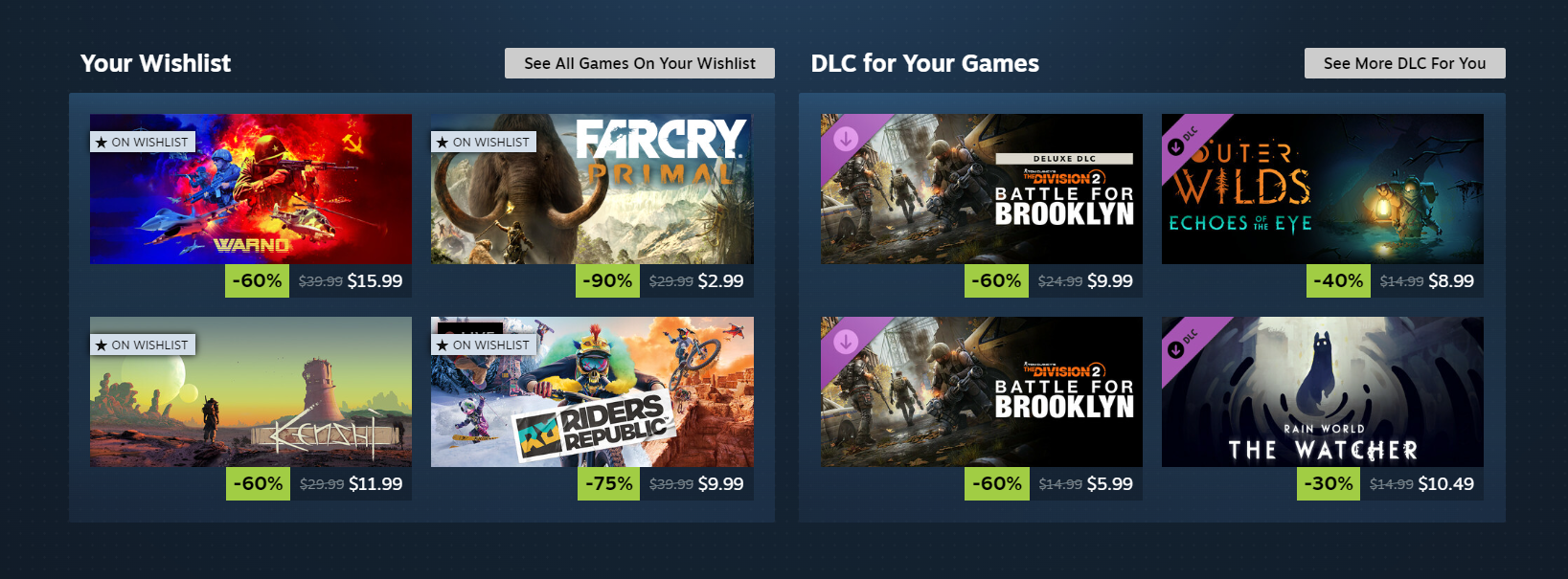
New Wishlist and DLC Sections

We've brought back two sections that you may have seen during our big seasonal sales permanently: Games currently on sale from your wishlist, and recommended DLCs for you on sale.

New Personalized Calendar

You can now find a personalized calendar right on the home page, giving you a quick way to see new and upcoming games recommended based on what you play. Page through to see new and exciting games that are coming out in the next two weeks or view your full calendar to look even further out. You can even see recommended new releases you may have missed.

Updated Discovery Queue

A quicker way to browse titles in your Discovery Queue without leaving the home page.

Keep scrolling for more recommendations

We refreshed the design to bring this part of the store home in line visually and functionally with the rest of the sections. This includes a micro-trailer and screenshot preview display. Additionally, you can now click a screenshot to expand it.

Popular Upcoming: Now more popular

The contents of this tab have been updated in response to player feedback in order to better capture the most anticipated releases of the coming month. If you're looking for more niche upcoming releases, check out your Personal Calendar (details above).

Attention to details

We've also shipped lots of upgrades to the details of what makes up the homepage. Here are a few of the bigger changes:

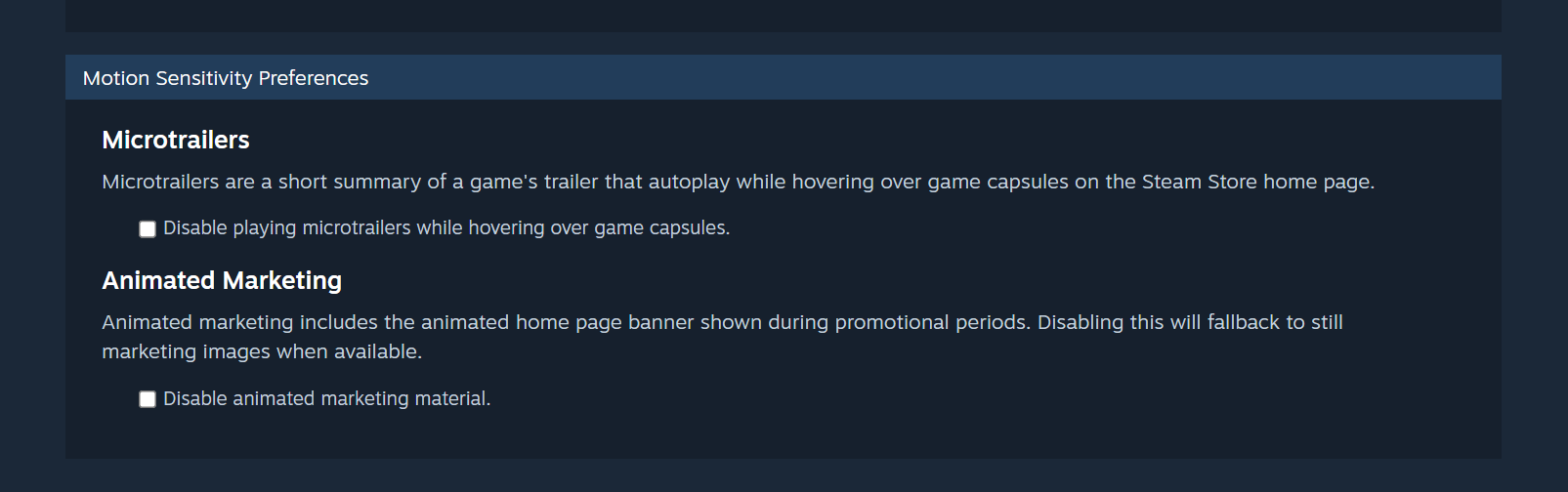
New Motion Sensitivity Store Preferences

We know that bigger animated assets can be a problem for some folks. If you're sensitive to motion such as animated marketing assets or trailers that appear when hovering over games, we've got you covered: These things can be disabled by visiting your Store Preferences. When disabled on the home page we will switch to static screenshots instead of micro-trailers and use static marketing assets.

Improved Gamepad Navigation

Users with a controller will see significant improvements to navigation on the homepage. This will mostly impact players on Steam Deck or using Big Picture Mode.

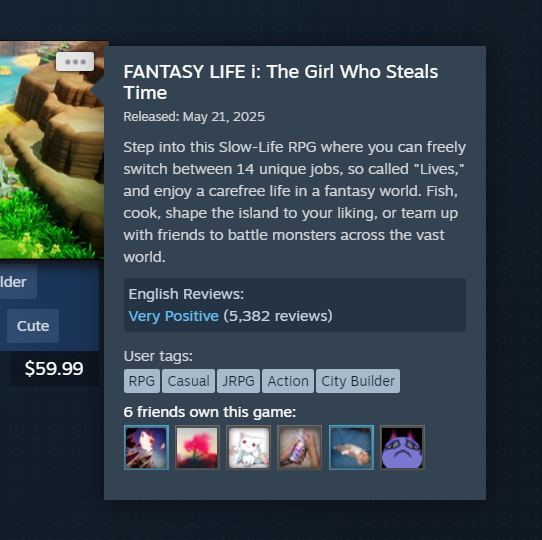
Improved Capsule Hover

A short description is now presented along with other relevant information. The UI is updated to provide better contrast and legibility.

High Resolution Game Art

We're now displaying higher resolution game art for better visual clarity, making the most of the latest game art uploaded by developers.

Frequently Asked Questions

Q. How long has this been in beta testing?

A. Since April 1.

Q. Can I personalize my view of the store?

A. Absolutely. You can customize your view by setting your store preferences, following game developers, and by ignoring individual games or tags.

Here's how to get started with editing your store preferences: https://store.steampowered.com/account/preferences/

  • At the top of your settings, you'll find options for setting the level of mature content you are comfortable with. Steam breaks down mature content into five categories, which are based 1:1 on categories selected by the game developers, and double-checked by Steam's review team.

  • As you scroll down your store preferences page, you'll see a number of options, including categories of products you wish to see, user tags to exclude, and individual products you've ignored in the past.

For Developers:

We are using higher resolution graphical assets in more places throughout Steam. We encourage you to review your game's graphical assets and update any missing or lower resolution assets from the store page editor. Visit the Graphical Assets documentation page for more information.

Новости Steam - Alden

The latest update to Steam Workshop has just wrapped up a beta test period and is now deployed for everyone.

The next time you visit the Steam Workshop for your favorite game, you'll see an updated interface for browsing, searching, and filtering, making it easier and faster to explore and find great user-created mods to enhance your gaming experience.

Read on for details of this update.

Updated Home For Every Workshop

The main Workshop page for each game has a fresh new layout, which can be customized by the game's developer.

By default, the page starts off with featuring the most popular mods based on user ratings in the past week.

Next, the page lists the available item tags to quickly browse relevant content, or you can flip through the tabbed section of "Most popular", "Most Subscribed", "Last Updated", and "Most Recent"

In some communities, certain items have become the foundation upon which many other mods are built, so we've added a section to highlight those important cornerstone mods that are required by other items.

And of course if you follow individual Workshop authors, or if your friends have uploaded items for that Workshop, the page will display sections for those too.

Reworked layout for browsing and filtering

We've reworked the browsing and filtering experience to make the whole thing faster and easier.

Applying filters now happens much faster and without a page refresh, so it's easier to keep track of where you are and what has changed as a result of the filters you set.

We've also redesigned the page to make better use of wider screens, allowing more items per row. Now, for most players, you'll find four or five items per row instead of the previous limitations of three.

Saved Searches

When you've applied desired filters to narrow down to a set of interesting mods, you can also save your search query to get back to it quickly from the "Browse" menu.

Powerful search: titles and/or descriptions

Now, the search within Workshop defaults to searching both the title and description fields to find your desired term. You can click the gear icon next to the search field for more options and details on constructing complex search queries to narrow in on exactly what you are looking for.

Filter by required DLC

Some mods only work with content available in specific items of DLC for the game. You can now easily narrow down your searches to exclude items that require DLC that you don't have.

New Quick View

When hovering over any item in the Workshop, you'll find a new magnifying glass icon appear. Clicking that icon will open a new quick view of the item, with key details such as dates, file size, screenshots, description and ways to immediately subscribe, rate, or add to your favorites. Plus, you can use the arrows on left and right of the quick view to quickly browse through the same list of items you opened the quick view from.

In addition to description of the item you are viewing, the quick view panel also includes sections for other items or DLC that are required. You can also easily jump to all of the items that depend on the item you are looking at, as possibly an interesting way to explore some similar kinds of content.

Frequently Asked Questions

Q. What if I find a bug? How do I give feedback on the changes?

A. Leave us a comment by clicking the 'Discuss' button below.

Q. Do you plan to update other pages in the Workshop?

A. Yes, but we don't have an exact timeline for when. Once we wrap up this beta of the browsing page, we'll have a better idea of scope of work for subsequent pages.

Q. Got any random Workshop trivia?

A. Absolutely, we love random trivia. Did you know...

  • The mod with the most subscribers, is crashz' Crosshair Generator v3, which has been around since 2014. This mod helps players customize their crosshairs in Counter-Strike and has over 36M subscribers!

  • The mod that is most depended on by other mod makers: the eloquently-named CBA_A3 for Arma 3 is a toolkit that over 19,000 other mods depend on.

  • The Steam Workshop has 2,013 items with over 1 Million current subscribers. That is a whole lot of people customizing their gaming experience!

  • There are 41 different games on Steam that have at least one item in their Steam Workshop with over 1 Million subscribers. Wallpaper Engine, Garry's Mod, Project Zomboid, DayZ, and Counter-Strike 2 make up the top 5 of those.

Team Fortress 2 - Valve
An update to Team Fortress 2 has been released. The update will be applied automatically when you restart Team Fortress 2. The major changes include:

  • Fixed crash related to wearables leaking when weapons are dropped (community fix from Sean McGeehan)
...

Поиск по новостям
Архив
Архив по годам
2026   2025   2024   2023   2022  
2021   2020   2019   2018   2017  
2016   2015   2014   2013   2012  
2011   2010   2009   2008   2007  
2006   2005   2004   2003   2002