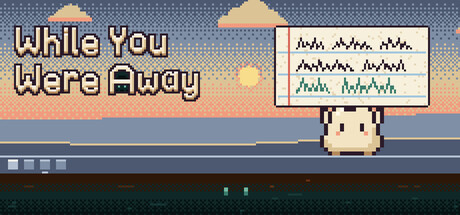
Nib, a round little critter, lives on your taskbar and plays a digging game on its handheld. Step away and it keeps playing, then hands you a report card when you come back. Over about two weeks the reports get stranger: a save file Nib reset hours ago is still digging.

Sign in to add this item to your wishlist, follow it, or mark it as ignored

This game is not yet available on Steam

Coming soon

Interested?
Add to your wishlist and get notified when it becomes available.
 

About This Game

A small critter lives on your taskbar, plays an idle game while you work, and writes you a report card every time you come back.

Nib stands in the corner of your screen with the Pocket, a handheld that plays a digging game called Down Below. You set Nib's Plan, tap to dig when you feel like it, and get on with your day. When you step away, Nib keeps playing. When you come back, it holds up a report: dirt dug, things found, naps taken, a score and a crayon drawing of you.


For the first hour or so the reports are just cute. Then they start to drift. A save file Nib reset hours ago is somehow still digging, and it has learned to write reports by reading Nib's.

Buy it once. No ads, no energy, no premium currency, no account and no online requirement.

A real idle game

Down Below has 10 layers down to 1,000 m, 18 tool upgrades in 5 lines, and 4 helpers (a Mole, a Worm Crew, a Lantern Bug and an Old Robot), each with two paths to choose at level 3.
  • A Plan of up to 3 lines says what Nib does while you are away
  • From 300 m you can start a New File for Stars, which buy 6 upgrades that stay
  • Every layer has a par time: clear it faster and it scores double, and every file goes on the HI-SCORE table

Reports from your own days

Every report is built from what really happened while you were gone: a sticky note for a short break, a report card with grades and a drawing for 30 minutes or more. Reports are numbered, tally marks count your returns, and every report goes in a binder you can reread. 30 curios dug up from the layers go on the Museum's shelf, each with a note from Nib.

A slow, unsettling story

The story is told only through the reports, in 20 beats over 4 acts, and it moves on with your real absences and nights. It takes about two weeks of desktop time: in the game's own pacing simulator, a player who glances at Nib all day reaches the end on day 11, one who opens it 9 to 5 on day 12, and one who looks in twice a day on day 12.

There are 4 endings. The last choice can be reopened, so you can see every ending without starting over: three of them take minutes and one needs a night away. Then Keeper mode keeps Nib digging, or New Story starts the story again.

Made for streams

  • One sitting, a streaming option in Settings, tells the whole story in about 3 hours, with Away now: a short break, a long break or a night played at once while viewers watch a time lapse
  • Streamer mode, next to it, shows your name as Friend and report times as "after 40 min"
  • Windowed mode has a chroma green background for capture software

What it never does

It reads and writes only its own save folder. It never changes your files, settings or wallpaper, never opens your browser, never uses the internet, webcam or microphone, and never fakes an error, a crash or a Windows dialog. There are no jump scares and no loud sounds. To notice that you stepped away it reads only the time of your last input, never which keys. It does not start with Windows.

Quiet by design

  • Nib stands in a small window on your taskbar, 48 pixels tall on a 1080p screen by default, and clicks on its empty pixels go through to your desktop
  • It hides while a fullscreen game or video runs
  • Nib's picture is redrawn about once a second while it plays and not at all while it holds still
  • Every sound stays under one volume ceiling, and the ambience starts at zero
  • One click mutes every sound: the speaker in the Pocket, the tray or the V key
  • Strangeness can be set to Gentle, and No knocks, Hush and Pause are always there

Steam Cloud saves with local backups, 20 achievements, keyboard shortcuts, bigger panels on large screens, text size from 85% to 160%, four colour vision palettes and cues that do not rely on colour, three contrast levels, reduced motion, a plain type option for the handwriting and partial controller support.

System Requirements

    Minimum:
    • Requires a 64-bit processor and operating system
    • OS: Windows 10 (64-bit)
    • Processor: Any x64 processor, 2 GHz
    • Memory: 2 GB RAM
    • Graphics: Any GPU that runs Microsoft Edge
    • DirectX: Version 11
    • Storage: 100 MB available space
    • Additional Notes: Needs the Microsoft Edge WebView2 runtime, which comes with Windows 11 and current Windows 10. Uses a small window on one screen's taskbar.
    Recommended:
    • Requires a 64-bit processor and operating system
    • OS: Windows 11 (64-bit)
    • Processor: Any modern x64 processor
    • Memory: 4 GB RAM
    • Storage: 100 MB available space
Review Filters