Have you ever wanted a personalized desktop companion? Look no further than NOODS Maker, a way to upload your own art and animations to make desktop pets. Want a magical creature or your worst enemy trapped on your screen? Then make it! Afterwards, share and sell your “NOODS” on the world wide web.

Sign in to add this item to your wishlist, follow it, or mark it as ignored

Check out the entire Glossbird collection on Steam
This game is not yet available on Steam

Planned Release Date: Q4 2026

Interested?
Add to your wishlist and get notified when it becomes available.
 

About This Software

Make custom desktop companions with NOODS Maker! This tool lets you upload your own art and animations to create personalized productivity pets that live on your screen via our free app NOODS.

What is NOODS you ask?

NOODS (Niche Operators Orchestrating Desktop Shenanigans) is a free productivity app that brings quirky companions, known as “Operators”, to live on your computer screen and interact with your workspaces (remember Clippy and shimeji?). These handmade Operators keep you company during extended screen time, making long work grinds less lonely and computer time more productive and fun.

Download NOODS (Niche Operators Orchestrating Desktop Shenanigans) separately for free.

Perfectly cooked NOODS

NOODS Maker is your one-stop-shop for Operator creation.

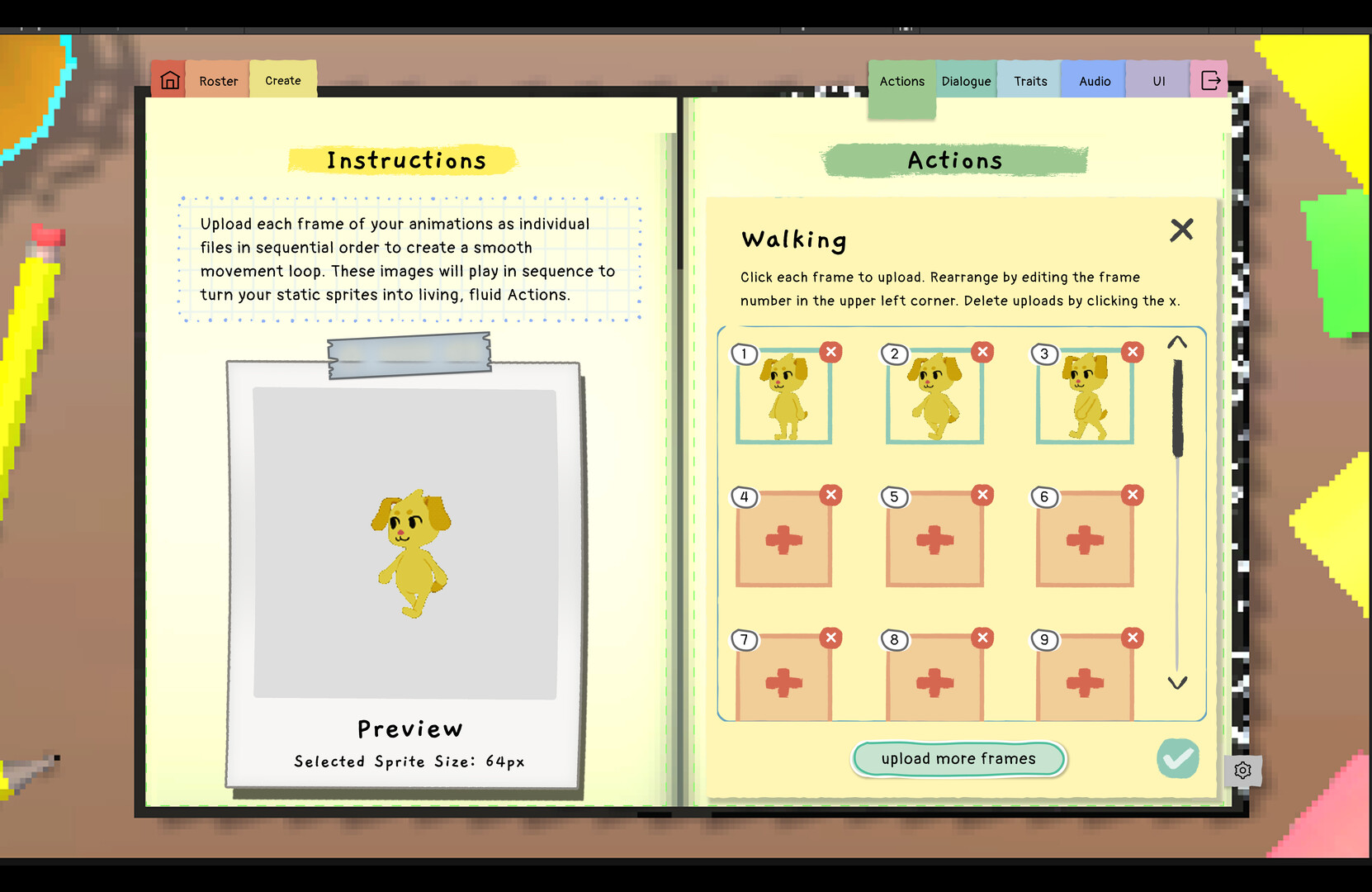
Use your art to customize your Operator’s looks, one action at a time. Import frame-by-frame animations of all your Operator’s actions- like walking, falling, climbing up the walls (of your desktop of course), and more!

Does your operator have an attitude? Are they eepy 24/7? Are they the type to compliment you, or would they rather drop random trivia out of nowhere? It’s up to you; you can write your own custom dialogue lines and even import your own sound effects to give your Operators a truly unique voice! NOODS Maker is designed with your creative process in mind, so you can let the juices (NOODSle soup? NOODS broth?) flow and make an Operator that truly speaks to you.

  • Turn your original characters into functional Operators that live on your PC

  • Give your Operator a unique name and story

  • Write custom dialogue and upload your own sound effects

  • Upload frame-by-frame animations for custom character sprites

  • Use personality sliders to decide behavior (are they naughty or nice?)

  • Customize the NOODS UI for the aesthetic

All for NOODs and NOODs for all!

Now that your Operators have come to life, why not share them with the world? Set your price and sell your approved Operators on the Operator Store, allowing other users to purchase and download them! Let the chaos spread!

Frequently Asked Questions

Do I need to buy NOODS Maker to use NOODS?

  • No, NOODS is free and can be used by itself. NOODS Maker is a separate app that allows you to build your own characters that can be imported and used in NOODS.

Can I download additional Operators for NOODS without NOODS Maker?

  • Yes, you don’t need NOODS Maker to download additional characters that other users have made. You can download NOODS for free and access already-made Operators from the Operator Store/Steam Workshop.

Do I draw the character or art itself within NOODS Maker?

  • No, NOODS Maker is not a drawing app. NOODS Maker creates a unique Operator from: existing images of your character that become animations, user-defined personality traits, and a host of other custom options that are compiled into a package that can be imported into NOODS. In other words, this means your character should be designed/drawn in another software (like Aseprite or Procreate) then brought into NOODS Maker.

What is frame-by-animation?

  • Frame-by-frame animation is a traditional animation technique where every single image (known as a frame) is drawn or created individually. When played sequentially, these static snapshots create the illusion of continuous, fluid motion.

System Requirements

Windows
macOS
    Minimum:
    • OS: Windows 11
    • Processor: Intel® Core™ i3 @ 3.2 GHZ
    • Graphics: 4 GB RAM
    Minimum:
    • Requires an Apple processor
    • OS: macOS Tahoe
    • Processor: Apple M1
There are no reviews for this product

You can write your own review for this product to share your experience with the community. Use the area above the purchase buttons on this page to write your review.

Review Filters