Steam Multiplayer for any LAN game. Want to play classic LAN multiplayer games with your friends but cannot get together for a LAN party? Use PartyLAN to run a LAN party over Steam Multiplayer!
发行日期:
即将推出
开发者:
发行商:
标签

想要将此项目添加至您的愿望单、关注它或标记为已忽略,请先登录

不支持简体中文

本产品尚未对您目前所在的地区语言提供支持。在购买请先行确认目前所支持的语言。

注意: PartyLAN 已在 Steam 停售。
此游戏尚未在 Steam 上推出

即将推出

感兴趣吗?
将此游戏添加至您的愿望单,以便在游戏推出时收到通知。
 

关于此软件

PartyLAN is a tool for playing LAN games over the Steam Network.
It is designed to be easy to use and work with any game that supports LAN play.

Features


  • No frills interface - just the bare minimum for playing LAN games with your friends
  • No restarts required - unlike many overlay network solutions, PartyLAN does not require you to restart your computer

Usage


1. Download PartyLAN from Steam.
2. Launch PartyLAN.
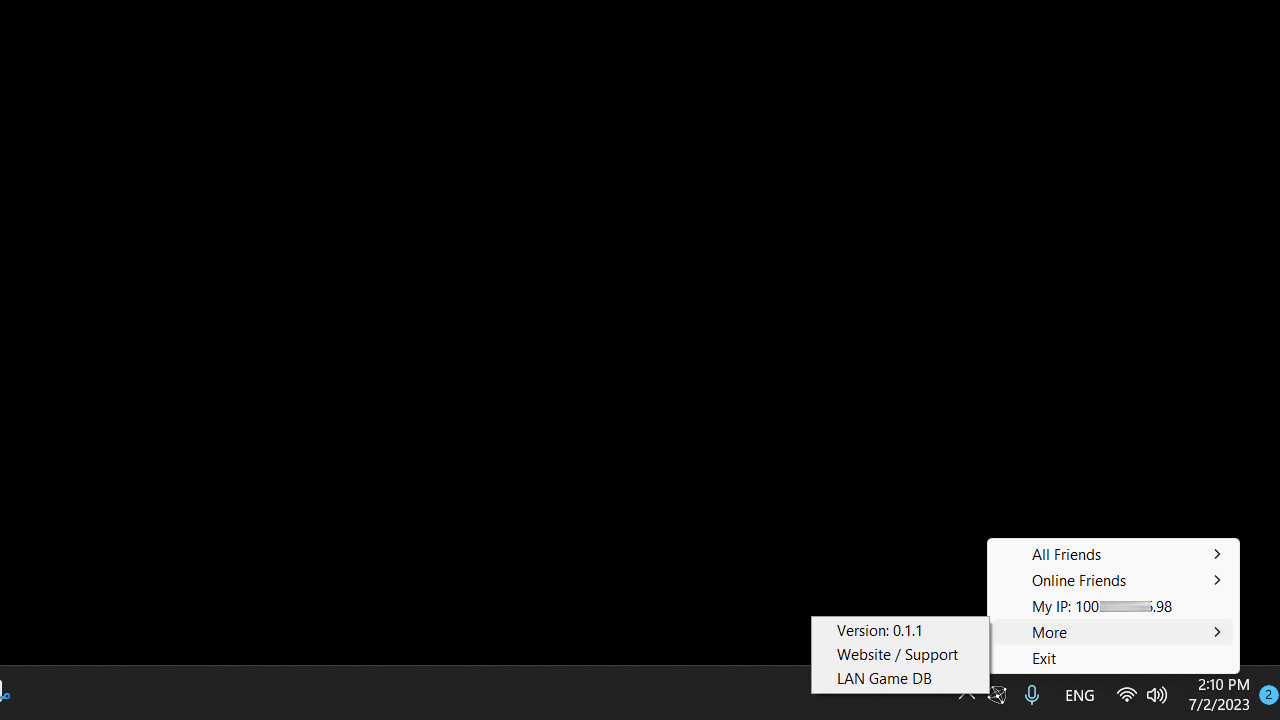
3. Ensure all players have PartyLAN installed and running. PartyLAN icon should be visible in the system tray.
4. For the host, open the game and start as a LAN game host as normal.
5. For the clients, click the system tray icon , select the host in the "Online Friends" menu, an IP address should be copied to the clipboard.
6. For the clients, open the game and connect to the host using the IP address from the clipboard.

系统需求

    最低配置:
    • 操作系统 *: Windows 7
    • 处理器: Potato
    • 网络: 宽带互联网连接
    • 存储空间: 需要 50 MB 可用空间
    推荐配置:
    • 操作系统 *: Windows 7
    • 处理器: Not a potato
    • 网络: 宽带互联网连接
    • 存储空间: 需要 50 MB 可用空间
* 2024 年 1 月 1 日(PT)起,Steam 客户端将仅支持 Windows 10 及更新版本。
此产品无任何评测

您可以为此产品撰写您自己的评测,与社区分享您的使用体验。在本页面购买按钮上方的区域撰写您的评测。