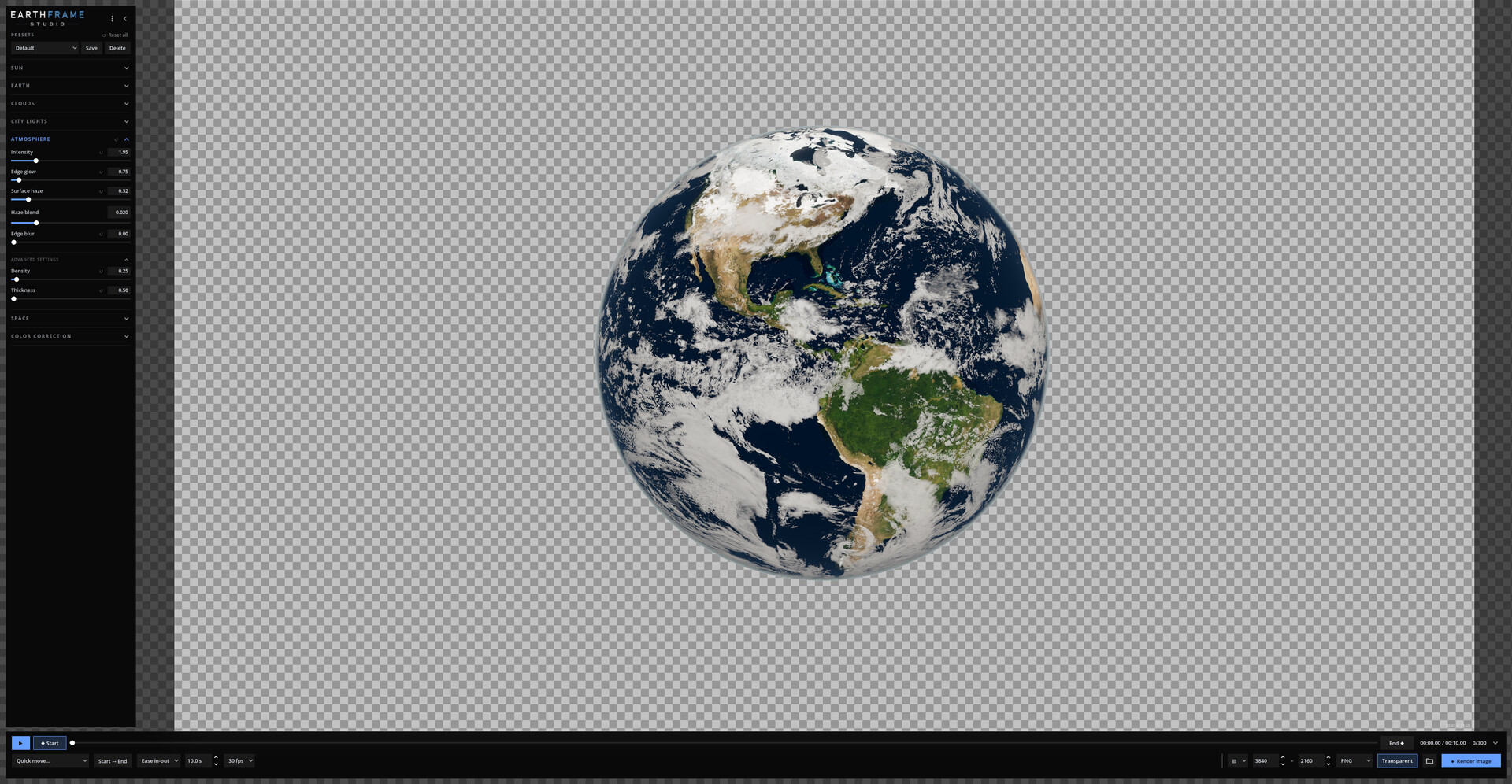
Create spectacular photorealistic images and videos of planet Earth in minutes with an intuitive, easy-to-use tool. Set the sun, clouds, city lights and atmosphere, animate with two keyframes and render stills up to 16K or MP4 and ProRes video.

Sign in to add this item to your wishlist, follow it, or mark it as ignored

This game is not yet available on Steam

Coming soon

Interested?
Add to your wishlist and get notified when it becomes available.
 

About This Software

The whole planet, ready for your next shot

Earthframe Studio is a real-time Earth renderer that makes spectacular, photorealistic images and videos of our planet incredibly easy. It is intuitive from the very first minute: orbit the Earth with your mouse, drag a slider to place the sun, frame your shot and hit render. What you see on screen is what you get, and the results look like they came from a high-end 3D studio. No 3D skills needed if you are just starting out, and if you already work in 3D, it saves you hours of building, texturing and lighting an Earth scene from scratch.

Your animation, exactly the way you want it

Stop searching stock sites for an Earth clip that almost fits. With Earthframe Studio you design the exact shot you need: where the sun is, which part of the world is in frame, day or night, how the camera moves, how long it lasts and at what resolution. Make as many versions as you want, for every project, without paying for each clip. Instead of buying Earth footage and images again and again, you create unlimited custom shots and save hundreds of dollars in stock assets.

Animate with just two keyframes

Animation in Earthframe Studio is as simple as it gets. Set up how your shot starts, then set up how it ends:
  • Start keyframe: the first frame of your video. Place the camera and the look of your shot.
  • End keyframe: the last frame. Move the camera closer, turn the planet, bring the night in or change any setting.
Every setting has a small ◆ animate switch: turn it on for what you want to change over time (the sun, the rotation, the clouds), and everything else, like your color correction, stays the same for the whole video. Earthframe Studio smoothly animates everything in between. Choose the duration and the easing, press play to preview, and render. Want a head start? Pick a quick move (Earth rotation, camera orbit, zoom in or out, day to night, orbital sunrise, cloud drift) and the end keyframe is created for you, ready to tweak. Changed your mind? Undo and redo every step.

Perfect for social media content

Create eye-catching posts, Reels, Shorts, TikToks, Stories, thumbnails and banners in minutes. Render vertical 9:16, square or widescreen, as a still image or an animated video, and make your feed stand out with a planet-sized visual nobody else has.

Features

  • Photoreal Earth: detailed day surface, terrain relief, sun glints on the oceans and city lights at night, built from NASA imagery.
  • Volumetric-looking clouds: real cloud shadows that stretch into long curtains at sunrise and sunset, self-shadowing and parallax that lifts the cloud layer above the ground.
  • Physical atmosphere: light scattering simulation for the blue edge glow, haze over the surface near the horizon and warm sunsets along the day/night line.
  • Cinematic sun: a visible sun with a warm lens flare, star rays and soft glow.
  • Night side control: show only the city lights, or reveal the moonlit terrain beneath them.
  • Space background: adjustable star field with an optional subtle Milky Way.
  • Color correction: exposure, contrast, saturation and gamma for the whole image, the surface, the clouds and the city lights.
  • Transparent background (alpha channel): export PNG or WEBP images without space or stars, keeping the planet and its atmosphere glow, ready to drop into your own designs, thumbnails and compositions.
  • Texture quality 4K, 8K or 16K: choose the detail level that fits your graphics card. 16K textures give razor-sharp close-ups; 4K runs on modest PCs.
  • Presets: save your looks, keyframes and camera moves and reuse them anytime.
  • Clean and simple: essential controls first in every section, with advanced settings one click away when you need them.

Supported formats

  • Images: JPG, PNG and WEBP (PNG and WEBP with optional transparent background).
  • Video: MP4 (H.264), MOV (Apple ProRes 422 HQ, ideal for editing and color grading) and WEBM (VP9).
  • Resolution: any custom size up to 16K, with presets for HD, 4K, 8K, vertical 1080x1920 and 4K, square and 4K DCI cinema.
  • Frame rate: 24, 25, 30, 50 or 60 fps.

Made for

YouTubers, documentary and video editors, motion designers, 3D artists, teachers, presenters, game and app developers, and anyone who needs a beautiful shot of Earth, fast.

Your renders are yours

Everything you create with Earthframe Studio can be used in your personal and commercial projects.

Free demo: what's included and what's not

The demo is the full program with just three limits:
  • Exports images and videos up to 1080p (Full HD).
  • Exported images and videos include a watermark.
  • Earth textures up to 8K. The full version adds 16K textures for razor-sharp close-ups.
Everything else is included: keyframes, quick moves, presets, transparent background, every image and video format (JPG, PNG, WEBP, MP4, MOV ProRes and WEBM) and all 8 languages.

Full version: exports up to 16K, with no watermark and 16K textures. Your demo presets keep working.

AI Generated Content Disclosure

The developers describe how their game uses AI Generated Content like this:

Store page text and interface translations were drafted with AI assistance and reviewed by the developer. All visuals are rendered by the software itself from NASA imagery; no AI-generated images, video or audio are included.

System Requirements

    Minimum:
    • Requires a 64-bit processor and operating system
    • OS: Windows 10 64-bit
    • Processor: Intel Core i5 (4 cores) or AMD Ryzen 5
    • Memory: 8 GB RAM
    • Graphics: NVIDIA GTX 1050 Ti / AMD RX 570 (4 GB VRAM)
    • Storage: 2 GB available space
    • Additional Notes: Texture quality can be set to 4K or 8K for graphics cards with less video memory.
    Recommended:
    • Requires a 64-bit processor and operating system
    • OS: Windows 10/11 64-bit
    • Processor: Intel Core i7 or AMD Ryzen 7
    • Memory: 16 GB RAM
    • Graphics: NVIDIA RTX 3060 / AMD RX 6700 XT (8 GB VRAM or more)
    • Storage: 4 GB available space
    • Additional Notes: 16K textures and faster 8K–16K exports benefit from 8 GB of VRAM or more.
Review Filters