A dubbing party game where you and your friends turn any video clip into your own dub. Claim the roles, record every line in the booth, then watch the finished result together and save it. Play solo, pass one mic around on the couch, or jump online with up to 8 players in private or public lobbies.

เข้าสู่ระบบ เพื่อเพิ่มผลิตภัณฑ์นี้ลงในสิ่งที่อยากได้ของคุณ ติดตาม หรือทำเครื่องหมายเป็นถูกละเว้น

ไม่รองรับภาษาไทย

ผลิตภัณฑ์นี้ไม่รองรับภาษาท้องถิ่นของคุณ โปรดตรวจสอบรายชื่อภาษาที่รองรับก่อนทำการสั่งซื้อ

เข้าร่วม Dub Party Playtest

ส่งคำร้องขอการเข้าถึง แล้วคุณจะได้รับแจ้งเมื่อผู้พัฒนาพร้อมที่จะรับผู้เข้าร่วมเพิ่มเติม
เกมนี้ยังไม่พร้อมใช้งานบน Steam

วันวางจำหน่ายที่วางแผนไว้: ตุลาคม 2026

น่าสนใจ?
เพิ่มในสิ่งที่คุณอยากได้ และรับการแจ้งเตือนเมื่อผลิตภัณฑ์พร้อมใช้งาน
 

เกี่ยวกับเกมนี้

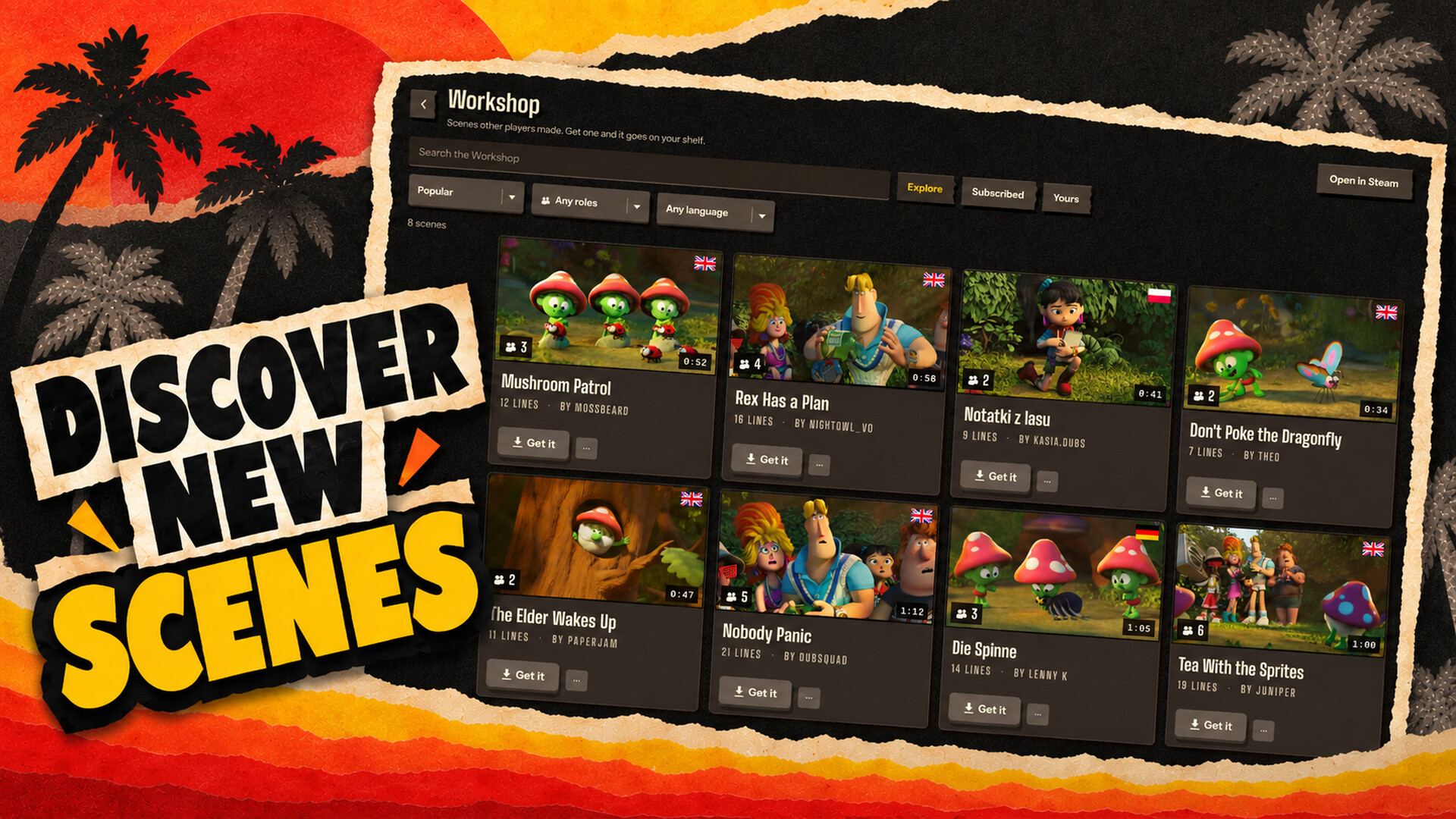
Dub Party is a party game where you replace every voice in a video with your own. Pick a scene from the built-in Steam Workshop browser, import your own video, cast the roles, record one line at a time, then gather everyone for the premiere.

Play alone, pass the mic around locally, or jump online and join a public Steam lobby.

How it works

  • Pick or make a scene. Browse community scenes inside the game, or import a video from your computer. Optional on-device Auto Dub separates dialogue, transcribes it and suggests who speaks when. Check the results, fix anything it missed and save the scene to your shelf.
  • Claim your roles. Pick a character yourself or shuffle the cast around the couch.
  • Record in the booth. Hear the original, perform your line, play it back and go again until it sounds right—or exactly as wrong as you wanted. Add a voice effect or nudge the timing when the joke needs it.
  • Watch the premiere. Every take comes together in one finished dub. Throw reactions at the screen with the room, then save the result as a video or audio file.

Play your way

  • Solo: voice every role yourself.
  • Couch party: up to 8 people on one computer, passing one mic around.
  • Online party: up to 8 players over Steam. Create your own lobby or browse public lobbies and join other players. The host picks the scene and Dub Party gets the matching copy to everyone in the room.

Features

  • Browse, download and publish scenes with the built-in Steam Workshop browser
  • Import MP4, MOV, MKV, WebM and AVI files
  • Support for packs made with Choicer Voicer
  • Optional local dialogue separation, transcription and speaker suggestions
  • A visual timeline for trimming, splitting, merging, adding and reassigning lines
  • Five voice effects: Phone, Chipmunk, Monster, Reverb and Robot
  • Mic setup, retakes and timing controls built for quick hand-offs
  • A shared premiere with live reactions
  • Save the finished dub as video or audio, with a shelf to watch it again
  • Two complete looks: a paper TV studio or a Frutiger Aero desktop

Auto Dub runs on the player's computer. Its suggestions are editable, and importing a scene never requires uploading the source video to an external AI service.

ความต้องการระบบ

    ขั้นต่ำ:
    • ต้องการโปรเซสเซอร์และระบบปฏิบัติการแบบ 64 บิต
    • ระบบปฏิบัติการ: Windows 10 64-bit
    • โปรเซสเซอร์: Intel Core i3-4130 / AMD FX-6300 or equivalent (64-bit, SSE4.2)
    • หน่วยความจำ: แรม 4 GB
    • กราฟิกส์: Potato
    • DirectX: เวอร์ชัน 11
    • พื้นที่จัดเก็บข้อมูล: พื้นที่ว่างที่พร้อมใช้งาน 1 GB
    • การ์ดเสียง: Any, microphone required
    • หมายเหตุเพิ่มเติม: Microphone required. Online multiplayer needs an internet connection.
    แนะนำ:
    • ต้องการโปรเซสเซอร์และระบบปฏิบัติการแบบ 64 บิต
    • ระบบปฏิบัติการ: Windows 10 / 11 64-bit
    • โปรเซสเซอร์: Intel Core i5-8400 / AMD Ryzen 5 2600 or better
    • หน่วยความจำ: แรม 8 GB
    • กราฟิกส์: Potato
    • DirectX: เวอร์ชัน 12
    • พื้นที่จัดเก็บข้อมูล: พื้นที่ว่างที่พร้อมใช้งาน 2 GB
    • การ์ดเสียง: Headset or USB microphone
    • หมายเหตุเพิ่มเติม: Microphone required. Online multiplayer needs an internet connection.
ตัวกรองบทวิจารณ์