"Moho-Moho DX" is a falling block puzzle to recreate finished pictures. 1,400+ stages! 3 modes: "FIX", "SIMILAR" & "MIRROR". Turn photos into stages with "Moho-Photo"! Also time attacks, stage editing & sharing, generated stages!

Sign in to add this item to your wishlist, follow it, or mark it as ignored

Buy Moho-Moho DX

335 руб.
 

About This Game

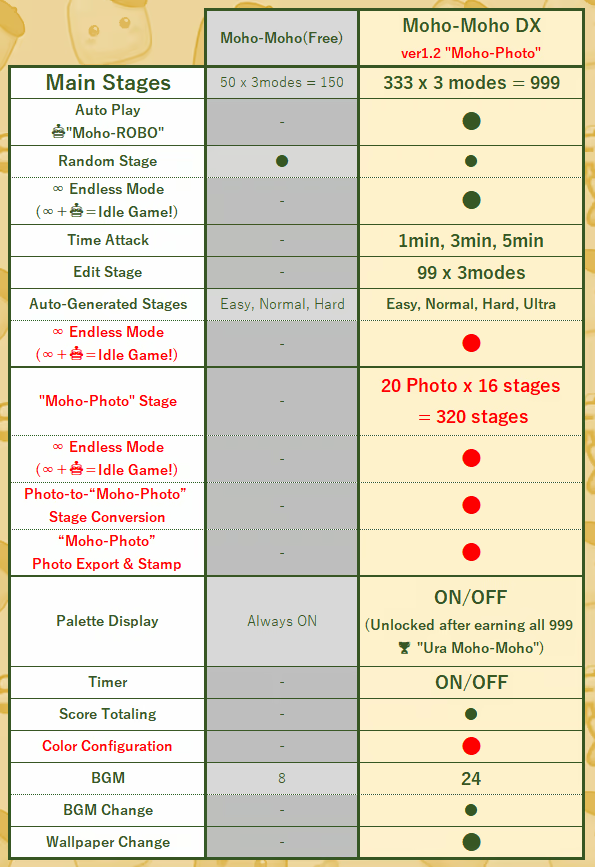
"Moho-Moho DX" is a deluxe, expanded version of the free game "Moho-Moho."

Featuring over 6 times more main stages, "Moho-Photo" for turning photos into playable puzzle stages, 99 custom stage slots, enhanced auto-generation, Time Attack modes, automatic 🤖"Moho-ROBO" play, "∞ Endless" Mode, numerous new BGM tracks, Color Configuration, and more, the game has evolved into a title with over 100 hours of gameplay.

Basic Rules of "Moho-Moho DX"

First, check the completed image in the upper right corner of the screen! Place the color blocks onto the canvas to recreate the picture exactly as shown.

Once the game starts, 48 blocks will line up in the palette at the lower right of the screen. The blocks will slowly descend from the top of the canvas. Use the following controls to place them:

  • Arrow Keys (Left/Right): Move the block

  • A Key: Spin

  • Down Arrow: Increase fall speed

  • Up Arrow: Instant placement

  • B Key: Skip

When playing with a gamepad, please use DirectInput mode and assign the controls above to the gamepad buttons for a comfortable experience.

Key Points

  • Skip: The number of skips is counted, but it is not a mistake. Skipped blocks return to the end of the palette and are marked with a ▼ symbol.

  • Chance Lost: Missing a spot where a block can be placed is counted as a "Chance Loss." This is not a mistake.

  • NG Piece: Placing a block in the wrong location results in an error.

  • Game Over: If the blocks exceed the blue line on the canvas by 2 rows, it's game over. Complete the picture to clear the stage! Depending on the mode, the completion rate (%) will also be displayed. Aim for 100%!

Play Across Diverse Stages and Modes!

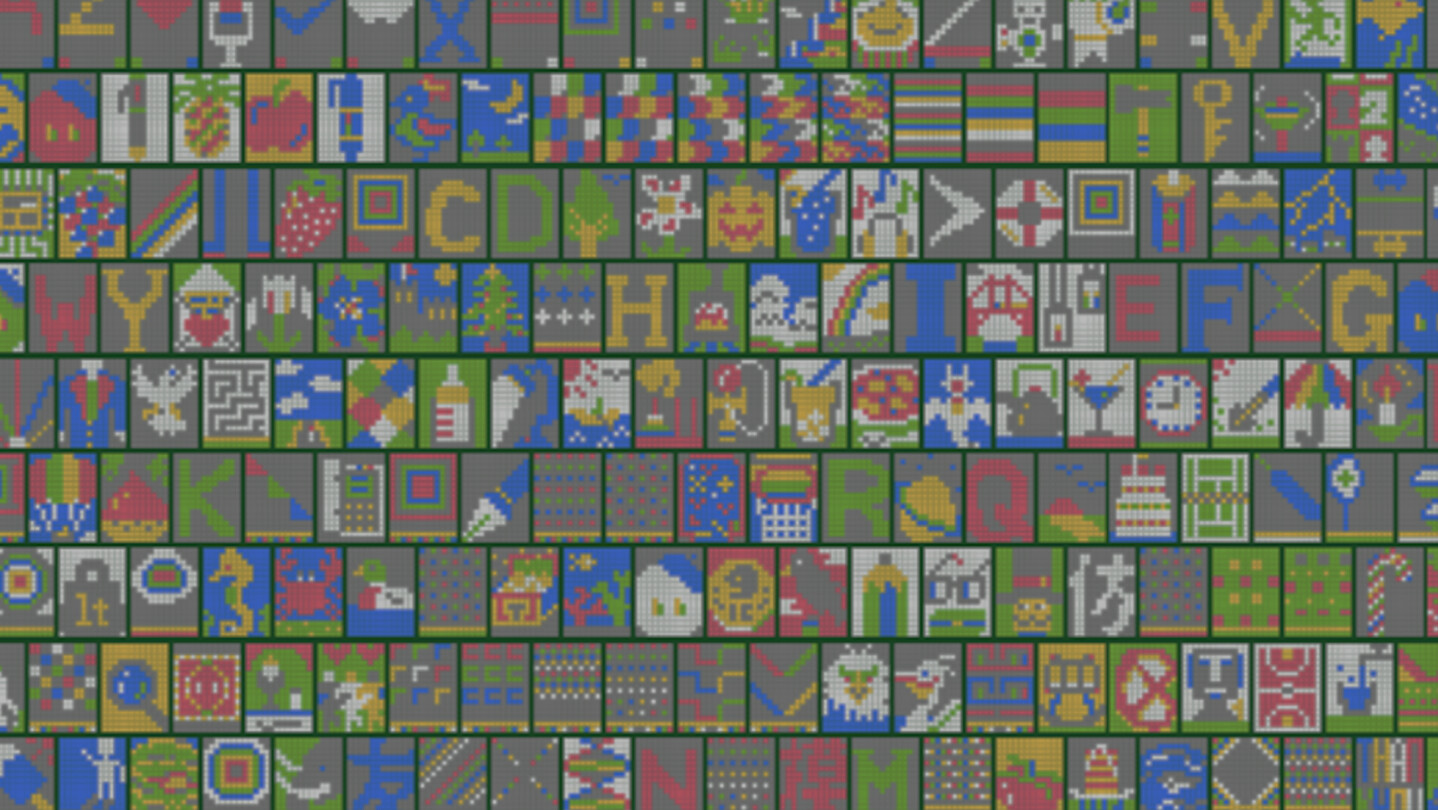
  • Main Stages: 333 stages × 3 modes = 999 variations to play!

  • Random Stages: Play randomly selected stages from the main stages.

  • Auto-Generated Stages: 4 difficulty levels (Easy, Normal, Hard, Ultra) × 3 modes.

  • Custom Stages: 99 editable stages × 3 modes. Share your 192-character stage data with friends via SNS or email!

  • Moho-Photo: Load your own photos or images and turn them into playable Moho-Moho puzzle stages. Each photo is converted into 16 stages arranged in a 4×4 grid. Complete all 16 stages to create one giant "Moho-Photo".

3 Unique Game Modes (+α)

  • FIX Mode: For beginners. No game over, allowing you to relax and aim for a 100% completion rate.

  • SIMILAR Mode: For intermediates. Incorrectly placed blocks remain on the canvas.

  • MIRROR Mode: For advanced players. The reference image is horizontally flipped, requiring you to solve it while reversing it in your mind.

  • Moho-Photo: A special mode that turns your own photos into "Moho-Moho" puzzle stages. Complete the photo little by little, and finally create one giant image.

Challenge Your Personal Best!

When you clear a stage, your results are saved on the stage selection screen:

  • Completion Rate (%)

  • Clear Time

  • Number of Skips

  • Number of Mistakes

🤖Moho-Robo-cleared stages are recorded with a clear time of 59:59.

Unlockables & Extra Challenges

Clear any main stage with 100% completion and zero mistakes to earn a trophy 🏆 and unlock 1-minute, 3-minute, and 5-minute Time Attack modes! Aim to complete them all.

The current number of trophies you have earned is displayed on the Stage Select screen, so you can easily track your progress toward collecting all 999 trophies.

Furthermore, if you earn all 999 trophies (333 main stages × 3 modes), a "Palette Toggle Switch" will appear at the top of the stage selection screen, allowing you to hide the palette during gameplay. Enjoy the ultimate challenge!

You can also hide the timer using the "Timer Toggle Switch" at the top of the stage selection screen.

🤖Moho-ROBO: Your Automatic Puzzle Partner!

Turn on Robo Mode to have 🤖Moho-ROBO automatically help place blocks for you.

Robo can be turned ON or OFF at any time during gameplay, and three speed levels are available.

Robo can assist with all types of stages, including Main Stages, Random Stages, Auto-Generated Stages, Custom Stages, and Moho-Photo stages.

Even Main Stages cleared by Robo can still earn a trophy as long as the stage is completed with zero mistakes (NG: 0). Robo-cleared stages are recorded with a clear time of 59:59, so they do not interfere with your own Time Attack or personal best challenges.

∞ Endless Mode + 🤖Moho-ROBO = Idle Play!

Turn on both the "∞" Endless switch and the "🤖" Robo switch in Random Stages, Auto-Generated Stages, or Moho-Photo stages, and Moho-Moho DX can be enjoyed as an idle game.

You can also place the game window in a corner of your PC screen and relax while watching 🤖Moho-ROBO automatically clear stages one after another.

In Endless Mode, BGM continues across stages. When a song ends, it automatically switches to another random track, and the wallpaper changes at the same time.

At the fastest Robo speed, you can aim to collect all 333 trophies in each of the three main modes in about 30 minutes per mode.

Even if you are not good at puzzle games, you can enjoy "Moho-Moho DX" as a relaxing desktop companion!

📷 Turn Your Photos into "Moho-Photo"!

Load your own photos or images and automatically convert them into 16 "Moho-Photo" stages arranged in a 4×4 grid!

Adjust the colors with sliders, try converting the image to black and white, and more... Use your artistic sense to fine-tune the settings and turn the same photo into puzzles with various looks and difficulty levels.

Complete all 16 stages to create one giant "Moho-Photo."

Once you have collected 24 ★, your completed "Moho-Photo" can also be exported as an image!

You can also add Moho-Moho characters and the logo as stamps to create your own original image.

The completed image can be enjoyed as a wallpaper on your PC or smartphone.

Send the exported image to a friend who also owns "Moho-Moho DX" by email or other means, and they can load it into their own game and play the same "Moho-Photo" stage.

BGM & Volume Controls

Press the "♪" button at the top of the screen during gameplay to randomly change the background music whenever you like.

In Endless Mode for Random Stages, BGM continues across stages and automatically switches to another random track when a song ends.

BGM volume can be adjusted to 100%, 75%, or 50%, while SE volume can be adjusted to 100%, 75%, 50%, 25%, or 10% from the Stage Select screen.

A Variety of Wallpapers

A large selection of wallpapers is available, including wallpapers featuring 🤖Moho-ROBO. Switch wallpapers using the button during gameplay.

🎨 Customize Your 6 Favorite Colors! Color Configuration

You can freely customize the six colors used for the blocks in the game (gray, red, green, blue, yellow, and white).

Preview the six game colors and adjust each one across five levels before saving your settings.

The saved colors are applied not only to the stages in the game, but also to the scrolling animation of all 333 Main Stage images displayed on the title screen.

Enjoy "Moho-Moho DX" with your own custom colors!

Video Streaming & Monetization Guidelines

Video streaming (let's plays, gameplay footage, etc.) and monetization via streaming platform features are permitted without prior notice, regardless of whether you are an individual or a corporation.

AI Generated Content Disclosure

The developers describe how their game uses AI Generated Content like this:

This game was developed with the assistance of generative AI tools for coding support and some visual asset creation.
All content was reviewed and finalized by the developer.
No generative AI is used during gameplay.

System Requirements

    Minimum:
    • Requires a 64-bit processor and operating system
    • OS: Windows 10 (64-bit)
    • Processor: Intel Core i3-2100 or equivalent
    • Memory: 4 GB RAM
    • Graphics: DirectX 11 compatible GPU (Intel HD Graphics 4000 or better)
    • DirectX: Version 11
    • Storage: 500 MB available space
    • Sound Card: DirectX compatible sound card
    Recommended:
    • Requires a 64-bit processor and operating system
Review Filters