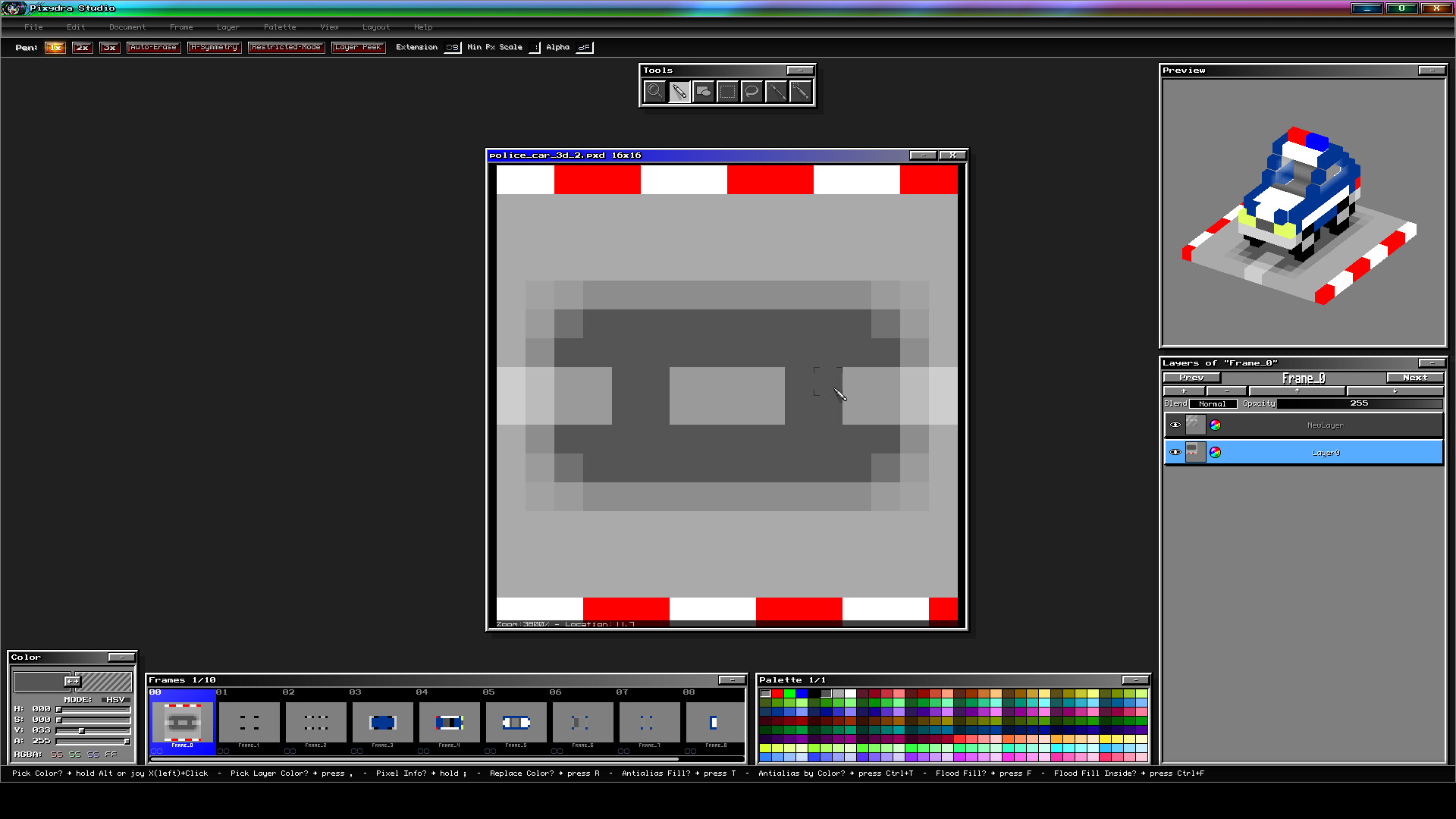
Pixydra Studio is a pixel-art software fully focused on animated sprites for videogames.

เข้าสู่ระบบ เพื่อเพิ่มผลิตภัณฑ์นี้ลงในสิ่งที่อยากได้ของคุณ ติดตาม หรือทำเครื่องหมายเป็นถูกละเว้น

ซอฟต์แวร์ระหว่างการพัฒนา

มีส่วนร่วมกับซอฟต์แวร์นี้ในขณะที่กำลังพัฒนา

หมายเหตุ: ซอฟต์แวร์ระหว่างการพัฒนานี้ยังไม่เสร็จสมบูรณ์ ซึ่งอาจจะมีหรืออาจจะไม่มีการเปลี่ยนแปลงเพิ่มเติมก็ได้ หากคุณไม่ตื่นเต้นกับการใช้ซอฟต์แวร์นี้ในช่วงสถานะปัจจุบัน คุณควรจะรอเพื่อตัดสินใจในกรณีที่ซอฟต์แวร์มีความคืบหน้าในการพัฒนาเพิ่มเติมมากกว่านี้ เรียนรู้เพิ่มเติม

สิ่งที่ผู้พัฒนาต้องการจะบอก:

เหตุใดจึงเป็นช่วงระหว่างการพัฒนา?

“Pixydra is a software that started as a personal experiment: a custom-built 2D sprite graphics program tailored to my personal workflow in video-games development.
One thing led to another, and I ended up discovering that it could be quite useful for other people as well. But the program still lacks testing by users other than myself.
I would like to make this program truly useful for those who appreciate its workflow and unique features.”

ซอฟต์แวร์นี้จะอยู่ในช่วงระหว่างการพัฒนานานเท่าไรโดยประมาณ?

“The goal is to have the full release ready before 2027.”

เวอร์ชันเต็มได้ถูกวางแผนไว้ให้แตกต่างจากเวอร์ชันระหว่างการพัฒนาอย่างไร?

“There are several things still pending, including:
-An improved interface system with dockable objects.
-More variety of exporters based on user needs.
-More commonly used tools (specific shapes, gradients, etc).
-A more versatile palette editor (currently, it's a bit rigid).
-Support for Lua scripting (internally, this functionality is only partially implemented and therefore disabled for now).
-Improved joystick support (currently, joystick support is pretty basic).
-Many unique features that I will reveal as development progresses.”

สถานะปัจจุบันของเวอร์ชันระหว่างการพัฒนาเป็นอย่างไร?

“The current version is stable and fully functional (it's the one I use for my own games, and even for the program's graphics: cursors, icons, etc.).
I'm releasing it as early access simply because I haven't tested it enough with other people yet, even though I do use it myself daily... it's a program that fits my workflow perfectly, nothing more, nothing less.”

ซอฟต์แวร์นี้จะมีราคาเปลี่ยนแปลงไปหรือไม่ในระหว่างและหลังจากช่วงระหว่างการพัฒนา?

“Probably yes, the price will most likely increase when the program leaves early access state. This is because I plan not only to work just on bug fixing but add new features as well.”

คุณกำลังวางแผนให้ชุมชนมีส่วนร่วมในขั้นตอนการพัฒนาของคุณอย่างไร?

“I would be very grateful for any comments and feedback.
I have several features to add that are already defined, but I need to see how my program is actually used in order to eliminate friction in the tasks for which it was created.
I will be monitoring the Steam forums, Discord, and other social media to answer questions while I continue developing this program to make it a truly useful tool for its intended purpose.”
อ่านเพิ่มเติม
ไม่รองรับภาษาไทย

ผลิตภัณฑ์นี้ไม่รองรับภาษาท้องถิ่นของคุณ โปรดตรวจสอบรายชื่อภาษาที่รองรับก่อนทำการสั่งซื้อ

เกมนี้ยังไม่พร้อมใช้งานบน Steam

วันวางจำหน่ายที่วางแผนไว้: 1 ก.ย. 2026

แอปพลิเคชันนี้จะปลดล็อกในอีกประมาณ 13 วัน

น่าสนใจ?
เพิ่มในสิ่งที่คุณอยากได้ และรับการแจ้งเตือนเมื่อผลิตภัณฑ์พร้อมใช้งาน
 
ดูกระดานสนทนาทั้งหมด

รายงานจุดบกพร่องและฝากข้อเสนอแนะสำหรับซอฟต์แวร์นี้บนกระดานสนทนา

เกี่ยวกับซอฟต์แวร์นี้

Pixydra Studio is pixel-art software fully focused on creating animated sprites for video games.

--- Unique Features ---

  • Playtest Mode where you can test your sprites playability feel.

  • Document with Mixed-Type Layers between RGBA and Indexed Color.

  • Multiple Selectable Palettes per document.

  • Ability to Rename Colors by Palette Range.

  • Configurable Special Commands for specific palette colors.

  • Color Range Delimiters.

  • Layer Invalidation System by name for the entire document.

  • Focus System for layers or animation frames.

  • Individual and global Real-Time Visualization of layers and animation frames.

  • Configurable Non-Square Pixel Aspect Ratios with presets for old consoles.

  • Free and Independent Layer Setup per Frame.

  • Joystick Support for editing.

  • Isometric Visualization by stacking sprites.

  • "Draft" Marker to discard specific sprites when exporting.

  • Automatic Layer Outlines.

  • Layer Peek Mode that lets you see hidden areas on the working layer.

  • Editor and preview Real Transparent Background option.

  • OLED-Friendly Interface with shifting colors.

  • Automatic Edge-Smoothing Command.

  • Layer Search and navigation by name.

  • Smooth Zooming and Panning movements.

  • Interface with smooth animation effects.

  • Automatic restricted mode draw on Pen tool.

  • Animated Stamp Moving while switching animation frames.

  • Non-destructive mirrow view.

  • Freely move Stamps between layers and even frames.

--- General Features ---

  • Fully Configurable Shortcuts.

  • Editable Axis/Pivot for game sprite exporting.

  • Layer Blend Modes.

  • Animation frames with Comments and Tags.

  • Auto-Erase Pen Mode.

  • Image Atlas Exporter.

  • Animated GIF exporter.

  • Gradient Assignment in color palette.

  • Reads files in the following formats: BMP, PNG, GIF, ASE.

  • Animation Preview while editing.

  • RGB and HSV color editing.

  • Continuous Drawing while switching animation frames.

  • Freely movable interface elements.

  • Horizontal Symmetry for Pen tool.

  • Visual Themes.

ความต้องการระบบ

    ขั้นต่ำ:
    • ต้องการโปรเซสเซอร์และระบบปฏิบัติการแบบ 64 บิต
    • ระบบปฏิบัติการ: Windows 10, 11
    • โปรเซสเซอร์: 64-bit quad-core processor
    • หน่วยความจำ: แรม 256 MB
    • กราฟิกส์: OpenGL 3.3
    • พื้นที่จัดเก็บข้อมูล: พื้นที่ว่างที่พร้อมใช้งาน 200 MB
    แนะนำ:
    • ต้องการโปรเซสเซอร์และระบบปฏิบัติการแบบ 64 บิต
ตัวกรองบทวิจารณ์