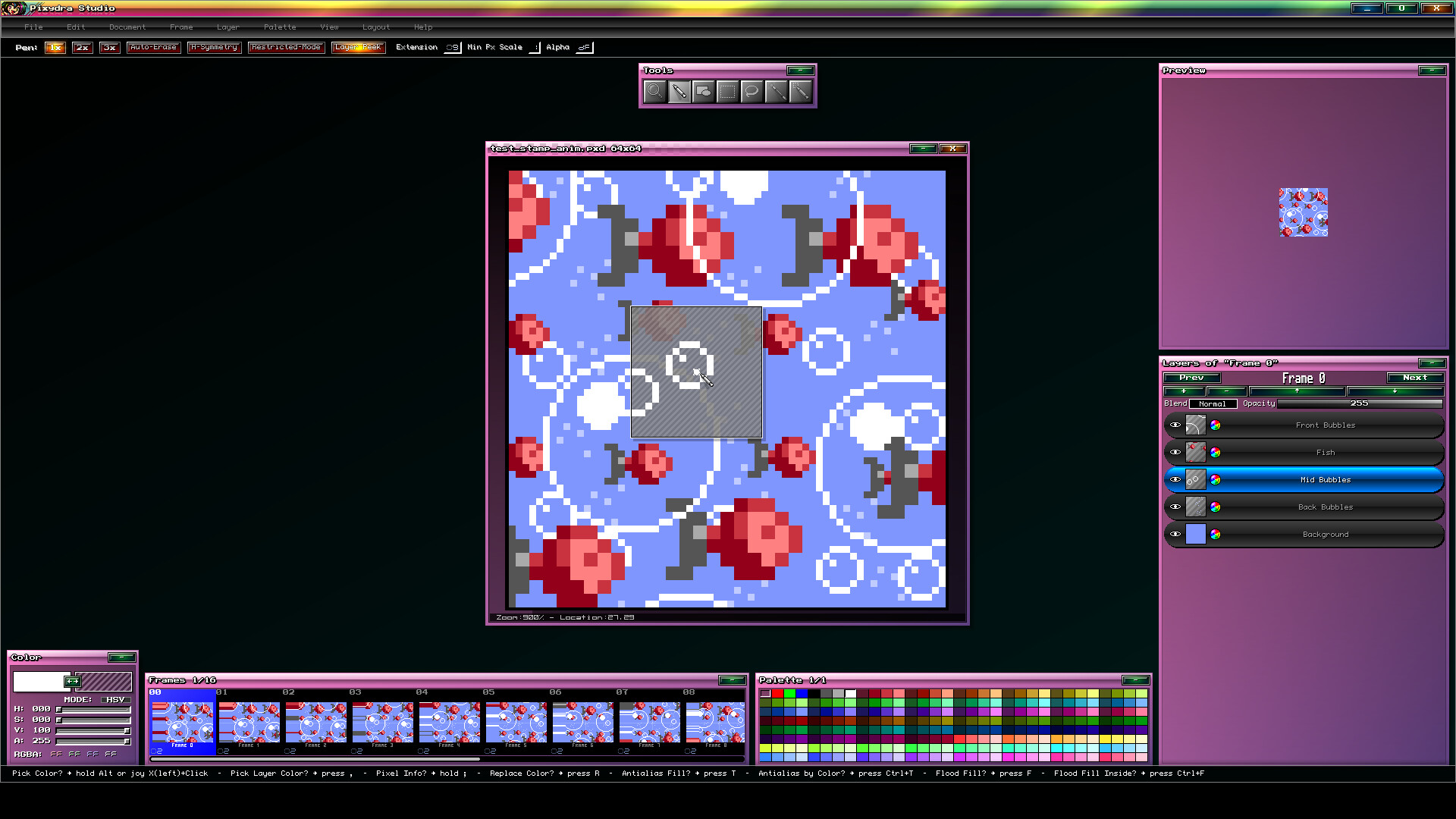
Pixydra Studio is a pixel-art software fully focused on animated sprites for videogames.

Kirjautumalla sisään voit lisätä tämän tuotteen toivelistallesi, seurata sitä tai merkitä sen ohitetuksi

Early Access -sovellus

Osallistu sovelluksen kehitykseen.

Huomio: Tämä Early Access -sovellus on keskeneräinen ja se saattaa vielä muuttua. Jos sinua ei kiinnosta käyttää tätä sovellusta tällä hetkellä saatavilla olevassa muodossa, odota ja tarkista sovellus myöhemmin uudelleen. Lue lisää

Kehittäjien kertomaa:

Miksi Early Access?

Pixydra is a software that started as a personal experiment: a custom-built 2D sprite graphics program tailored to my personal workflow in video-games development.
One thing led to another, and I ended up discovering that it could be quite useful for other people as well. But the program still lacks testing by users other than myself.
I would like to make this program truly useful for those who appreciate its workflow and unique features.

Miten kauan Early Access -vaihe suunnilleen kestää?

The goal is to have the full release ready before 2027.

Millä tavoin lopullinen versio tulee eroamaan Early Access -versiosta?

There are several things still pending, including:
-An improved interface system with dockable objects.
-More variety of exporters based on user needs.
-More commonly used tools (specific shapes, gradients, etc).
-A more versatile palette editor (currently, it's a bit rigid).
-Support for Lua scripting (internally, this functionality is only partially implemented and therefore disabled for now).
-Improved joystick support (currently, joystick support is pretty basic).
-Many unique features that I will reveal as development progresses.

Mikä on Early Access -version tila tällä hetkellä?

The current version is stable and fully functional (it's the one I use for my own games, and even for the program's graphics: cursors, icons, etc.).
I'm releasing it as early access simply because I haven't tested it enough with other people yet, even though I do use it myself daily... it's a program that fits my workflow perfectly, nothing more, nothing less.

Hinnoitellaanko sovellus toisin Early Accessin aikana ja sen jälkeen?

Probably yes, the price will most likely increase when the program leaves early access state. This is because I plan not only to work just on bug fixing but add new features as well.

Miten yhteisö otetaan mukaan kehitysprosessiin?

I would be very grateful for any comments and feedback.
I have several features to add that are already defined, but I need to see how my program is actually used in order to eliminate friction in the tasks for which it was created.
I will be monitoring the Steam forums, Discord, and other social media to answer questions while I continue developing this program to make it a truly useful tool for its intended purpose.
Lue lisää
Peli ei ole vielä saatavilla Steamissä

Suunniteltu julkaisupäivä: 1.9.2026

Sovelluksen avautumiseen on aikaa noin 11 päivää

Kiinnostuitko?
Lisää toivelistallesi, niin saat ilmoituksen, kun peli on saatavilla.
 
Katso kaikki keskustelut

Ilmoita bugeista ja anna tälle sovellukselle palautetta keskustelupalstalla

Tietoa ohjelmistosta

Pixydra Studio is pixel-art software fully focused on creating animated sprites for video games.

--- Unique Features ---

  • Playtest Mode where you can test your sprites playability feel.

  • Document with Mixed-Type Layers between RGBA and Indexed Color.

  • Multiple Selectable Palettes per document.

  • Ability to Rename Colors by Palette Range.

  • Configurable Special Commands for specific palette colors.

  • Color Range Delimiters.

  • Layer Invalidation System by name for the entire document.

  • Focus System for layers or animation frames.

  • Individual and global Real-Time Visualization of layers and animation frames.

  • Configurable Non-Square Pixel Aspect Ratios with presets for old consoles.

  • Free and Independent Layer Setup per Frame.

  • Joystick Support for editing.

  • Isometric Visualization by stacking sprites.

  • "Draft" Marker to discard specific sprites when exporting.

  • Automatic Layer Outlines.

  • Layer Peek Mode that lets you see hidden areas on the working layer.

  • Editor and preview Real Transparent Background option.

  • OLED-Friendly Interface with shifting colors.

  • Automatic Edge-Smoothing Command.

  • Layer Search and navigation by name.

  • Smooth Zooming and Panning movements.

  • Interface with smooth animation effects.

  • Automatic restricted mode draw on Pen tool.

  • Animated Stamp Moving while switching animation frames.

  • Non-destructive mirrow view.

  • Freely move Stamps between layers and even frames.

--- General Features ---

  • Fully Configurable Shortcuts.

  • Editable Axis/Pivot for game sprite exporting.

  • Layer Blend Modes.

  • Animation frames with Comments and Tags.

  • Auto-Erase Pen Mode.

  • Image Atlas Exporter.

  • Animated GIF exporter.

  • Gradient Assignment in color palette.

  • Reads files in the following formats: BMP, PNG, GIF, ASE.

  • Animation Preview while editing.

  • RGB and HSV color editing.

  • Continuous Drawing while switching animation frames.

  • Freely movable interface elements.

  • Horizontal Symmetry for Pen tool.

  • Visual Themes.

Järjestelmävaatimukset

    Vähintään:
    • Vaatii 64-bittisen suorittimen ja käyttöjärjestelmän
    • Käyttöjärjestelmä: Windows 10, 11
    • Suoritin: 64-bit quad-core processor
    • Muisti: 256 MB RAM
    • Grafiikka: OpenGL 3.3
    • Tallennus: 200 MB kiintolevytilaa
    Suositus:
    • Vaatii 64-bittisen suorittimen ja käyttöjärjestelmän
Arvostelusuodattimet