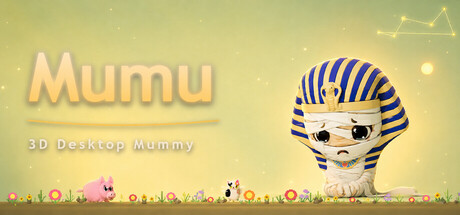
A companion desktop pet game where you raise a little Mummy, plant flowers, take quizzes, go fishing, paint, cloud fortune-telling, and explore thousands of quiz questions and starry easter eggs — all inside your chat window.

Sign in to add this item to your wishlist, follow it, or mark it as ignored

This game is not yet available on Steam

Coming soon

Interested?
Add to your wishlist and get notified when it becomes available.
 

About This Game

[h1]Mumu — 3D Desktop Mummy Companion[/h1]

📖 Story

Three thousand years ago, an orphan by the Nile carried more sorrow than any should bear. The Forgotten God of Mercy chose him as a "Soul Keeper." He was granted eternal life — and with it, a blessing and a curse: to touch is to take away another's pain. Those he touches are freed from their grief — but he carries it all alone. Now he is sealed behind the screen, waiting for someone to keep a place for him on their desktop. A glance when you're tired. A word when you're alone. That is why he exists.

You are never alone.

🐾 About the Game

Mumu is a 3D companion desktop pet — raise your own little Mummy and enjoy a heartwarming companionship in the garden, under the stars, and among the clouds.

🎮 What You Can Do

  • 🐾 Raise your own little Mummy desktop pet
  • 🌸 Plant flowers and play Kitty Quiz in the chat garden
  • 🎣 Piggy Fishing · World Tree Creative Painting · Red Panda Merchant Trading
  • 🌊 Cloud fortune-telling, exploring the unknown and your questions
  • 🖼️ Explore thousands of quiz questions and discover hidden constellation surprises
  • 🏠 Customize your chat interface skin and create your own desktop style
  • 🚀 Grab Mumu and fling him across your desktop — real gravity physics, bouncing off the screen edges, spinning back to you

✨ Features

  • Heartwarming art style + dynamic pet interactions
  • Gardening + Fishing + Painting = triple the fun
  • Cloud Fortune × Plum Blossom Yi Jing divination
  • 🌌 Hidden constellation and starry sky easter eggs
  • Lives on your desktop, ready to interact anytime

🧩 How to Access Every Feature

After launching the game, Mumu will appear in the corner of your desktop (as a system tray icon).

Right-click the Mumu icon in the system tray → choose "Chat 💬" → the chat window opens.

Gardening, Kitty Quiz, Piggy Fishing, World Tree Creative Painting, Red Panda Merchant Trading, Cloud fortune-telling, thousands of quiz questions, and chat skin switching — all of these are inside the chat window. Click the tabs at the top to switch between them.

Other system tray menu items: Star River 🌌 (toggle and colors), Constellation ⭐ (constellations and stardust), Pose (Auto/Sit/Lie), Window Size 📐, Star Clock ✨ (focus & rest timer), Check-in, Language 🌐.

🎁 Launch Bonus

On first launch, you'll receive the Sirius constellation and 100 stardust — light up your very first golden galaxy ✨

System Requirements

    Minimum:
    • Requires a 64-bit processor and operating system
    • OS: Windows 10 64-bit
    • Processor: Intel(R)Core(TM) i3
    • Memory: 4 GB GB RAM
    • Graphics: Intel HD Graphics 620
    • Storage: 1 GB available space
    • Sound Card: any PC with sound
    • Additional Notes: Internet required for text-to-speech voice; offline pet mode works without.
    Recommended:
    • Requires a 64-bit processor and operating system
    • OS: Windows 11 64-bit
    • Processor: Intel(R)Core(TM)i5
    • Memory: 8 GB RAM
    • Graphics: NVIDIA GTX 1050
    • Storage: 1 GB available space
    • Sound Card: any PC with sound
    • Additional Notes: Internet required for text-to-speech voice; offline pet mode works without.
Review Filters