Turn your media library into a private VR cinema. Reel Room plays films, TV, and music from a Jellyfin server, local drives, or a network share — on a virtual 4K screen in hand-crafted environments, with HDR and 3D movie playback. Lossless audio, in-VR HUD, multi-headset, no subscription.

Sign in to add this item to your wishlist, follow it, or mark it as ignored

This game is not yet available on Steam

Planned Release Date: August 2026

Interested?
Add to your wishlist and get notified when it becomes available.
 

About This Software

Reel Room is a VR home theatre that plays films, TV, and music from a Jellyfin server, your local drives, or any network share — onto a virtual 4K screen, inside hand-crafted theatre environments. Put on a PCVR headset, sink into a curated room, and watch what you actually own — in lossless original quality, with no monthly fee and no streaming service in the middle.

Features

  • Play from wherever your media lives. Connect to a Jellyfin server on your home network, open files straight off your local drives, or point Reel Room at a network share. It reads your full library — films, series, music — and respects your folder structure, posters, and metadata.

  • Lossless first. Direct-plays original files when your hardware can. Where transcoding is needed, audio is preserved at high fidelity (FLAC and lossless AAC on the music path) and video is stream-copied without re-encoding for H.264 and HEVC sources.

  • 4K HDR, tuned for your headset. Hardware-decodes 10-bit HDR HEVC and tone-maps it to your headset’s display with full color and contrast — so HDR Blu-ray rips that other players show washed-out, or can’t open at all, finally look right.

  • Picture modes, like a good TV. Standard, Cinema, Vivid, Bright, and Night presets adjust brightness, contrast, and color to suit the room and your headset’s panel — switched live, no restart.

  • 3D movies, automatically. Side-by-side and over-under 3D films are detected straight from your library and shown with true stereoscopic depth on the virtual screen — in every environment, with no setup. For untagged files, a 2D/3D toggle is always one click away.

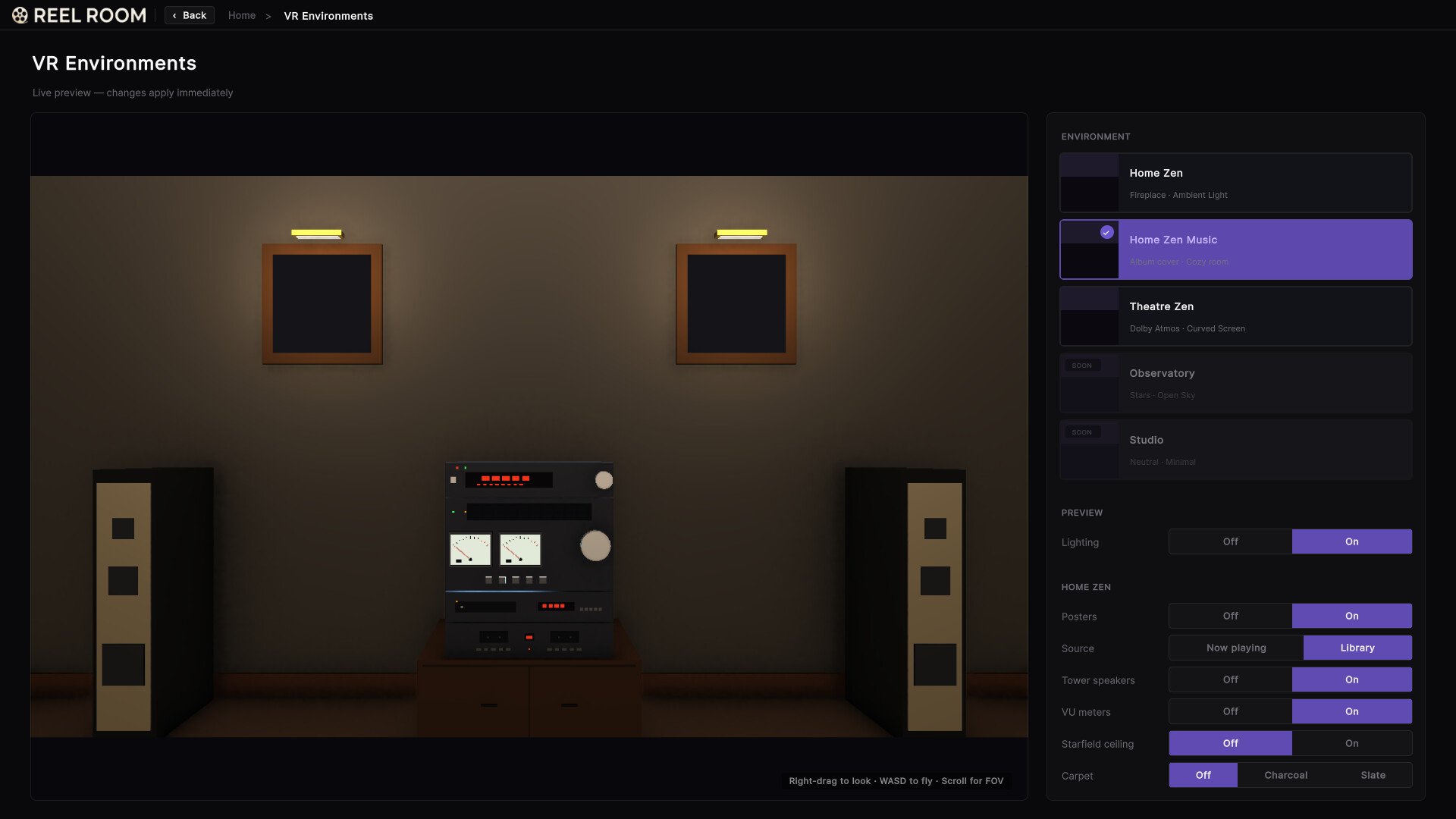
  • Hand-crafted environments. Choose between cozy “Home Zen” rooms and more cinematic “Theatre Zen” spaces, each with its own lighting, ambient audio rig, and decor. More environments arrive post-launch.

  • Full in-VR HUD. A purpose-built world-space UI gives you scrubbing, chapter jumps, environment switching, and music controls — all on a single motion controller. Nothing is hidden behind a menu.

  • Music mode too. Albums stream to a music-tuned environment with album art on the screen, audio rig in the room, and a queue you can shuffle, repeat, or seek.

  • Multi-headset by design. Built on OpenXR — tested on Meta Quest and Pimax, and compatible with any OpenXR PCVR headset, with controller bindings tuned per device.

  • Settings that follow you. Your Jellyfin login, room configurations, and playback preferences sync across machines via Steam Cloud — set up once, pick up where you left off on any PC.

  • No subscription. No telemetry. You pay once. Your watch history stays on your Jellyfin server. Your network traffic stays on your network.

Your library, your way

Reel Room never asks you to upload, re-encode, or migrate. Point it at a Jellyfin server on your LAN, a folder on a local drive, or a network share and it works — Blu-ray rips, anime collections, family videos, FLAC albums, podcasts. Up to 140 Mbps streaming covers 4K Blu-ray bitrates without compromise.

Built for VR, not ported to it

Every screen is world-space UI Toolkit, every interaction is motion-controller native. There is no flat menu floating in space, no mouse cursor, no awkward gaze-pointer. The HUD lives where your eyes are; the controls live where your hands are.

Supported headsets

  • Meta Quest 2, Quest 3, Quest 3S, Quest Pro (via Link or Air Link)

  • Pimax (Crystal and 8K-series headsets)

  • Any other OpenXR-compatible PCVR headset

What you need

  • A Windows 10 or 11 PC with a VR-capable GPU

  • A PCVR headset and motion controllers

  • Your media — on a local drive, a network share, or a Jellyfin server on your home network (Jellyfin is free and open-source — see

  • For network or Jellyfin sources, enough LAN bandwidth for your library (gigabit recommended for 4K)

One-time purchase

No subscription. No ads. No telemetry. Pay once and the core app is yours — every feature and environment described above, plus free quality-of-life updates. Additional environment packs may be offered down the road.

Reel Room is an independent commercial product and is not affiliated with, endorsed by, sponsored by, or otherwise associated with Jellyfin, Inc. or the Jellyfin project. “Jellyfin” is a trademark of Jellyfin, Inc.

AI Generated Content Disclosure

The developers describe how their game uses AI Generated Content like this:

Some of the artwork shown in our store screenshots, trailer, and on the app's in-game screen is placeholder media created with an AI image-generation tool (Google's Gemini image model). This includes the example movie posters, album covers, TV-series key art, and the cinematic "now playing" stills.

These images depict entirely fictional films, albums, and shows. They exist only as copyright-safe demo content so we can show the app's interface without displaying real, copyrighted media that the user does not own the rights to publish. They do not represent any real title.

Reel Room is a media player for the user's own library (Jellyfin server, local files, and network shares). The app performs no AI generation at runtime — all media a player sees in normal use is their own content. This is pre-generated content only; there is no live/runtime-generated AI.

System Requirements

    Minimum:
    • Requires a 64-bit processor and operating system
    • OS: Windows 10 64-bit
    • Processor: Intel Core i5-9600K / AMD Ryzen 5 3600
    • Memory: 8 GB RAM
    • Graphics: NVIDIA GTX 1660 Super / AMD RX 5600 XT
    • DirectX: Version 11
    • Network: Broadband Internet connection
    • Storage: 2 GB available space
    • Sound Card: DirectX-compatible
    • VR Support: SDK: OpenXR. Tested on Meta Quest (Quest 2, Quest 3, Quest 3S, and Quest Pro via Link or Air Link) and Pimax (Crystal and 8K-series) headsets. Compatible with any PC VR headset that presents a Windows OpenXR runtime, such as SteamVR, Oculus PC, or Pimax Play. Controls use a standard motion controller with a thumbstick and A/B face buttons. Play seated or standing.
    Recommended:
    • Requires a 64-bit processor and operating system
    • OS: Windows 11 64-bit
    • Processor: Intel Core i7-12700K / AMD Ryzen 7 5800X3D
    • Memory: 16 GB RAM
    • Graphics: NVIDIA RTX 3070 / AMD RX 6800
    • DirectX: Version 12
    • Network: Broadband Internet connection
    • Storage: 2 GB available space
    • Sound Card: DirectX-compatible
    • VR Support: SDK: OpenXR. Tested on Meta Quest (Quest 2, Quest 3, Quest 3S, and Quest Pro via Link or Air Link) and Pimax (Crystal and 8K-series) headsets. Compatible with any PC VR headset that presents a Windows OpenXR runtime, such as SteamVR, Oculus PC, or Pimax Play. Controls use a standard motion controller with a thumbstick and A/B face buttons. Play seated or standing.
There are no reviews for this product

You can write your own review for this product to share your experience with the community. Use the area above the purchase buttons on this page to write your review.

Review Filters