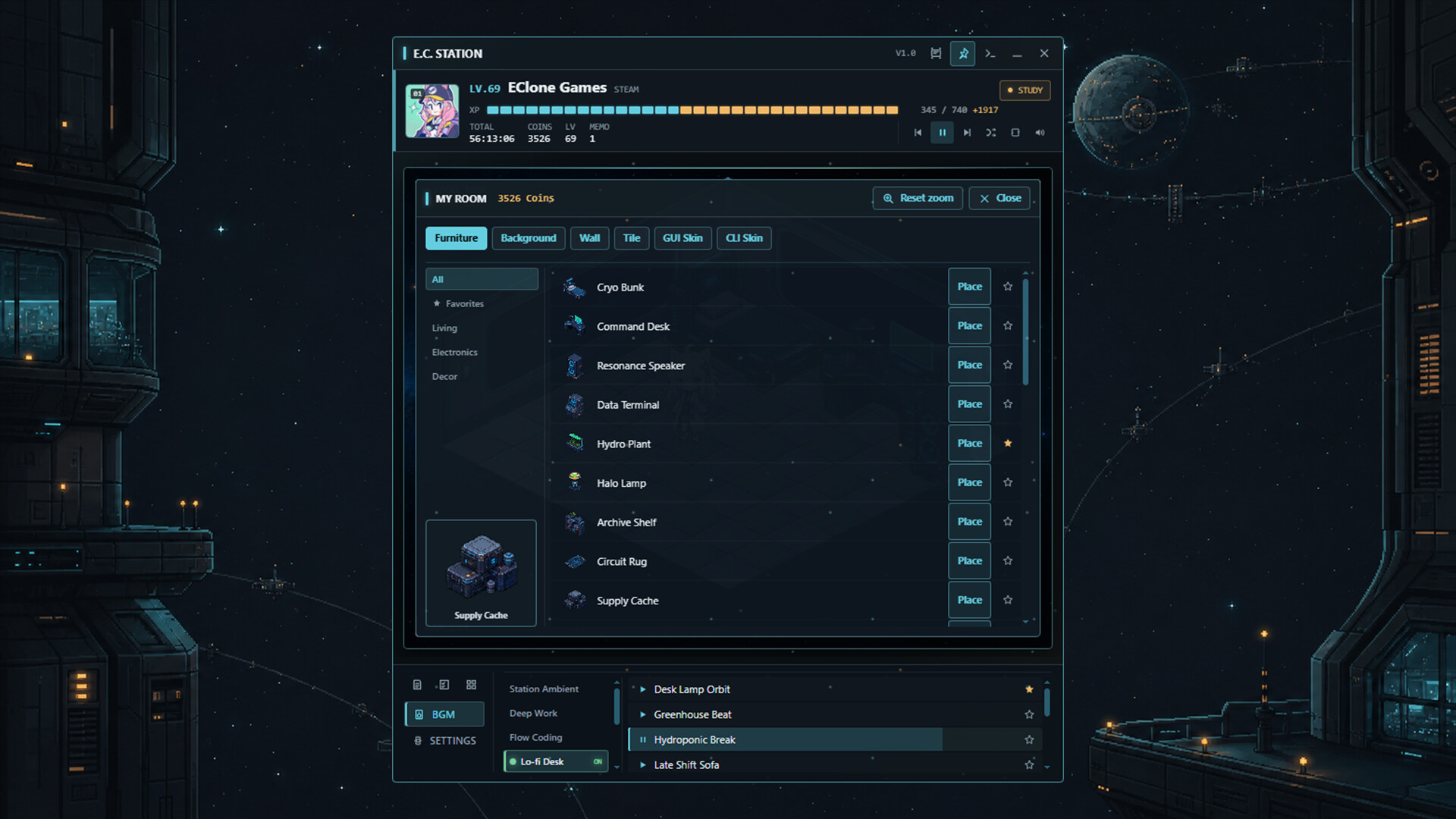
Keep a cyberpunk-inspired space-station terminal at the edge of your desktop. Decorate an isometric habitat through the GUI or use the command line to control music and productivity tools, expand your station over time, and visit friends.

Sign in to add this item to your wishlist, follow it, or mark it as ignored

This game is not yet available on Steam

Coming soon

Interested?
Add to your wishlist and get notified when it becomes available.
 

About This Game

ECLONE STATION

EClone Universe // MAIN STATION uplink established.

In a quiet gap between dimensions, a waystation drifts beside a purpose-built artificial planet.
Travelers stop here to prepare for their next journey, receiving a small habitat module, a station terminal, and temporary operator access.

EClone Station is a desktop companion that brings this little cosmic stopover to the edge of your screen.
Decorate your room, play music, organize your work, and stay for a while before the next journey begins.

See Through the GUI. Operate Through the CLI.

Graphic View lets you observe your character and habitat module while operating the station with your mouse.

The Command Processor lets you navigate virtual station paths and enter commands through a familiar terminal workflow.
Use help, ls, cd, and history, or control music, productivity tools, rooms, and network features without leaving the keyboard.

Both interfaces share the same station state.
Commands entered in the CLI are reflected in the GUI, while every essential system remains accessible without using the command line.

Build Your Own Habitat Module

Place living furniture, research equipment, and holographic decorations inside an isometric room.
Move and flip objects, then combine backgrounds, walls, and flooring to create your own corner of the station.

A Station That Stays With You

Choose from playlists for focus, lo-fi work, rest, and energetic sessions, then collect your favorite tracks in one place.

Use memos, to-do lists, and dashboard shortcuts from the main panel or separate windows.
Expand the station when you need it, or fold it into Mini Mode when you want it out of the way.

Connect to Other Stations

Invite Steam friends or browse public rooms to visit other travelers and their habitat modules.
Furniture, room themes, character positions, and activity states are synchronized so everyone can share the same space.

Progress Through Time Spent Together

Experience and currency accumulate as you spend time at the station, gradually unlocking new furniture and interface options.
There is no need to rush. The time you spend here becomes part of the station's record.

Key Features

  • Graphic View and CLI View connected to the same persistent state
  • Isometric room decoration with furniture, backgrounds, walls, and flooring
  • Category playlists, ambient music, and favorites
  • Memo, to-do, and dashboard productivity tools
  • Separate windows, always-on-top support, and Mini Mode
  • Steam invitations, public rooms, and real-time room synchronization
  • Experience, currency, and unlockable content earned over time

AI Generated Content Disclosure

The developers describe how their game uses AI Generated Content like this:

The background music (BGM) tracks and some key visual art assets included in this application were created using AI generation tools.

System Requirements

    Minimum:
    • OS: Windows 10 (64-bit)
    • Processor: 64-bit dual-core processor
    • Memory: 4 GB RAM
    • Graphics: DirectX 11-compatible integrated graphics
    • DirectX: Version 11
    • Network: Broadband Internet connection
    • Storage: 500 MB available space
    • Sound Card: Windows-compatible audio device
    Recommended:
    • OS: Windows 10 / 11 (64-bit)
    • Processor: 64-bit quad-core processor
    • Memory: 8 GB RAM
    • Graphics: Modern integrated graphics or better
    • DirectX: Version 11
    • Network: Broadband Internet connection
    • Storage: 500 MB available space
    • Sound Card: Windows-compatible audio device
There are no reviews for this product

You can write your own review for this product to share your experience with the community. Use the area above the purchase buttons on this page to write your review.

Review Filters