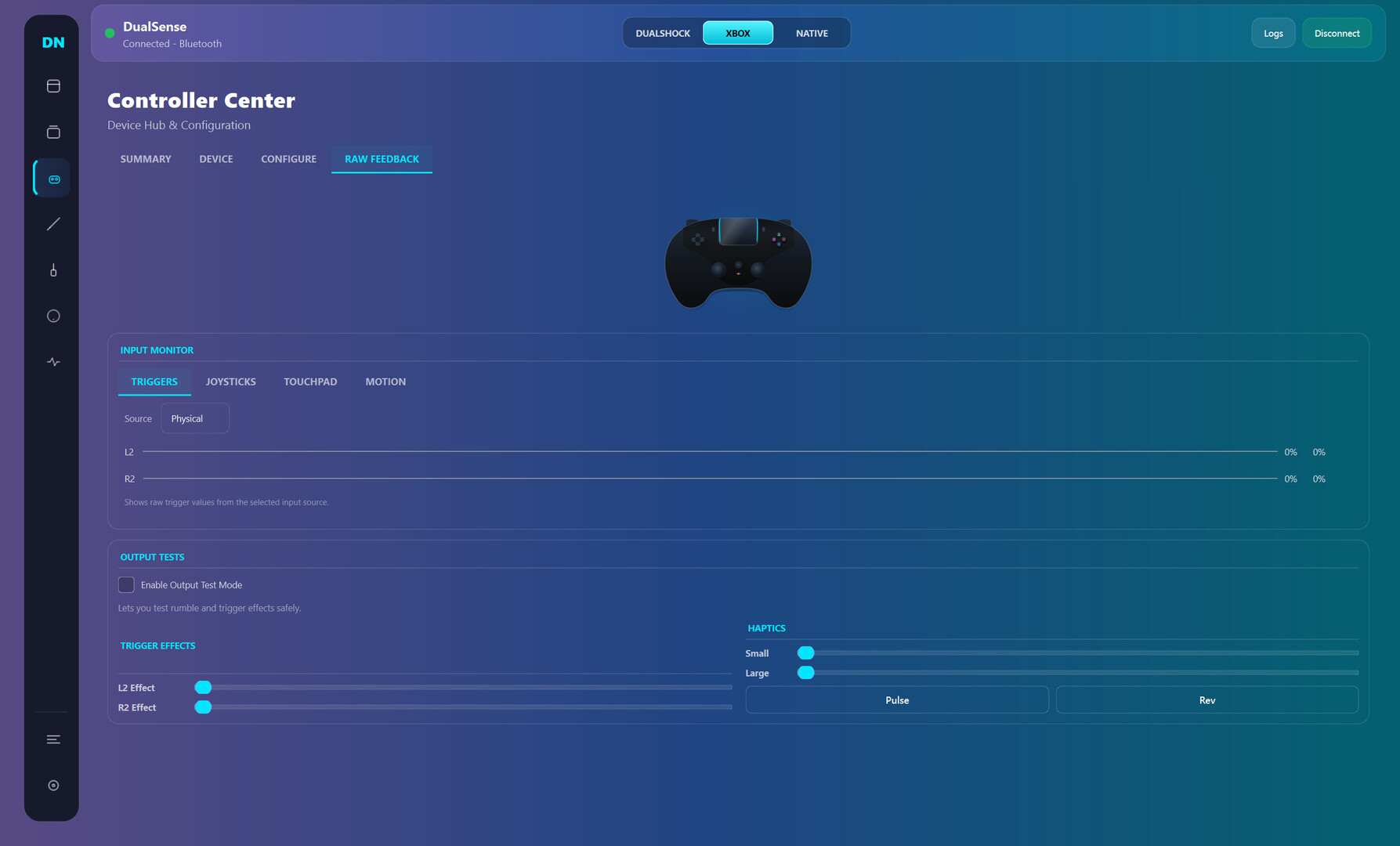
Dual Nexus is a Windows controller toolkit for DualSense and other gamepads: switch between Native/Xbox/DualShock modes, build per-game profiles, remap inputs, and tune triggers, haptics, motion, and lighting in real time.

Zaloguj się, aby dodać tę pozycję do listy życzeń, zacząć ją obserwować lub oznaczyć jako ignorowaną

Program z wczesnym dostępem

Zaangażuj się w powstawanie programu.

Uwaga: ten program oferowany w formie wczesnego dostępu nie został jeszcze ukończony i może (choć nie musi) ulec dalszym zmianom. Jeśli program w jego obecnym stanie nie interesuje cię, sugerujemy poczekać, by zobaczyć, czy prace nad nim będą kontynuowane. Dowiedz się więcej.

Od twórców:

Dlaczego wczesny dostęp?

„Early Access fits this product because controller software depends on many real-world hardware and driver combinations. Community usage data helps validate stability, improve usability, and prioritize the highest-impact fixes while core functionality is already available.”

Mniej więcej jak długo program będzie w fazie wczesnego dostępu?

„Current estimate: 9 to 15 months. Timing depends on compatibility testing across controller variants, Windows builds, Bluetooth/USB stacks, and driver environments.”

Czym różni się zaplanowana pełna wersja od tej z wczesnego dostępu?

„Planned full version scope includes broader controller compatibility beyond the current DualSense focus, deeper calibration and diagnostics, stronger profile automation, improved onboarding, and additional reliability tooling. Feature scope may evolve based on technical findings and community feedback.”

Jaki jest obecny stan wersji z wczesnego dostępu?

„Current version is usable for daily controller customization, with full DualSense support and partial DualSense Edge support. Available features include mode switching (Native, Xbox, DualShock-compatible workflows), profile management, mapping studio, trigger/haptic/lighting tuning, live input monitoring, and logs/diagnostics. Current limitations include incomplete Edge parity, limited non-Sony controller support, and ongoing UX/performance polish.”

Czy cena programu ulegnie zmianie podczas i po wczesnym dostępie?

„No immediate price increase is planned during the stabilization phase. A gradual adjustment may be considered closer to full release if major feature expansion is delivered.”

Jak zamierzacie włączyć społeczność w wasz proces tworzenia?

„Community involvement includes public changelogs, feedback threads, issue tracking, reproducible bug reporting, and priority-based triage. Compatibility reports and runtime diagnostics guide iteration order. Experimental changes may ship behind opt-in toggles before broad rollout.”
Więcej
Polski język nie jest obsługiwany

Ten produkt nie obsługuje twojego lokalnego języka. Przed zakupem zapoznaj się z listą obsługiwanych języków, która znajduje się poniżej.

Ta gra nie jest jeszcze dostępna na Steam

Planowana data wydania: marzec 2026

Interesuje cię ten produkt?
Dodaj go do swojej listy życzeń i otrzymaj powiadomienie, gdy stanie się dostępny.
 
Zobacz wszystkie dyskusje

Zgłoś błędy i zostaw swoją opinię o tym programie na forach dyskusyjnych

O tym programie

Dual Nexus is for players who want their controller to feel exactly right, game by game.

Default controller settings are often too limited. Dual Nexus gives you one place to switch modes, manage profiles, remap controls, and tune behavior live while your controller is connected.

Current controller support:

  • Full support: DualSense

  • Partial support: DualSense Edge

What you can do today:

  • Switch output mode quickly (Native, Xbox, DualShock-compatible workflows)

  • Create multiple profiles and swap between them fast

  • Remap buttons, sticks, touchpad, motion, and macros in Mapping Studio

  • Tune deadzones, curves, trigger behavior, haptics, and lighting

  • Use live input and feedback views to validate changes immediately

  • Use logs and diagnostics to troubleshoot connection and runtime issues

Early Access focus:
Dual Nexus is already usable for core DualSense workflows. During Early Access, development is focused on stability, usability, and expanding compatibility to additional controllers over time without breaking core functionality.

Wymagania systemowe

    Konfiguracja minimalna:
    • System operacyjny: Windows 10
    • Procesor: x64
    • Pamięć: 4 GB RAM
    • Miejsce na dysku: 500 MB dostępnej przestrzeni
    Konfiguracja zalecana:
    • System operacyjny: Windows 11
    • Procesor: x64
    • Miejsce na dysku: 500 MB dostępnej przestrzeni
Brak recenzji dla tego produktu

Możesz napisać swoją własną recenzję dla tego produktu, żeby podzielić się swoimi wrażeniami ze społecznością. Użyj obszaru, który znajduje się na tej stronie nad przyciskiem zakupu, żeby napisać swoją recenzję.