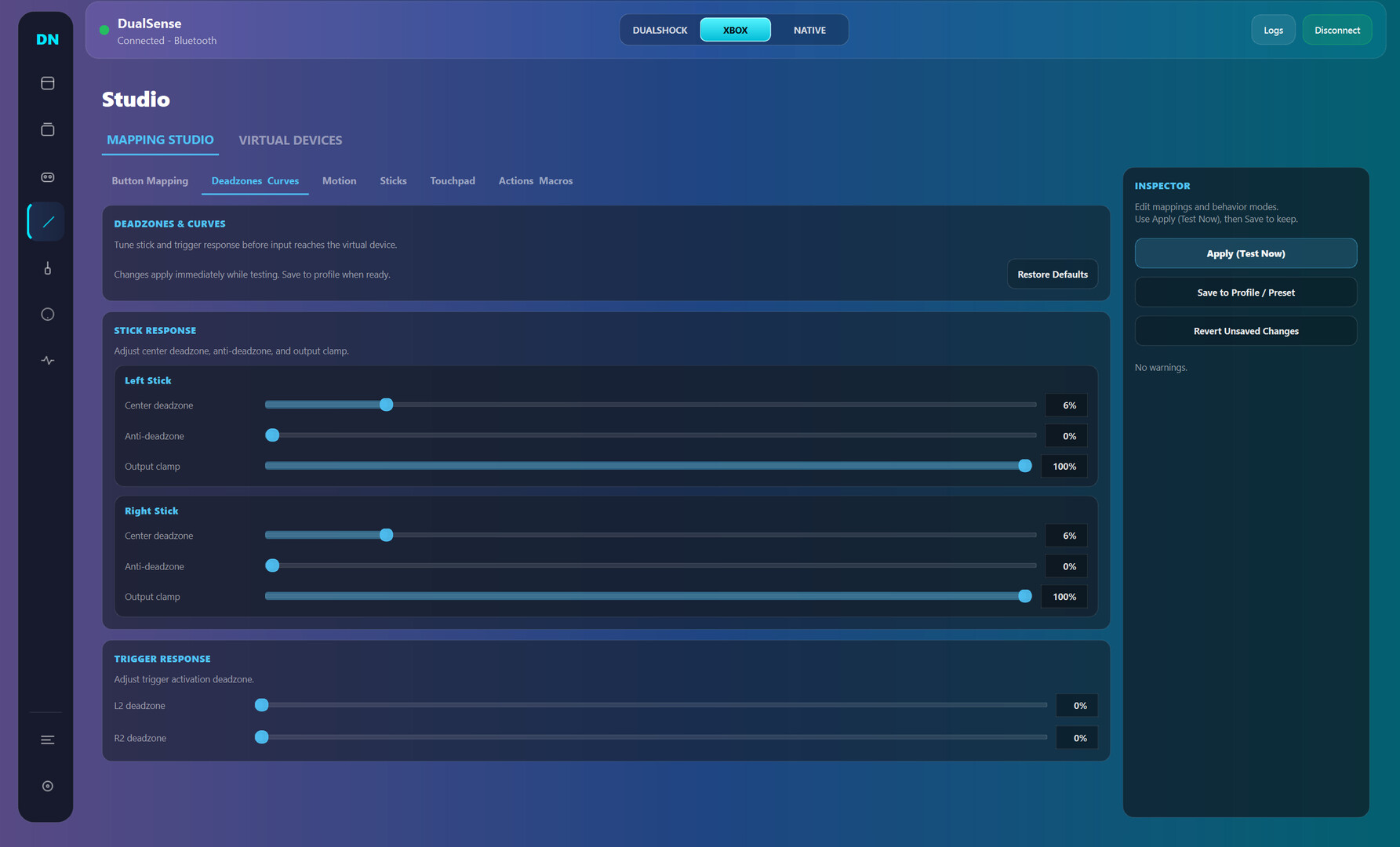
Dual Nexus is a Windows controller toolkit for DualSense and other gamepads: switch between Native/Xbox/DualShock modes, build per-game profiles, remap inputs, and tune triggers, haptics, motion, and lighting in real time.

Login untuk menambahkan item ini ke wishlist-mu, mengikutinya, atau mengabaikannya

Software Akses Dini

Bergabung dengan software ini seiring perkembangannya.

Catatan: Software Akses Dini ini belum selesai dan mungkin tidak ada perubahan lebih lanjut. Jika kamu tidak berminat untuk menggunakan software ini dalam statusnya saat ini, kamu harus menunggu untuk melihat jika software tersebut terus dikembangkan. Pelajari lebih lanjut

Prakata dari pengembang:

Kenapa harus Akses Dini?

“Early Access fits this product because controller software depends on many real-world hardware and driver combinations. Community usage data helps validate stability, improve usability, and prioritize the highest-impact fixes while core functionality is already available.”

Berapa lama software ini akan berada dalam Akses Dini?

“Current estimate: 9 to 15 months. Timing depends on compatibility testing across controller variants, Windows builds, Bluetooth/USB stacks, and driver environments.”

Apa perbedaan antara versi penuh dan versi Akses Dini?

“Planned full version scope includes broader controller compatibility beyond the current DualSense focus, deeper calibration and diagnostics, stronger profile automation, improved onboarding, and additional reliability tooling. Feature scope may evolve based on technical findings and community feedback.”

Apa status saat ini dari versi Akses Dini ini?

“Current version is usable for daily controller customization, with full DualSense support and partial DualSense Edge support. Available features include mode switching (Native, Xbox, DualShock-compatible workflows), profile management, mapping studio, trigger/haptic/lighting tuning, live input monitoring, and logs/diagnostics. Current limitations include incomplete Edge parity, limited non-Sony controller support, and ongoing UX/performance polish.”

Apakah harga software akan berbeda selama dan setelah Akses Dini?

“No immediate price increase is planned during the stabilization phase. A gradual adjustment may be considered closer to full release if major feature expansion is delivered.”

Seperti apakah rencana untuk melibatkan Komunitas dalam proses pengembangan?

“Community involvement includes public changelogs, feedback threads, issue tracking, reproducible bug reporting, and priority-based triage. Compatibility reports and runtime diagnostics guide iteration order. Experimental changes may ship behind opt-in toggles before broad rollout.”
Baca Selengkapnya
Bhs. Indonesia tidak didukung

Produk ini tidak didukung dalam bahasamu. Silakan tinjau daftar bahasa yang didukung di bawah ini sebelum melakukan pembelian.

Game ini belum tersedia di Steam

Rencana Tanggal Rilis: Maret 2026

Tertarik?
Tambahkan ke wishlist dan dapatkan pemberitahuan saat tersedia.
 
Lihat semua diskusi

Laporkan bug dan berikan masukan untuk software ini di papan diskusi

Tentang Software Ini

Dual Nexus is for players who want their controller to feel exactly right, game by game.

Default controller settings are often too limited. Dual Nexus gives you one place to switch modes, manage profiles, remap controls, and tune behavior live while your controller is connected.

Current controller support:

  • Full support: DualSense

  • Partial support: DualSense Edge

What you can do today:

  • Switch output mode quickly (Native, Xbox, DualShock-compatible workflows)

  • Create multiple profiles and swap between them fast

  • Remap buttons, sticks, touchpad, motion, and macros in Mapping Studio

  • Tune deadzones, curves, trigger behavior, haptics, and lighting

  • Use live input and feedback views to validate changes immediately

  • Use logs and diagnostics to troubleshoot connection and runtime issues

Early Access focus:
Dual Nexus is already usable for core DualSense workflows. During Early Access, development is focused on stability, usability, and expanding compatibility to additional controllers over time without breaking core functionality.

Persyaratan Sistem

    Minimum:
    • OS: Windows 10
    • Prosesor: x64
    • Memori: 4 GB RAM
    • Penyimpanan: 500 MB ruang tersedia
    Direkomendasikan:
    • OS: Windows 11
    • Prosesor: x64
    • Penyimpanan: 500 MB ruang tersedia
Tidak ada ulasan untuk produk ini

Kamu bisa menulis ulasanmu tentang produk ini untuk membagikan pengalamanmu dengan komunitas. Gunakan area di atas tombol pembelian di halaman ini untuk menulis ulasanmu.