Dual Nexus is a Windows controller toolkit for DualSense and other gamepads: switch between Native/Xbox/DualShock modes, build per-game profiles, remap inputs, and tune triggers, haptics, motion, and lighting in real time.

로그인하셔서 게임을 찜 목록에 추가하거나, 팔로우하거나 또는 제외로 지정하세요.

앞서 해보는 소프트웨어

이 소프트웨어가 개발되는 과정에 참여하세요.

주의 사항: 이 앞서 해보기 소프트웨어는 완성되지 않았으며 앞으로 더 변하거나 변하지 않을 수 있습니다. 현재 상태의 소프트웨어가 흥미롭지 않다면 이 소프트웨어가 개발을 거치며 발전하는지 살펴보는게 좋습니다. 앞서 해보기에 대해 더 알아보세요.

개발자의 한마디:

왜 앞서 해보기를 진행하나요?

“Early Access fits this product because controller software depends on many real-world hardware and driver combinations. Community usage data helps validate stability, improve usability, and prioritize the highest-impact fixes while core functionality is already available.”

이 소프트웨어는 대략 얼마간 앞서 해볼 수 있나요?

“Current estimate: 9 to 15 months. Timing depends on compatibility testing across controller variants, Windows builds, Bluetooth/USB stacks, and driver environments.”

정식 버전은 앞서 해보기 버전과 어떻게 달라지나요?

“Planned full version scope includes broader controller compatibility beyond the current DualSense focus, deeper calibration and diagnostics, stronger profile automation, improved onboarding, and additional reliability tooling. Feature scope may evolve based on technical findings and community feedback.”

앞서 해보기 버전은 현재 어떤 상태인가요?

“Current version is usable for daily controller customization, with full DualSense support and partial DualSense Edge support. Available features include mode switching (Native, Xbox, DualShock-compatible workflows), profile management, mapping studio, trigger/haptic/lighting tuning, live input monitoring, and logs/diagnostics. Current limitations include incomplete Edge parity, limited non-Sony controller support, and ongoing UX/performance polish.”

이 소프트웨어는 앞서해보기 기간동안 가격이 달라질 수도 있습니까?

“No immediate price increase is planned during the stabilization phase. A gradual adjustment may be considered closer to full release if major feature expansion is delivered.”

개발 과정에서 어떻게 커뮤니티와 소통할 계획인가요?

“Community involvement includes public changelogs, feedback threads, issue tracking, reproducible bug reporting, and priority-based triage. Compatibility reports and runtime diagnostics guide iteration order. Experimental changes may ship behind opt-in toggles before broad rollout.”
더 읽어보기
한국어(을)를 지원하지 않습니다

이 제품은 귀하의 로컬 언어를 지원하지 않습니다. 구매하기 전에 아래에 있는 지원하는 언어 목록을 확인해주세요.

이 게임은 아직 Steam에 출시되지 않았습니다

출시 예정일: 2026년 3월

관심이 있으신가요?
찜 목록에 추가하고 출시가 되면 알림을 받으세요.
 
모든 토론 보기

이 소프트웨어의 버그를 신고하고 피드백을 토론 게시판에 남겨주세요

소프트웨어 정보

Dual Nexus is for players who want their controller to feel exactly right, game by game.

Default controller settings are often too limited. Dual Nexus gives you one place to switch modes, manage profiles, remap controls, and tune behavior live while your controller is connected.

Current controller support:

  • Full support: DualSense

  • Partial support: DualSense Edge

What you can do today:

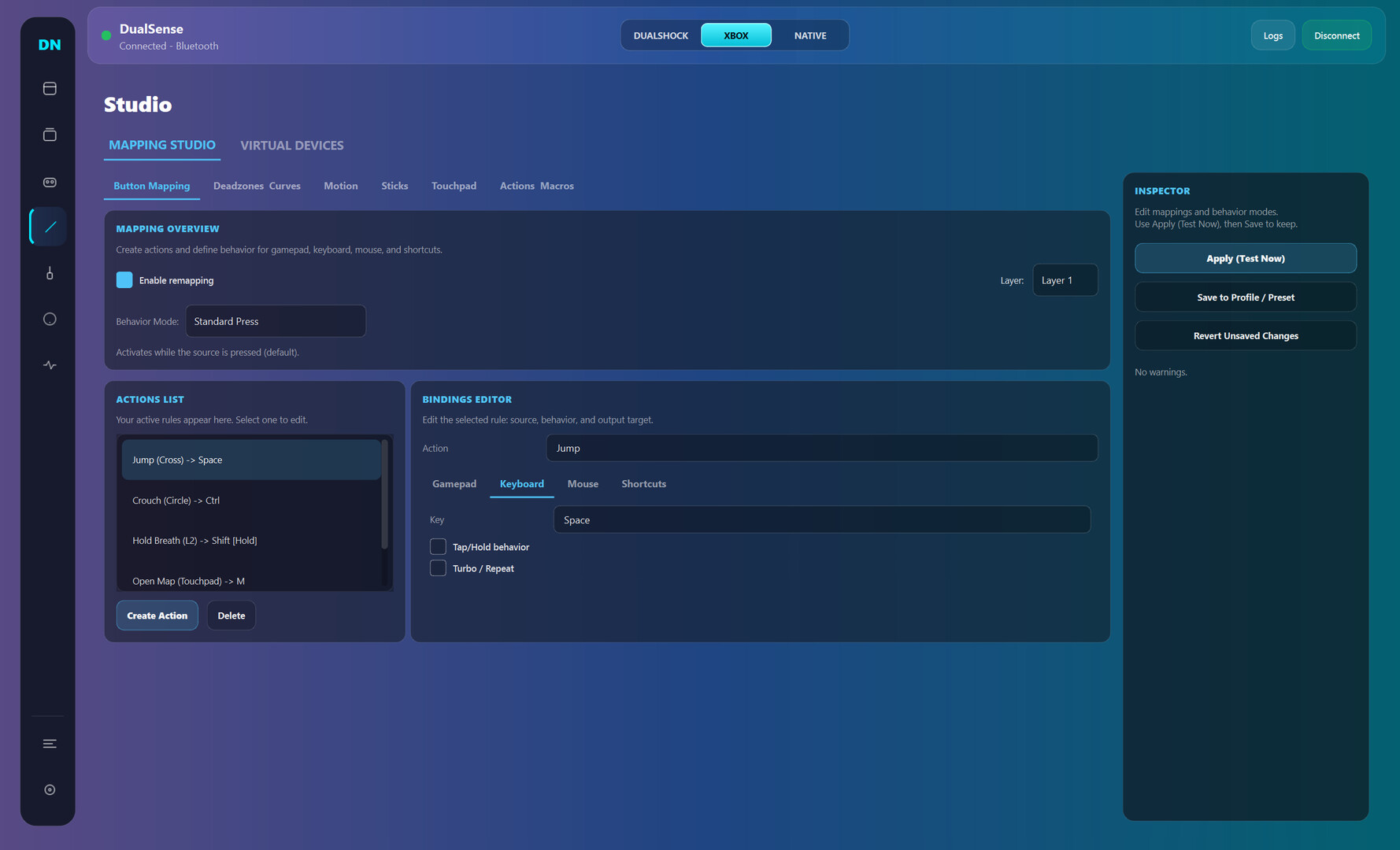
  • Switch output mode quickly (Native, Xbox, DualShock-compatible workflows)

  • Create multiple profiles and swap between them fast

  • Remap buttons, sticks, touchpad, motion, and macros in Mapping Studio

  • Tune deadzones, curves, trigger behavior, haptics, and lighting

  • Use live input and feedback views to validate changes immediately

  • Use logs and diagnostics to troubleshoot connection and runtime issues

Early Access focus:
Dual Nexus is already usable for core DualSense workflows. During Early Access, development is focused on stability, usability, and expanding compatibility to additional controllers over time without breaking core functionality.

시스템 요구 사항

    최소:
    • 운영 체제: Windows 10
    • 프로세서: x64
    • 메모리: 4 GB RAM
    • 저장 공간: 500 MB 사용 가능 공간
    권장:
    • 운영 체제: Windows 11
    • 프로세서: x64
    • 저장 공간: 500 MB 사용 가능 공간
이 제품에는 아직 평가가 없습니다.

이 제품의 평가를 직접 써서 자신의 경험을 커뮤니티와 공유할 수 있습니다. 구매 버튼 위의 기입란을 이용하여 자신만의 평가를 써 보세요.