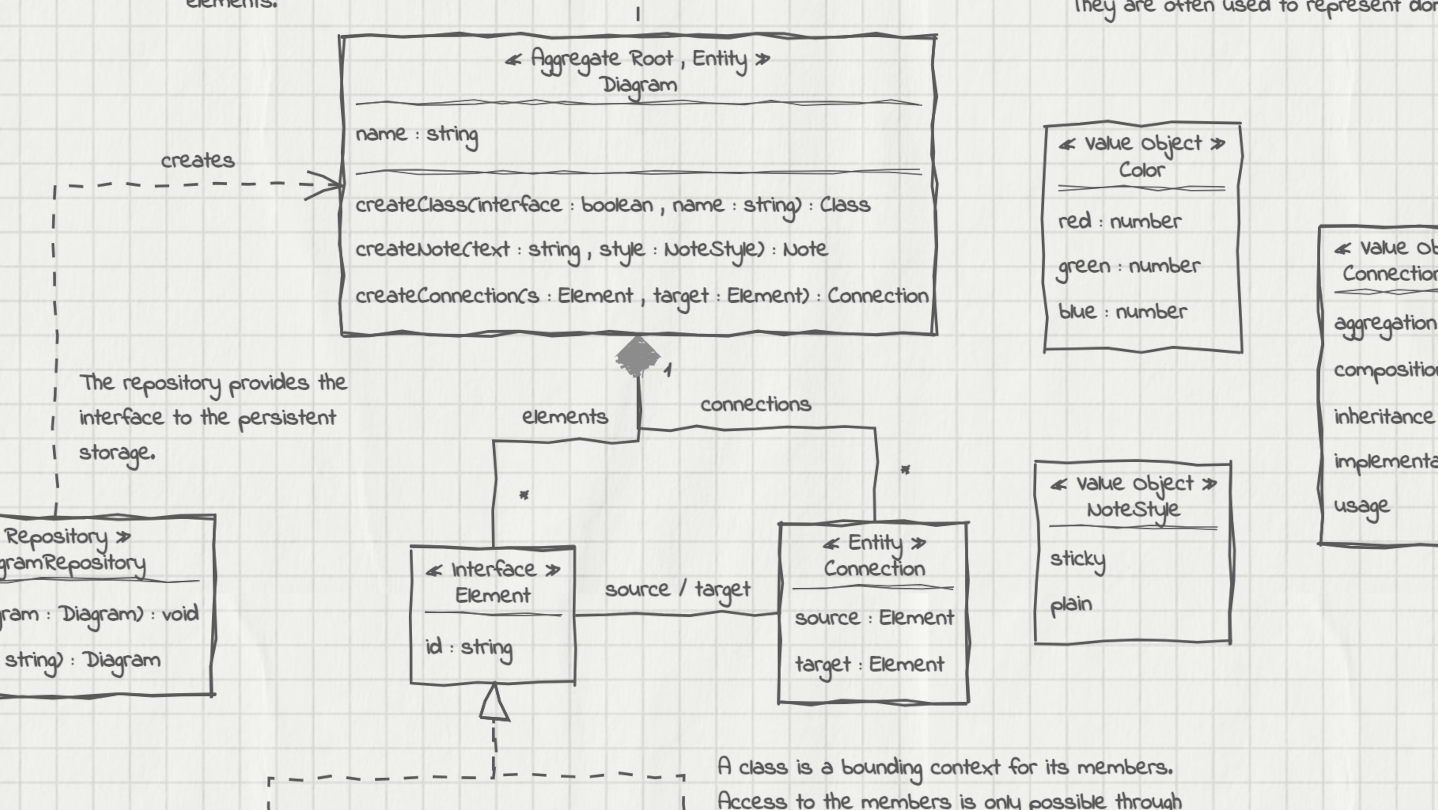
UMLBoard is an easy-to-use UML class diagram tool with a clean, hand-drawn whiteboard style. It’s perfect for visualizing software designs, enhancing code documentation, or creating polished diagrams for presentations and publications.

登入以將此項目新增至您的願望清單、關注它,或標記為已忽略

不支援繁體中文

本產品尚不支援您的目前所在地的語言。購買前請先確認語言支援清單。

購買 UMLBoard


評論

“A lovely little app - Hold control, tap anywhere, and you get a thoughtfully designed modal to add an object. Do the same on a class object to add properties. And of course a simple drag to connect objects.”
5/5 – Mac App Store

“LOVED the interface! I've played with lots of UML tools, and this one really stands out. It's both simple and fun - this makes it a tool I want to come back to, where I can just focus on accomplishing what I want. Really appreciated how fast it was to lay out and manipulate designs.”
5/5 – Mac App Store

“Superbly Simplified Complexity - The app rides above all in other UML basedoverly cluttered apps. Feel more organic & real just like working with a rough pen & page.”
5/5 – Mac App Store

關於此軟體

UMLBoard is an easy-to-use UML class designer with a nice hand-drawn whiteboard look.

Whether you want to visualize an architectural concept, add additional documentation to your code, or need some nice looking diagrams for your presentation or publication: UMLBoard is the perfect tool for creating and editing UML class diagrams quickly and easily.

Say goodbye to complicated UML editors that require several steps and dialogs to change just a single class member: UMLBoard provides a clean and minimalistic user interface with in-place editing and full WYSIWYG support.

Some feature highlights:

  • Gives your diagrams a nice hand-drawn and sketchy look.

  • In-place-editing of properties and methods.

  • Export your diagram as a PNG or SVG image or as PDF or PlantUML text file.

  • Automatic connector routing which can easily be configured with custom anchor points.

  • Choose between different drawing styles: Sketchy, Enterprise and Too-much-caffeine.

  • Customize your diagrams with different fonts, background and colors.

  • Dark and light color themes.

  • Automatically propagate changes of your elements throughout the whole diagram.

  • Define custom stereotypes to give your classes specific domain roles

  • Validates your diagram and ensures compliance with UML rules.

No registration or subscription required, just install it, and you're ready to go!

系統需求

Windows
macOS
SteamOS + Linux
    最低配備:
    • 需要 64 位元的處理器及作業系統
    • 作業系統: Windows 10, Windows 11
    建議配備:
    • 需要 64 位元的處理器及作業系統
    • 作業系統: Windows 10, Windows 11
    最低配備:
    • 需使用 Apple 處理器
    • 處理器: Apple Silicon
    建議配備:
    • 需使用 Apple 處理器
    • 處理器: Apple Silicon
    最低配備:
    • 作業系統: Debian: 11 and later, Ubuntu: 24.04 and later
    建議配備:

    UMLBoard 的顧客評論 關於使用者評論 您的偏好設定

    整體評論:
    1 篇使用者評論 (1 篇評論)


    如欲檢視特定日期範圍內的評論,請在上方圖表框選一段日期範圍,或點擊直條。


    依照使用者撰寫評論當時的遊戲時數篩選:


    不限最低時數不限最高時數

    以所選顯示順序顯示評論


    進一步了解
    篩選條件
    排除離題評論活動
    遊戲時數:
    主要在 Steam Deck 上遊玩
    Operating System:
    CPU:
    GPU:
    Device Type:
    無其它評論符合上述篩選條件
    調整上方的篩選條件以檢視其它評論
    評論讀取中…