Steam News - Alden

The latest update to Steam Workshop has just wrapped up a beta test period and is now deployed for everyone.

The next time you visit the Steam Workshop for your favorite game, you'll see an updated interface for browsing, searching, and filtering, making it easier and faster to explore and find great user-created mods to enhance your gaming experience.

Read on for details of this update.

Updated Home For Every Workshop

The main Workshop page for each game has a fresh new layout, which can be customized by the game's developer.

By default, the page starts off with featuring the most popular mods based on user ratings in the past week.

Next, the page lists the available item tags to quickly browse relevant content, or you can flip through the tabbed section of "Most popular", "Most Subscribed", "Last Updated", and "Most Recent"

In some communities, certain items have become the foundation upon which many other mods are built, so we've added a section to highlight those important cornerstone mods that are required by other items.

And of course if you follow individual Workshop authors, or if your friends have uploaded items for that Workshop, the page will display sections for those too.

Reworked layout for browsing and filtering

We've reworked the browsing and filtering experience to make the whole thing faster and easier.

Applying filters now happens much faster and without a page refresh, so it's easier to keep track of where you are and what has changed as a result of the filters you set.

We've also redesigned the page to make better use of wider screens, allowing more items per row. Now, for most players, you'll find four or five items per row instead of the previous limitations of three.

Saved Searches

When you've applied desired filters to narrow down to a set of interesting mods, you can also save your search query to get back to it quickly from the "Browse" menu.

Powerful search: titles and/or descriptions

Now, the search within Workshop defaults to searching both the title and description fields to find your desired term. You can click the gear icon next to the search field for more options and details on constructing complex search queries to narrow in on exactly what you are looking for.

Filter by required DLC

Some mods only work with content available in specific items of DLC for the game. You can now easily narrow down your searches to exclude items that require DLC that you don't have.

New Quick View

When hovering over any item in the Workshop, you'll find a new magnifying glass icon appear. Clicking that icon will open a new quick view of the item, with key details such as dates, file size, screenshots, description and ways to immediately subscribe, rate, or add to your favorites. Plus, you can use the arrows on left and right of the quick view to quickly browse through the same list of items you opened the quick view from.

In addition to description of the item you are viewing, the quick view panel also includes sections for other items or DLC that are required. You can also easily jump to all of the items that depend on the item you are looking at, as possibly an interesting way to explore some similar kinds of content.

Frequently Asked Questions

Q. What if I find a bug? How do I give feedback on the changes?

A. Leave us a comment by clicking the 'Discuss' button below.

Q. Do you plan to update other pages in the Workshop?

A. Yes, but we don't have an exact timeline for when. Once we wrap up this beta of the browsing page, we'll have a better idea of scope of work for subsequent pages.

Q. Got any random Workshop trivia?

A. Absolutely, we love random trivia. Did you know...

  • The mod with the most subscribers, is crashz' Crosshair Generator v3, which has been around since 2014. This mod helps players customize their crosshairs in Counter-Strike and has over 36M subscribers!

  • The mod that is most depended on by other mod makers: the eloquently-named CBA_A3 for Arma 3 is a toolkit that over 19,000 other mods depend on.

  • The Steam Workshop has 2,013 items with over 1 Million current subscribers. That is a whole lot of people customizing their gaming experience!

  • There are 41 different games on Steam that have at least one item in their Steam Workshop with over 1 Million subscribers. Wallpaper Engine, Garry's Mod, Project Zomboid, DayZ, and Counter-Strike 2 make up the top 5 of those.

Team Fortress 2 - Valve
An update to Team Fortress 2 has been released. The update will be applied automatically when you restart Team Fortress 2. The major changes include:

  • Fixed crash related to wearables leaking when weapons are dropped (community fix from Sean McGeehan)
Team Fortress 2 - Valve
An update to Team Fortress 2 has been released. The update will be applied automatically when you restart Team Fortress 2. The major changes include:

  • Fixed crash related to KeyValues
  • Fixed Mk.II Botkiller eyes not glowing in the dark (community fix from Whurrhurr)
  • Fixed Halloween spell attribute text being grayed out during full moons (community fix from FrozenDragon)
  • Fixed attachments on dropped weapons having broken textures for certain war paints and skins (community fix from Piogre)
  • Fixed automatic "Control Point Lost" lines not playing (community fix from robbilookatme)
  • Fixed spacing issues for item descriptions (community fix from DiskIntegrity)
  • Fixed many cases where Spy disguises were broken (community fix from Sean McGeehan)
  • Fixed The Fancy Spellbook's large backpack icon not matching the small version
  • Updated VScript to allow set damage for force calc (community fix from doclic)
  • Updated the Snow Merc to count as an assister in the death notice
  • Updated the prop for Taunt: Dead Mann's Drink to fix a problem with LODs
  • Updated the Die Regime-Panzerung to add a 'No Bullets' style
  • Updated/Added some tournament medals
  • Updated the Mann of the Hour
    • Restored missing rim mask
    • Made shapekeys for a few problematic face flexes
    • Replaced incorrect normal map
    • Altered hair mesh to ensure compatibility with Voodoo-Cursed Scout Soul
    • Updated backpack icon to represent above changes
  • Updated koth_demolition
    • Fixed some lighting issues with the pipes next to the control point
    • Replaced some textures in the radio rooms
    • Added a clipbrush on the radio rooms to avoid players getting stuck when going in the air (thanks Big Wiggy)
    • Reworked the nobuild on the crane platform to allow Engineers to build on the concrete area (thanks Uncle Dane)
    • Fixed a leftover prop being inside a wall
    • Fixed a texture in the jumppad using the wrong cubemap
    • Made the catwalk behind the office building a bit bigger
    • Added a clipbrush to the pipes on the furnace rooms so players can climb up to the barrels
  • Updated plr_hacksaw and plr_hacksaw_event
    • Removed attic balconies overlooking the capture zone
    • Moved a small pickup location into the attic
    • Fixed clipping errors
  • Updated cp_process_final
    • Fixed various collision issues across the map
      • Most of these involved changing existing collision from player_clip to bullet_block to prevent splash damage from getting caught on small pieces of level geometry
      • Some of these involved closing off open areas where explosions could vanish
      • Some of these involved making collision areas more clear by including new geometry to better indicate what would collide and what wouldn't
    • Increased skybox height across the map to be consistent with other 5CP maps
    • Changed the small prop pipes at last to be nonsolid, but still block stickies
      • Players should be able to cleanly walk and jump along these pipes without getting stuck
      • Additionally, rockets and other explosions should collide cleanly through the pipes so they don't block splash damage
      • Stickies will adhere to the pipes as expected, rather than clipping through and being hidden by the pipe model
    • Changed the level geometry around the large pipes on the ground near the last control point. They are now enclosed in glass and have a layer of bullet block so that collision is correct.
    • Increased the height of numerous doors across the entire map. Players should be able to jump normally through the door without hitting their heads.
    • Removed some rocks near the angled ramp at 2nd and replaced them with crates
    • Added angled player clipping underneath some of the large awnings at middle to prevent players from getting stuck under the awnings
    • Made exterior fences more consistent with the bounding of the level
    • Changed some metal textures to better match the mirrored symmetry of the level
    • Added some additional detail behind the starting spawn room
    • Cleaned up the displacements in the middle and second to better handle splash damage, and reduced the amount of grass poking through concrete
    • Replaced some small pipes at the 2nd spire to make a more consistent platform
    • Made many existing light props nonsolid to prevent movement issues
      • Most were already nonsolid, but this should make most props consistent
  • Updated cp_metalworks
    • Fixed various collision issues across the map
      • Most of these involved changing existing collision from player_clip to bullet_block to prevent splash damage from getting caught on small pieces of level geometry
    • Changed the level geometry at last to have more consistent collision
      • While there are small gaps and holes in the windows/doors of the new bunker and the stack of wood/chickenwire, they are covered with bullet block to prevent collision issues
    • Changed the way shadows work on certain walls throughout the map to prevent shadows leaking through
    • Redesigned the second forward spawn for both teams. The spawn has now moved back and into a larger hut structure in the yard before the second control point.
    • Increased the door size of the first forward spawn
    • The various small door brushes throughout the map have been turned into func_brushes and have had collision turned off so they don't catch splash
    • Made adjustments to the truck ramp at middle. The ramp is now a displacement, which should catch splash damage correctly and allow player to walk up to the wall cleanly.
    • Changed the collision around the very tall light poles throughout the map. Players should no longer get caught on them while in midair (but they still can't land on top of them).
    • Fixed a section of displacement where players could get stuck in the ground
    • Slight visual tweaks throughout the level
Steam News - Alden

Today we've made some changes to the set of official store tags available on Steam, adding 17 new tags, removing 28, and merging/updating a handful of others. These changes are made with the goal of helping players identify the games that best fit their interests, and helping Steam generate appropriate recommendations.

Each year, we typically add a few new tags based on community feedback, but it has been a while since we last did so (Most recently in 2024 when we added Dice, Dwarf, Boomer Shooter, and Elf tags). In the time since, we've built up a list of tags to add, remove, and update.

Store tags support recommendations and exploration

Tags help developers better describe their game to players, but also help Steam understand what kind of game it is and show it accordingly to players via recommendations. Tags are also the foundation upon which each of the store hubs are built, allowing players to find all of the games tagged with their favorite genre, theme, style, or other relevant context.

Tags can be applied to a game by the developer, by players with non-limited accounts, and also by Steam moderators. This means that a game's tags can shift over time as more customers play the game and contribute their perspective on what tags are most relevant for each game. Over time, the types of games that exist and the way customers look at games changes too - so today, we have a list of changes to our current set of tags. Read on for specifics.

New Tags

New tags are added when there are enough games on Steam that the tag could apply to, and when we think it helps establish a connection between games that couldn't already be attained through other combinations of tags. Some of these are content-specific, such as "Wolves" and "Zoo". Others represent broader genres such as "Bullet Heaven" and "Desktop Companion". And some tags cover specific game mechanics such as "Organizing" and "Decorating".

Here is the full list of tags added today:

  • Bullet Heaven - The opposite of Bullet Hell; Focus on upgrades while automatically attacking hordes of enemies

  • Desktop Companion - Games that only use part of your screen and keep you company while you do other things

  • Organizing - Tidy up, de-clutter, or unpack, carefully placing items in virtual spaces

  • Cleaning - Satisfying removal of grime and dirt from stuff

  • Decorating - Creative placement of furniture and other objects

  • Wuxia - Historical fantasy adventure featuring martial arts, competing sects, and inner qi

  • Xianxia - Fantasy adventure focused on cultivating supernatural powers and strength

  • Falling Blocks - Arranging, rotating, and placing blocks from above

  • Espionage - Spying or secretly securing valuable intel

  • Samurai - Japanese warriors best known for katanas, loyalty, and self-discipline

  • Zoo - Care for and display a park full of wild animals

  • Wolves - Also known as Canis Lupus

  • Capybaras - The largest and possibly most adorable rodent species

  • Animals - Cute and furry, or large and terrifying and everything in between

  • Cult - Small groups with extreme devotion to a person, thing, or belief

  • Poker - Draw, bet, and bluff

  • Language Learning - Learning and teaching new languages

Removed Tags

We haven't often removed tags from Steam, so we've built up quite a list. The set that we've removed today are done so because they no longer serve a good purpose for establishing connections between games or describing unique and useful elements of content in the game. Many of these tags have alternative options on Steam that better describe the content, and already have a high degree of overlap in application.

For example, both the "NSFW" tag and the "Mature" tag have a very high degree of overlap with more descriptive tags such as "Gore", "Violent", and "Sexual Content".

Some of the other tags that we are removing today are perhaps too subjective like "Well-Written" and "Masterpiece", resulting in disagreements and inconsistent application. Some tags just don't apply to very many products, such as "Drama" and "Ambient".

And lastly, there are a number of tags that apply to specific intellectual property, an attribute that community-sourced information like tags is not well suited for. These collections of intellectual property are typically already covered by the developers and publishers setting up franchise pages to collect together officially all the content shared by that IP.

Here is the full list of tags being removed:

  • 3D Vision

  • Ambient

  • America

  • Blood

  • Crowdfunded

  • Cult Classic

  • Documentary

  • Drama

  • Dungeons & Dragons

  • Electronic

  • Experience

  • Feature Film

  • Foreign

  • GameMaker

  • Games Workshop

  • Illuminati

  • Kickstarter

  • LEGO

  • Masterpiece

  • Mature

  • Movie

  • Narration

  • NSFW

  • Roguevania

  • RPGMaker

  • Warhammer 40K

  • Web Publishing

  • Well-Written

Modified Tags

We also have a set of tags that we've renamed or merged together to clean up some redundancy or to explain the content more clearly.

  • "Clicker" has been renamed into "Incremental" to capture the broader essence of games that focus on numbers going up.

  • "Conversation" has been renamed to "Dialogue Heavy" for clarity

  • We've made a few tags plural to match other tags: Dogs, Foxes, Vampires, Elves, Dwarves, and Assassins

  • "Pool" was humorously applied to games with a swimming pool, so we've renamed this to "Billiards", which is the overarching term for all games played with cue sticks anyway

  • Merging "Jet" into "Flight", as the term "Jet" was not unique enough.

  • Merging "Unforgiving" into "Difficult" since these terms mostly overlap in usage and intent

Frequently Asked Questions

Q. What do I do with this information?

A. If any of the newly added tags are of interest to you, feel free to explore the new store hubs to explore the relevant games. If you are aware of a game that should have one of these new tags and doesn't already, you can apply it yourself to help that game get categorized properly.

Q. How are tags applied to games?

A. User tags are applied by game developers in the process of preparing for release, and can also be applied by users to help fill in the gaps where games may be missing useful metadata. To add your own tag to a game, just visit the store page for a game and click the little "+" (Plus) symbol next to the list of tags that appear near the top of the page.

Q. What if I see a game tagged with something that is wrong or inaccurate?

A. Letting customers tag games directly adds a bunch of valuable data to the store. But yes, sometimes people deliberately mis-tag a game. If you see that, feel free to report it to Valve or the game developer- it's quick and easy for a developer to remove a tag if they need to do so. To report a tag you see, just visit the store page for a game and click the little "+" (Plus) symbol next to the list of tags that appear near the top of the page. That will open a pop-up with a list of tags. Just click the little flag that appears next to the tag you wish to report.

Q. What if I had marked as 'excluded' one of the tags that got merged or updated?

A. Your excluded tag should migrate with any changes, so that you're still ignoring the thing that you wanted. (FYI for those not familiar with excluding tags: You can exclude specific tags to filter them out of most places across the Steam store. Just visit your store preferences and scroll down to "Tags To Exclude")

Q. Why isn't my favorite tag on this list?

A. We are not all-knowing, so we sometimes miss stuff. Let us know in the comments. We also don't agree with the appropriateness of every tag that the community advocates for, so we may be unable to add every tag that y'all want.

Q. What are the most common tags on Steam?

A. The "Singleplayer" tag wins by being applied to over 98,000 games (about 62% of all games on Steam). The runner up is the "Indie" tag, which is applied to more than 82,000 games (about 53% of all games on Steam). Then "Action", "Casual", and "Adventure" in that order.

Steam News - kaci

Do you get seasick? No? Great! Wait, yes? Also great—because being on or under the water during Steam Ocean Fest keeps you in the safety of your gaming chair the whole time.

You'll find discounts on games from adventurous to relaxing, and everywhere in between: Ocean explorations and shark encounters; pirate adventures and maritime battles; even underwater shooters and cozy tourist towns by the sea.

Join us now for Steam Ocean Fest, on through May 25th at 10 a.m. Pacific on Steam.

Steam News - Emilyk

Available in beta starting today, we're releasing major updates to the Steam Community Market to improve item pages, listings, and search/filters. The Community Market enables Steam players to buy and sell in-game and Steam Community items to each other. Over the past few years, the number of games participating in the Market has grown significantly. More than 13,000 games now have Steam Community items available on the Market, and more than 700 have in-game items. These game economies have outgrown the Market’s existing browsing and discovery tools, so it's time for an upgrade. Our newly expanded tools provide the Market with a deeper understanding of item data from games - so it's easier to learn about the unique features of items listed for sale, directly on Steam.

Since Counter-Strike items are popular in the Community Market (and a game we work closely with) we’ve used them to experiment and build out this extensive item integration, but we look forward to other games leveraging these same new features.

Here are some noteworthy upgrades:

Bigger, Better Listings

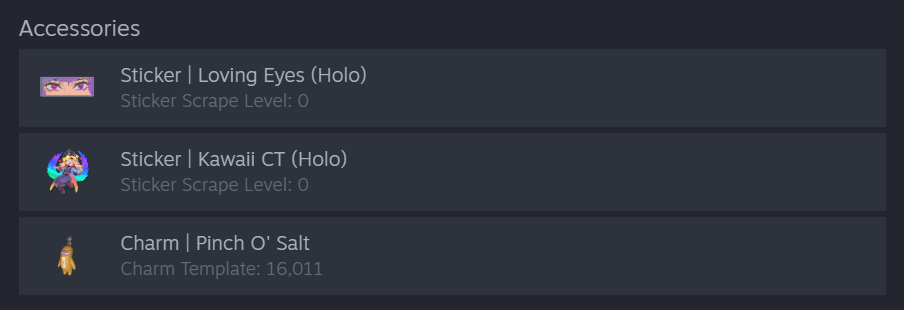
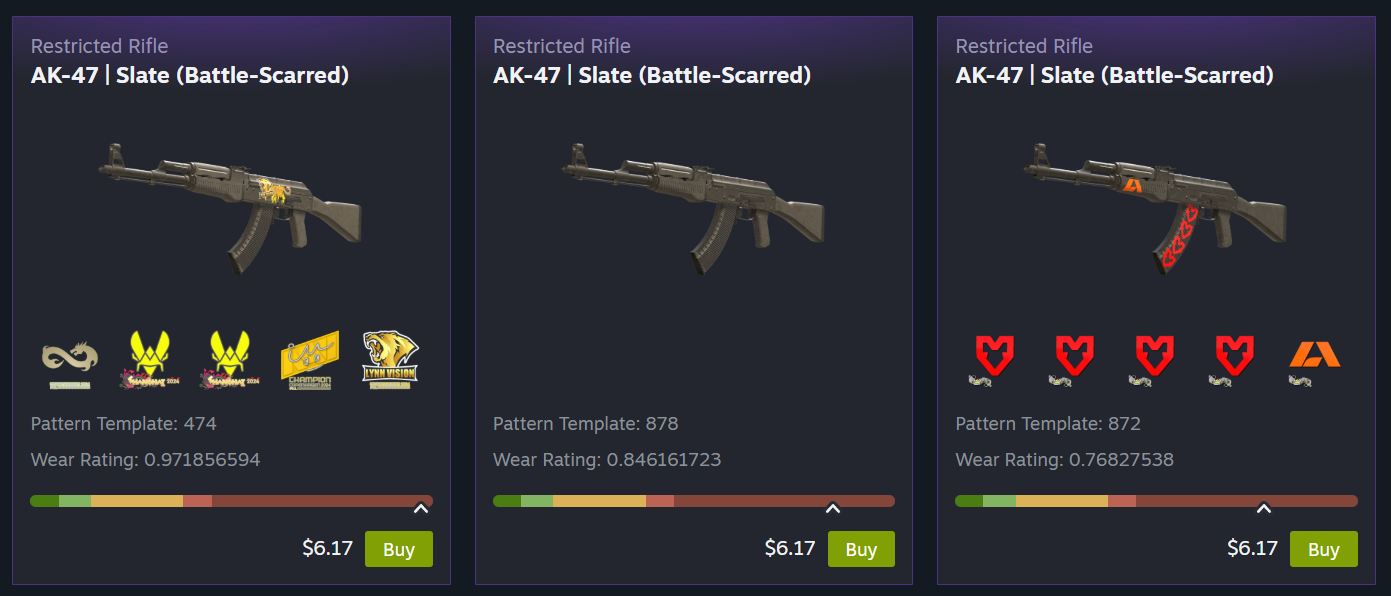
Sometimes you just need a bigger view, and now you get it! Listings can now feature more images, item descriptions, and callouts for listing specific information such as wear/float, pattern template, applied accessories, etc.

Counter-Strike players will immediately notice the new images generated specifically for that listing, rather than generic images, to showcase each item's unique features. No more having to fire up the game in order to make your purchasing decision. (Not just new listings! As part of our internal testing we generated over 27,000,000 unique images to backfill existing Counter-Strike listings.)

Once you narrow down to the desired item, you now get a larger listing view, and you can flip through all the matching results, making it easy to compare the variants of a skin in place.

Showcasing New Game-Specific Data

The Market now leverages all these new item details for better filtering, grouping, and visibility, making it easier for you to find what you want.

Accessories

With a better understanding of attached items like stickers and charms, we link directly to their Market listings. Additionally, we surface that information to show better images and current values.

Unique Properties

Games can now feature unique item properties on their listings. For Counter-Strike skins, that means a better view of things like pattern template, wear/float, and charm template.

(This additional data from Counter-Strike goes a long way toward making listings more accurate, but it's extra useful when bubbled up into the filter options. All games using Steam’s Inventory system — which includes most games on the Market — will automatically benefit from dynamic filters based on item data, with no additional work required from developers. Read more about dynamic filters below.)

Grouping Like Items into One Page

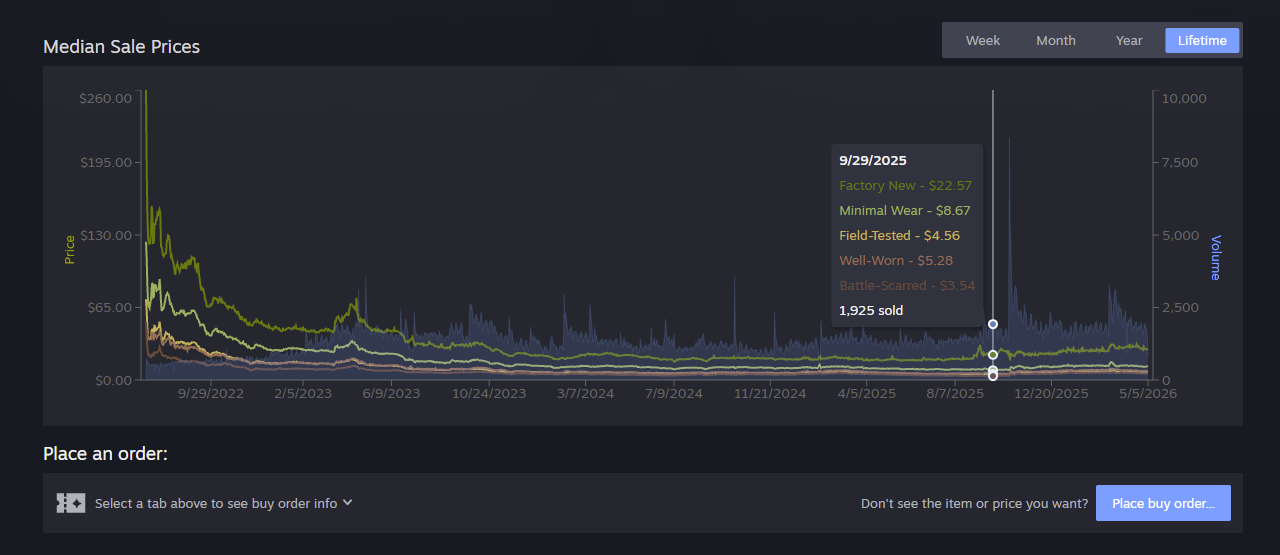
Many Market items are simply variations of the same base item, and we think it's easier to make your selection when you can easily compare them. For some Counter-Strike skins there might be 10 different versions of an item that vary based on one characteristic. When a game decides to group their items together you'll find a set of tabs that let you filter them quickly. For Counter-Strike skins you can use the tabs to get a price overview. Hover over the tab to preview that wear level, then click it to filter both the listings and the graph below.

General Improvements

Many of today's changes require no additional game-specific data to make the Market a better experience for all users and games. We think these updates will feel great across the board, whether you've come to window shop or you know exactly what you are looking for.

Item Pages

All the data mentioned above gets shown off on the updated item pages - which have a new, wider layout to accommodate a full-width grid of items for sale.

Here you can take advantage of additional category links, better graphs, and new dynamic filters. 

Scroll down to see the new listing cards with larger images, as well as asset and accessory info.

Improved Graphs

Graphs have also received an overhaul. In addition to many general usability and performance fixes, graphs now display volume data alongside price and can display multiple datasets for grouped items.

Making search more robust with dynamic filters

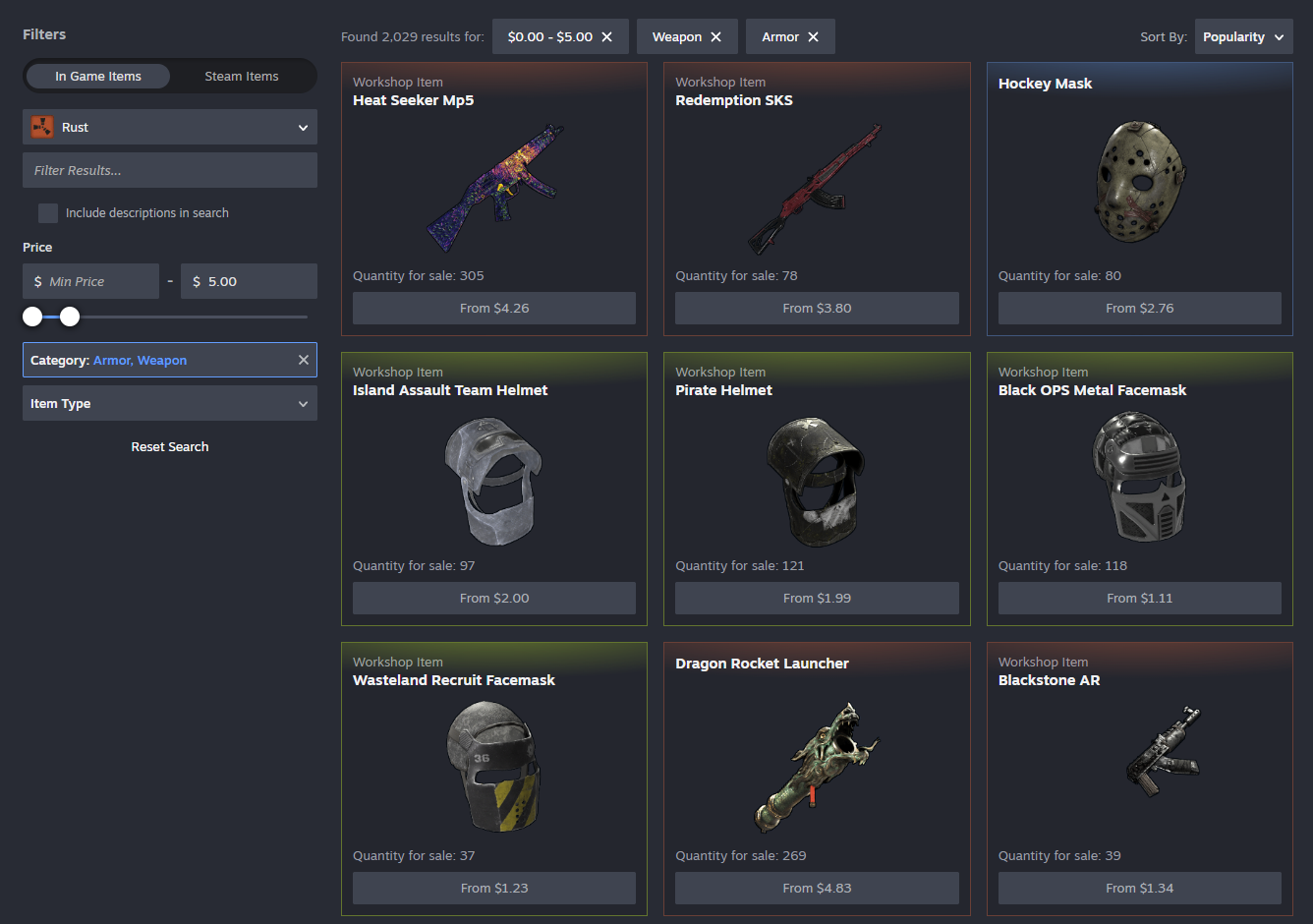
If you've used the Market lately, you've probably seen the new dynamic filters we've been beta testing. Those will now appear on both item pages and search pages alongside the new listing cards. Plus you'll see price filtering and new sorting options like popularity, price, quantity, etc.

These filters are built from existing item data, so you can filter (and sometimes search) against anything we know about. We've made searching and filtering faster - changing a filter immediately updates the displayed results (plus they automatically load more when you scroll.)

Steam Community Items

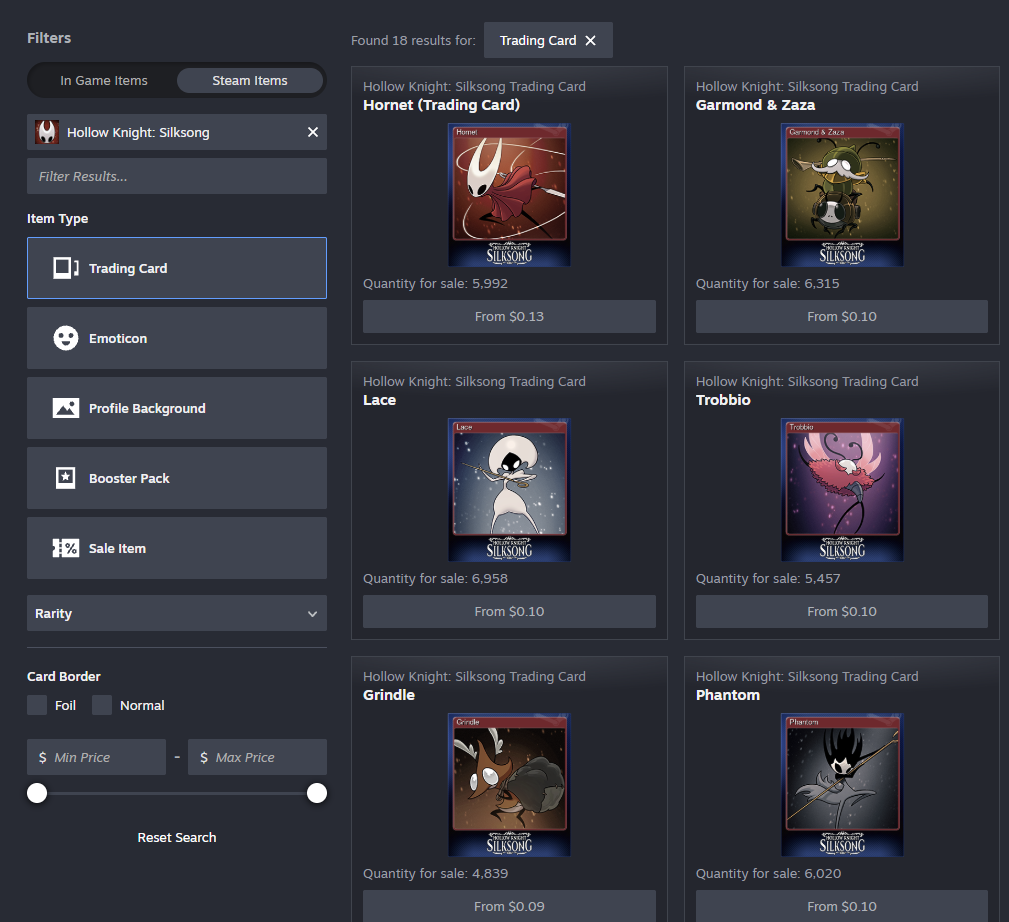
Now it's easier to switch between in-game items and Steam Community items. Buying and selling Steam Community items such as emoticons, trading cards, or profile backgrounds has been possible on the Market for years, but the relevant filters were hard to find. 

While you're browsing Trading Card Booster Packs, you might also notice we're starting to introduce cross-linking between containers and contained items.

These changes are available now, along with smaller quality of life updates such as automatic loading of listings while scrolling, broader access to advanced search from more page headers, breadcrumb navigation, and text entry support across long lists.

All of this work builds upon other features we've released over the past year including support for Trade Protected Items, game specific filters, price filtering, search autocomplete, and improving overall reliability.

Frequently Asked Questions

Where can I find the changes?

Today we're updating the Community Market's item pages and search results. We're learning as we go and this is a great point for us to gather feedback from players and game developers.

How can I join the beta?

You don't need to! We're enabling the Market beta for everyone. If you need to opt out, there's a button at the top of the item and search pages.

Where can I give feedback?

We're excited to hear what you think in the Steam Community Market discussions.

Left 4 Dead - Valve
An update has been released for Left 4 Dead:

- Fixed several exploits that could be used to crash servers or remote players.
Steam News - kaci

Sure, a fest all about deckbuilders might sound straightforward. But even just a quick glance at Steam Deckbuilders Fest (or even at the official trailer, above) tells you not all deckbuilders are the same.

Build a formidable deck and use it to lure humans into a haunted mansion. Restore a crumbling library in the 1930s. Collect mystical cards, build unique decks, even use your deck alongside dice: there's a deckbuilder for you no matter what kind you're looking for.

Join us now for Steam Deckbuilders Fest, on through May 11th at 10 a.m. Pacific. See you there!

Steam News - kaci

Find yourself immersed in medieval times playing the games we're celebrating on Steam this week: Steam Medieval Fest is April 20th through 27th, and there are discounts and demos of all kinds.

You can protect your crown; expand your dynasty; even run a tavern for travelers. There are many ways to play games that take place way back when: from open world survivals to adventures, city builders to sims, and more.

Join us now for Steam Medieval Fest, packed with discounts and demos through April 27th at 10 am Pacific on Steam.

Steam News - jennyj

Steam's Hidden Object Fest is live, and as you can tell from the trailer we've hidden (in plain sight) above, it's packed with discounts on games that require your keen eye.

Search through buildings, castles, rooms, piles, you name it: The objective is to find the object.

The Steam Hidden Object Fest, on now through April 13th. Go check it out now!

...

Search news
Archive
2026
May   Apr   Mar   Feb   Jan  
Archives By Year
2026   2025   2024   2023   2022  
2021   2020   2019   2018   2017  
2016   2015   2014   2013   2012  
2011   2010   2009   2008   2007  
2006   2005   2004   2003   2002