Steam News - Alden

Today we've made some changes to the set of official store tags available on Steam, adding 17 new tags, removing 28, and merging/updating a handful of others. These changes are made with the goal of helping players identify the games that best fit their interests, and helping Steam generate appropriate recommendations.

Each year, we typically add a few new tags based on community feedback, but it has been a while since we last did so (Most recently in 2024 when we added Dice, Dwarf, Boomer Shooter, and Elf tags). In the time since, we've built up a list of tags to add, remove, and update.

Store tags support recommendations and exploration

Tags help developers better describe their game to players, but also help Steam understand what kind of game it is and show it accordingly to players via recommendations. Tags are also the foundation upon which each of the store hubs are built, allowing players to find all of the games tagged with their favorite genre, theme, style, or other relevant context.

Tags can be applied to a game by the developer, by players with non-limited accounts, and also by Steam moderators. This means that a game's tags can shift over time as more customers play the game and contribute their perspective on what tags are most relevant for each game. Over time, the types of games that exist and the way customers look at games changes too - so today, we have a list of changes to our current set of tags. Read on for specifics.

New Tags

New tags are added when there are enough games on Steam that the tag could apply to, and when we think it helps establish a connection between games that couldn't already be attained through other combinations of tags. Some of these are content-specific, such as "Wolves" and "Zoo". Others represent broader genres such as "Bullet Heaven" and "Desktop Companion". And some tags cover specific game mechanics such as "Organizing" and "Decorating".

Here is the full list of tags added today:

  • Bullet Heaven - The opposite of Bullet Hell; Focus on upgrades while automatically attacking hordes of enemies

  • Desktop Companion - Games that only use part of your screen and keep you company while you do other things

  • Organizing - Tidy up, de-clutter, or unpack, carefully placing items in virtual spaces

  • Cleaning - Satisfying removal of grime and dirt from stuff

  • Decorating - Creative placement of furniture and other objects

  • Wuxia - Historical fantasy adventure featuring martial arts, competing sects, and inner qi

  • Xianxia - Fantasy adventure focused on cultivating supernatural powers and strength

  • Falling Blocks - Arranging, rotating, and placing blocks from above

  • Espionage - Spying or secretly securing valuable intel

  • Samurai - Japanese warriors best known for katanas, loyalty, and self-discipline

  • Zoo - Care for and display a park full of wild animals

  • Wolves - Also known as Canis Lupus

  • Capybaras - The largest and possibly most adorable rodent species

  • Animals - Cute and furry, or large and terrifying and everything in between

  • Cult - Small groups with extreme devotion to a person, thing, or belief

  • Poker - Draw, bet, and bluff

  • Language Learning - Learning and teaching new languages

Removed Tags

We haven't often removed tags from Steam, so we've built up quite a list. The set that we've removed today are done so because they no longer serve a good purpose for establishing connections between games or describing unique and useful elements of content in the game. Many of these tags have alternative options on Steam that better describe the content, and already have a high degree of overlap in application.

For example, both the "NSFW" tag and the "Mature" tag have a very high degree of overlap with more descriptive tags such as "Gore", "Violent", and "Sexual Content".

Some of the other tags that we are removing today are perhaps too subjective like "Well-Written" and "Masterpiece", resulting in disagreements and inconsistent application. Some tags just don't apply to very many products, such as "Drama" and "Ambient".

And lastly, there are a number of tags that apply to specific intellectual property, an attribute that community-sourced information like tags is not well suited for. These collections of intellectual property are typically already covered by the developers and publishers setting up franchise pages to collect together officially all the content shared by that IP.

Here is the full list of tags being removed:

  • 3D Vision

  • Ambient

  • America

  • Blood

  • Crowdfunded

  • Cult Classic

  • Documentary

  • Drama

  • Dungeons & Dragons

  • Electronic

  • Experience

  • Feature Film

  • Foreign

  • GameMaker

  • Games Workshop

  • Illuminati

  • Kickstarter

  • LEGO

  • Masterpiece

  • Mature

  • Movie

  • Narration

  • NSFW

  • Roguevania

  • RPGMaker

  • Warhammer 40K

  • Web Publishing

  • Well-Written

Modified Tags

We also have a set of tags that we've renamed or merged together to clean up some redundancy or to explain the content more clearly.

  • "Clicker" has been renamed into "Incremental" to capture the broader essence of games that focus on numbers going up.

  • "Conversation" has been renamed to "Dialogue Heavy" for clarity

  • We've made a few tags plural to match other tags: Dogs, Foxes, Vampires, Elves, Dwarves, and Assassins

  • "Pool" was humorously applied to games with a swimming pool, so we've renamed this to "Billiards", which is the overarching term for all games played with cue sticks anyway

  • Merging "Jet" into "Flight", as the term "Jet" was not unique enough.

  • Merging "Unforgiving" into "Difficult" since these terms mostly overlap in usage and intent

Frequently Asked Questions

Q. What do I do with this information?

A. If any of the newly added tags are of interest to you, feel free to explore the new store hubs to explore the relevant games. If you are aware of a game that should have one of these new tags and doesn't already, you can apply it yourself to help that game get categorized properly.

Q. How are tags applied to games?

A. User tags are applied by game developers in the process of preparing for release, and can also be applied by users to help fill in the gaps where games may be missing useful metadata. To add your own tag to a game, just visit the store page for a game and click the little "+" (Plus) symbol next to the list of tags that appear near the top of the page.

Q. What if I see a game tagged with something that is wrong or inaccurate?

A. Letting customers tag games directly adds a bunch of valuable data to the store. But yes, sometimes people deliberately mis-tag a game. If you see that, feel free to report it to Valve or the game developer- it's quick and easy for a developer to remove a tag if they need to do so. To report a tag you see, just visit the store page for a game and click the little "+" (Plus) symbol next to the list of tags that appear near the top of the page. That will open a pop-up with a list of tags. Just click the little flag that appears next to the tag you wish to report.

Q. What if I had marked as 'excluded' one of the tags that got merged or updated?

A. Your excluded tag should migrate with any changes, so that you're still ignoring the thing that you wanted. (FYI for those not familiar with excluding tags: You can exclude specific tags to filter them out of most places across the Steam store. Just visit your store preferences and scroll down to "Tags To Exclude")

Q. Why isn't my favorite tag on this list?

A. We are not all-knowing, so we sometimes miss stuff. Let us know in the comments. We also don't agree with the appropriateness of every tag that the community advocates for, so we may be unable to add every tag that y'all want.

Q. What are the most common tags on Steam?

A. The "Singleplayer" tag wins by being applied to over 98,000 games (about 62% of all games on Steam). The runner up is the "Indie" tag, which is applied to more than 82,000 games (about 53% of all games on Steam). Then "Action", "Casual", and "Adventure" in that order.

Steam News - kaci

Do you get seasick? No? Great! Wait, yes? Also great—because being on or under the water during Steam Ocean Fest keeps you in the safety of your gaming chair the whole time.

You'll find discounts on games from adventurous to relaxing, and everywhere in between: Ocean explorations and shark encounters; pirate adventures and maritime battles; even underwater shooters and cozy tourist towns by the sea.

Join us now for Steam Ocean Fest, on through May 25th at 10 a.m. Pacific on Steam.

Steam News - Emilyk

Available in beta starting today, we're releasing major updates to the Steam Community Market to improve item pages, listings, and search/filters. The Community Market enables Steam players to buy and sell in-game and Steam Community items to each other. Over the past few years, the number of games participating in the Market has grown significantly. More than 13,000 games now have Steam Community items available on the Market, and more than 700 have in-game items. These game economies have outgrown the Market’s existing browsing and discovery tools, so it's time for an upgrade. Our newly expanded tools provide the Market with a deeper understanding of item data from games - so it's easier to learn about the unique features of items listed for sale, directly on Steam.

Since Counter-Strike items are popular in the Community Market (and a game we work closely with) we’ve used them to experiment and build out this extensive item integration, but we look forward to other games leveraging these same new features.

Here are some noteworthy upgrades:

Bigger, Better Listings

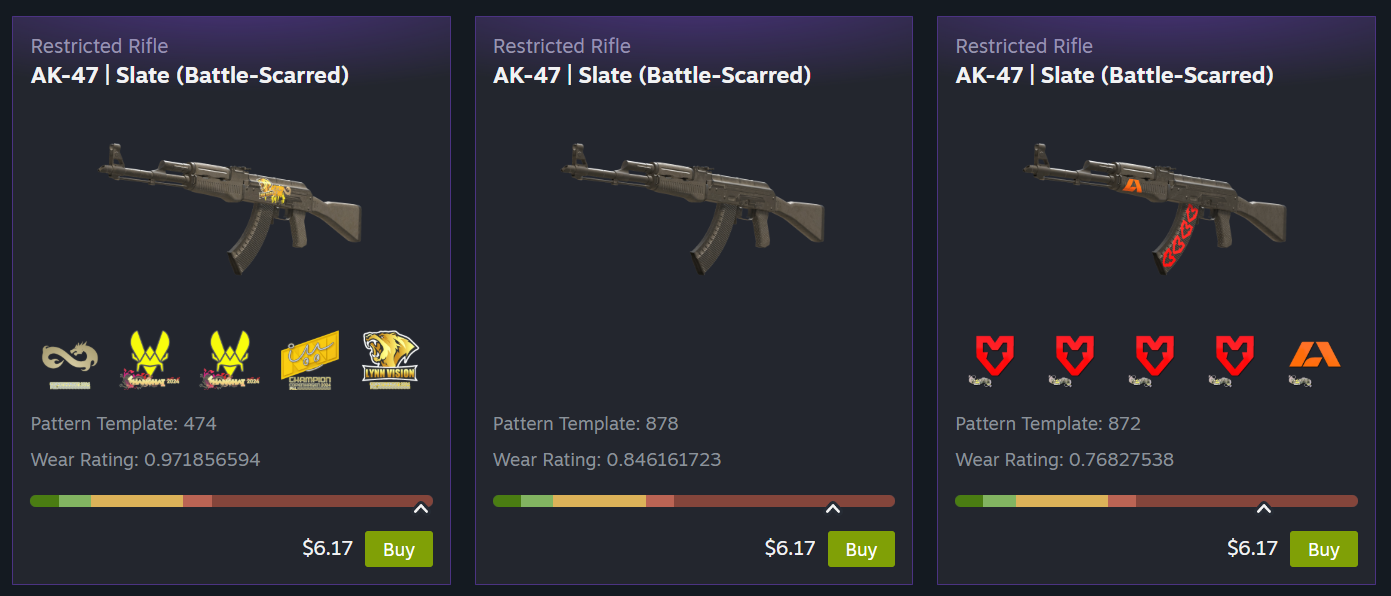
Sometimes you just need a bigger view, and now you get it! Listings can now feature more images, item descriptions, and callouts for listing specific information such as wear/float, pattern template, applied accessories, etc.

Counter-Strike players will immediately notice the new images generated specifically for that listing, rather than generic images, to showcase each item's unique features. No more having to fire up the game in order to make your purchasing decision. (Not just new listings! As part of our internal testing we generated over 27,000,000 unique images to backfill existing Counter-Strike listings.)

Once you narrow down to the desired item, you now get a larger listing view, and you can flip through all the matching results, making it easy to compare the variants of a skin in place.

Showcasing New Game-Specific Data

The Market now leverages all these new item details for better filtering, grouping, and visibility, making it easier for you to find what you want.

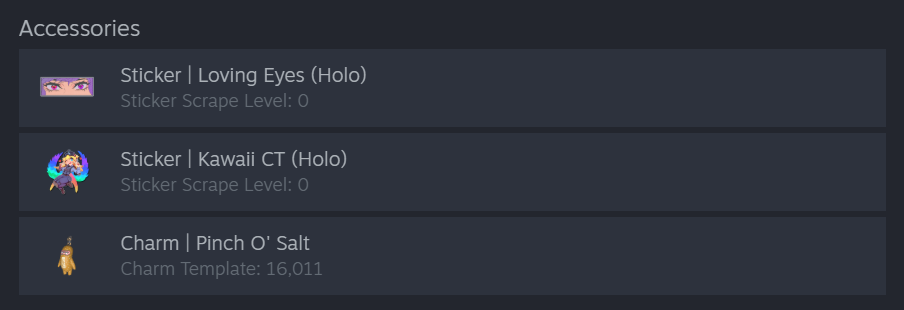
Accessories

With a better understanding of attached items like stickers and charms, we link directly to their Market listings. Additionally, we surface that information to show better images and current values.

Unique Properties

Games can now feature unique item properties on their listings. For Counter-Strike skins, that means a better view of things like pattern template, wear/float, and charm template.

(This additional data from Counter-Strike goes a long way toward making listings more accurate, but it's extra useful when bubbled up into the filter options. All games using Steam’s Inventory system — which includes most games on the Market — will automatically benefit from dynamic filters based on item data, with no additional work required from developers. Read more about dynamic filters below.)

Grouping Like Items into One Page

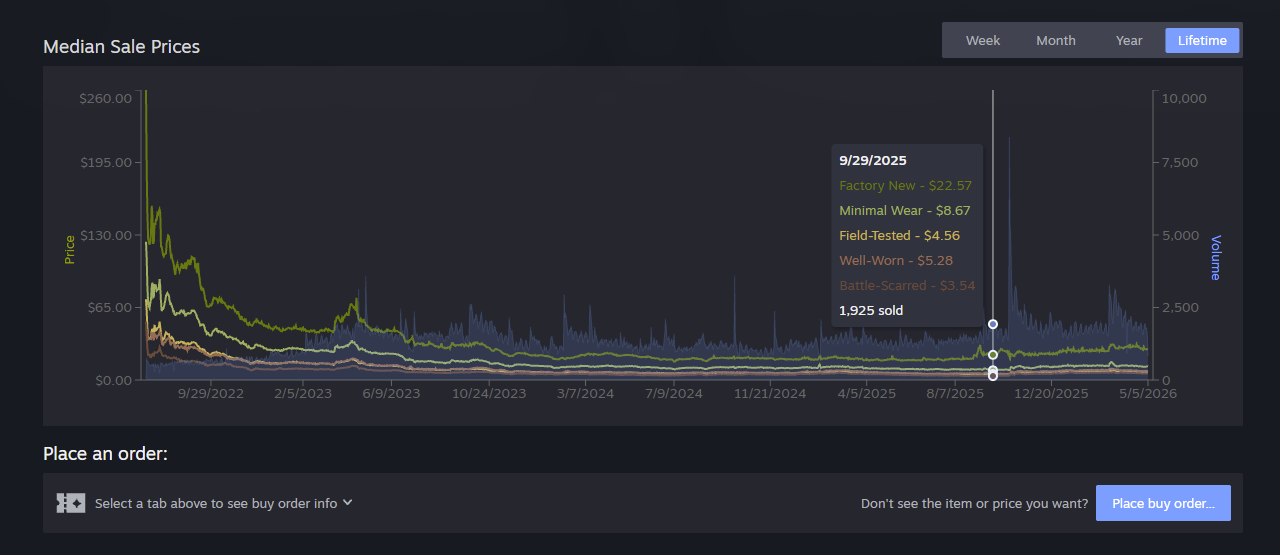
Many Market items are simply variations of the same base item, and we think it's easier to make your selection when you can easily compare them. For some Counter-Strike skins there might be 10 different versions of an item that vary based on one characteristic. When a game decides to group their items together you'll find a set of tabs that let you filter them quickly. For Counter-Strike skins you can use the tabs to get a price overview. Hover over the tab to preview that wear level, then click it to filter both the listings and the graph below.

General Improvements

Many of today's changes require no additional game-specific data to make the Market a better experience for all users and games. We think these updates will feel great across the board, whether you've come to window shop or you know exactly what you are looking for.

Item Pages

All the data mentioned above gets shown off on the updated item pages - which have a new, wider layout to accommodate a full-width grid of items for sale.

Here you can take advantage of additional category links, better graphs, and new dynamic filters. 

Scroll down to see the new listing cards with larger images, as well as asset and accessory info.

Improved Graphs

Graphs have also received an overhaul. In addition to many general usability and performance fixes, graphs now display volume data alongside price and can display multiple datasets for grouped items.

Making search more robust with dynamic filters

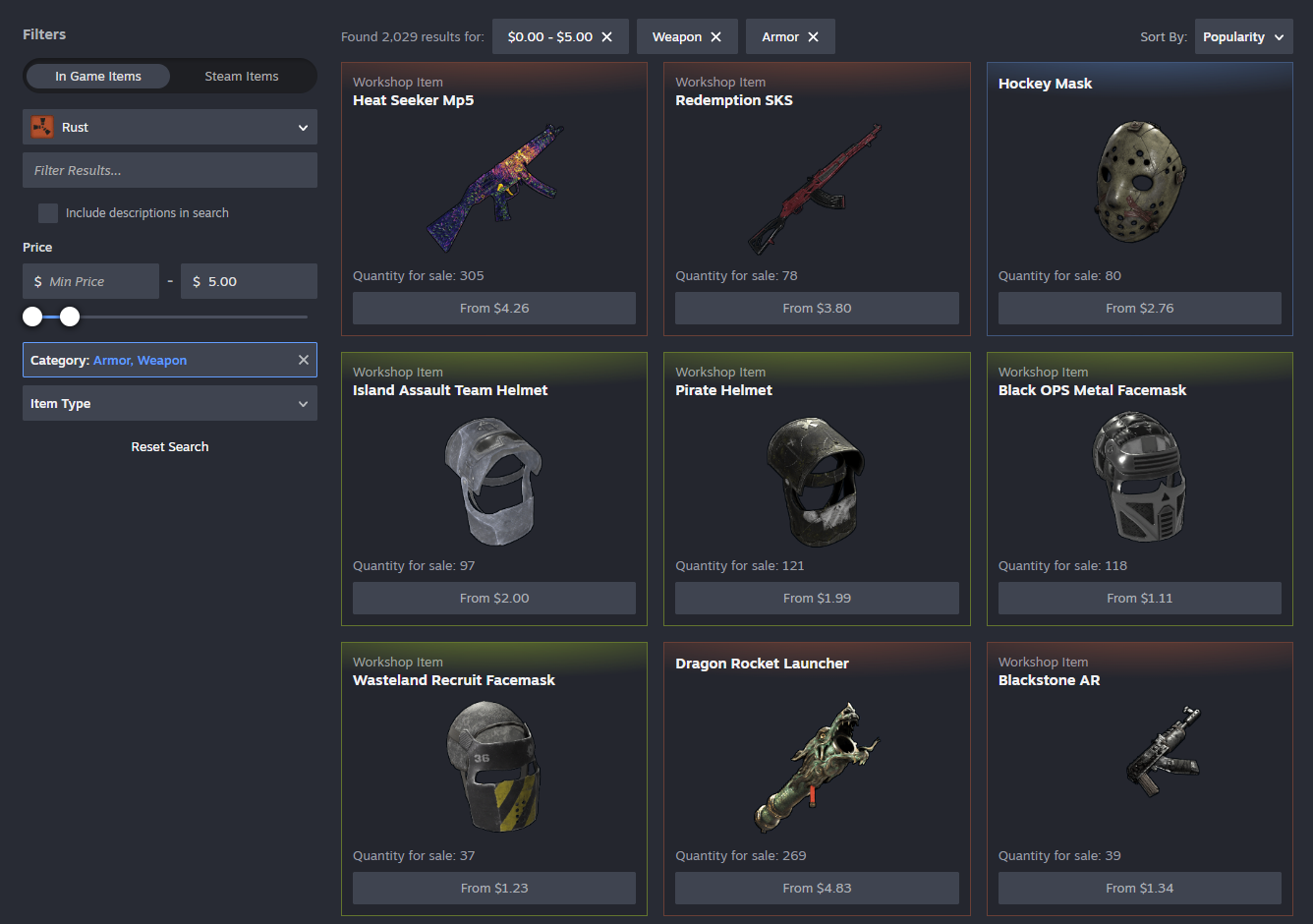
If you've used the Market lately, you've probably seen the new dynamic filters we've been beta testing. Those will now appear on both item pages and search pages alongside the new listing cards. Plus you'll see price filtering and new sorting options like popularity, price, quantity, etc.

These filters are built from existing item data, so you can filter (and sometimes search) against anything we know about. We've made searching and filtering faster - changing a filter immediately updates the displayed results (plus they automatically load more when you scroll.)

Steam Community Items

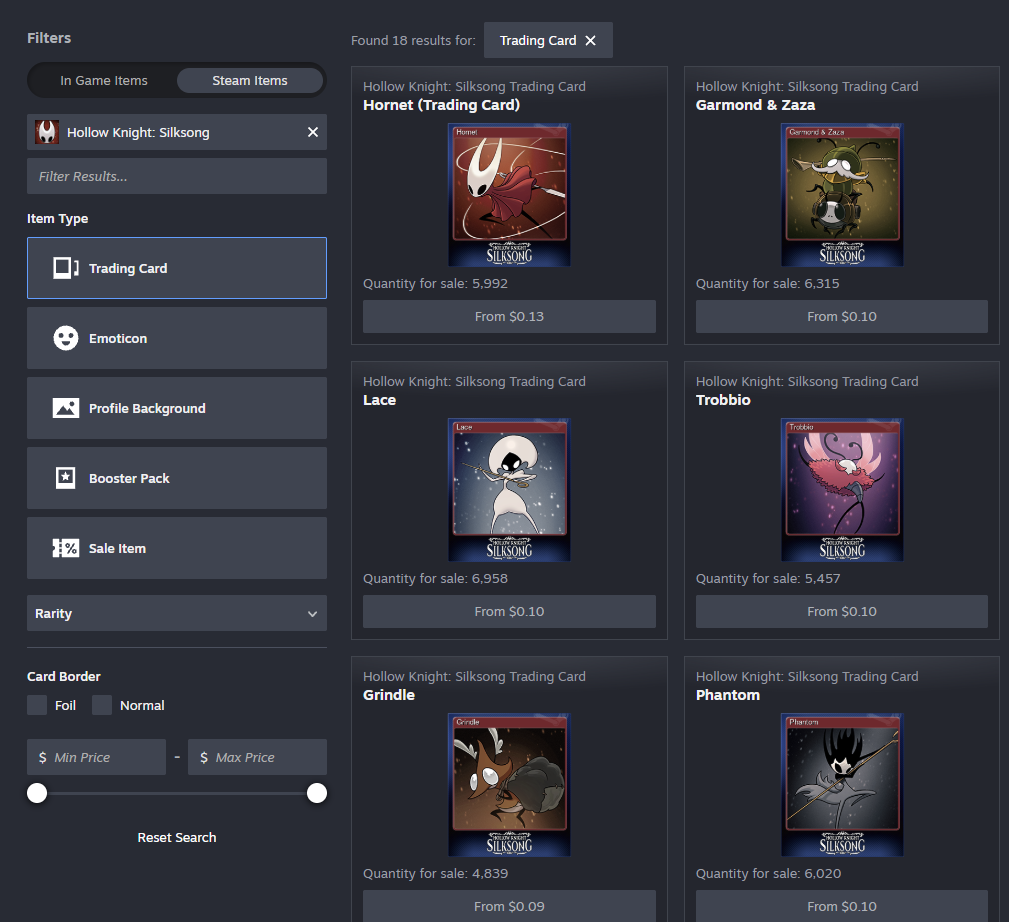
Now it's easier to switch between in-game items and Steam Community items. Buying and selling Steam Community items such as emoticons, trading cards, or profile backgrounds has been possible on the Market for years, but the relevant filters were hard to find. 

While you're browsing Trading Card Booster Packs, you might also notice we're starting to introduce cross-linking between containers and contained items.

These changes are available now, along with smaller quality of life updates such as automatic loading of listings while scrolling, broader access to advanced search from more page headers, breadcrumb navigation, and text entry support across long lists.

All of this work builds upon other features we've released over the past year including support for Trade Protected Items, game specific filters, price filtering, search autocomplete, and improving overall reliability.

Frequently Asked Questions

Where can I find the changes?

Today we're updating the Community Market's item pages and search results. We're learning as we go and this is a great point for us to gather feedback from players and game developers.

How can I join the beta?

You don't need to! We're enabling the Market beta for everyone. If you need to opt out, there's a button at the top of the item and search pages.

Where can I give feedback?

We're excited to hear what you think in the Steam Community Market discussions.

Left 4 Dead - Valve
An update has been released for Left 4 Dead:

- Fixed several exploits that could be used to crash servers or remote players.
Steam News - kaci

Sure, a fest all about deckbuilders might sound straightforward. But even just a quick glance at Steam Deckbuilders Fest (or even at the official trailer, above) tells you not all deckbuilders are the same.

Build a formidable deck and use it to lure humans into a haunted mansion. Restore a crumbling library in the 1930s. Collect mystical cards, build unique decks, even use your deck alongside dice: there's a deckbuilder for you no matter what kind you're looking for.

Join us now for Steam Deckbuilders Fest, on through May 11th at 10 a.m. Pacific. See you there!

Steam News - kaci

Find yourself immersed in medieval times playing the games we're celebrating on Steam this week: Steam Medieval Fest is April 20th through 27th, and there are discounts and demos of all kinds.

You can protect your crown; expand your dynasty; even run a tavern for travelers. There are many ways to play games that take place way back when: from open world survivals to adventures, city builders to sims, and more.

Join us now for Steam Medieval Fest, packed with discounts and demos through April 27th at 10 am Pacific on Steam.

Steam News - jennyj

Steam's Hidden Object Fest is live, and as you can tell from the trailer we've hidden (in plain sight) above, it's packed with discounts on games that require your keen eye.

Search through buildings, castles, rooms, piles, you name it: The objective is to find the object.

The Steam Hidden Object Fest, on now through April 13th. Go check it out now!

Steam News - jays

We're giving the Steam store home a refresh, and you can try it out now by opting into the latest Steam beta within your desktop client.

The updated design is our latest work in making improvements across the Steam store, like the game page updates we made a few months ago. The new layout aims to make it even easier for you to find new games by displaying more content and information. We're now displaying higher resolution game art for better visual clarity. Those of you with higher resolution monitors will notice the new store home is wider and more responsive. If you're viewing the store home on Steam Deck or in Big Picture mode you'll also see these updates.

Updates

  • Overall Design Refresh: Over the years we've introduced new sections and added new ways for you to discover and learn about games, and this update aims to make the store home feel more cohesive. Each section has a distinct set of tools and information to give users many ways to explore the diverse catalog of games on Steam. A goal of this visual refresh is to strike a balance between providing more consistency in UI elements, while allowing the unique nature of each section to show through.

  • Featured & Recommended: There is now more detailed information highlighting the reason a game is being recommended to you; plus a user review round-up.  When hovering over a game's cover art, the game's micro-trailer will play for a quick peak at the action. We also added a sneak-peek of the adjacent games in the carousel.

  • Option to disable: Micro-trailer hovers and animated marketing assets can be disabled in Store Settings for users with motion sensitivity.

  • Discounts & Events: Now uses larger game artwork.

  • Updated Discovery Queue: A quicker way to browse titles in your Discovery Queue without leaving the page.

  • Better Hover States: A short description is presented along with other relevant information. The UI is updated to provide better contrast and legibility. 

  • Infinite Scroll: Refreshed design to bring this part of the store home in line visually and functionally with the rest of the sections.

New Sections

  • Your Wishlist: This section, as you might guess, features games on discount from your wishlist. 

  • DLC for Your Games: This section will feature DLC that's on discount for games from your library.

About the beta

We're constantly looking to make Steam better, and we make decisions based on data and feedback we receive. The Steam Client Beta is a great way to test features that are in-progress and provide impactful feedback.

Not participating in the Steam Client Beta? Here's how to join. Try out the new homepage and let us know what you think.

Steam News - jennyj

Welcome to your humble abode for the week—Steam House & Home Fest—featuring discounts and demos on games all about the home from now through April 6th at 10AM Pacific.

You'll be floored by all the ways you can make a home your own, whether interior decoration, cleaning, organizing, power-washing, renovating, or anything in between. Chores may be no fun in real life, but in these games, there's nothing quite so satisfying as having everything in its right place.

Steam House & Home Fest is in residence now through April 6th...don't sleep on it!

Steam News - kaci

No matter what your favorite kind of game may be, this is a great time to shop for deals in the Steam Spring Sale. View the trailer above for a quick glance at the wide range of themes and genres you’ll find; or just stop reading this blog post right now and head straight to the sale itself!

The Steam Spring Sale is our first store-wide seasonal sale of the year, and the discounts are, much like the pollen seeping into our noses this time of year, everywhere. But in a good way!

Join us for the Steam Spring Sale, on now through March 26th at 10 a.m. PT on Steam.

...

Search news
Archive
2026
May   Apr   Mar   Feb   Jan  
Archives By Year
2026   2025   2024   2023   2022  
2021   2020   2019   2018   2017  
2016   2015   2014   2013   2012  
2011   2010   2009   2008   2007  
2006   2005   2004   2003   2002