Create pixel-art RPG characters, portraits, and 100 animations. Sculpt and paint sprites, reshape and paint animation frames, then export for RPG Maker and Godot,Unity.

Sign in to add this item to your wishlist, follow it, or mark it as ignored

This game is not yet available on Steam

Planned Release Date: Nov 30, 2026

This application will unlock in approximately 7 days

Interested?
Add to your wishlist and get notified when it becomes available.
 

About This Software

The software is translated into 29 languages.

License

Visual assets generated with Eltaros may be freely used in your games, whether free or commercial, provided that you include the following credit:

Sprites et éléments visuels générés avec Eltaros par Erophenice.

Reselling or redistributing the software, its code, or raw resources (asset packs, image libraries, individual files) is prohibited. Further details can be found in the End User License Agreement (EULA) included with the software.

10 Main Tools, 39 Built-in Tools

1. Character Creator. Build a character using layers: body, face, hair, clothing, accessories, and colors. Randomize (Ctrl+R) generates a complete character in your chosen style: warrior, mage, pirate, monster, and more.

  • Automatic fitting: Clothing cuts are selected to match the chosen body.

  • Automatic head positioning: The head is positioned on the neck separately for each direction, even when placing a child's or animal's head on an adult body (a neck is added if necessary).

  • Matching front and back hair: The back section of the hairstyle is positioned automatically and placed behind the body.

  • Fully automatic / Fully manual: Every automatic adjustment can be disabled for manual control.

2. Generate. Create new character parts. Brain mode draws an entire character (sprite and portrait) in your chosen style. Fusion mode blends two source parts, with the mixing ratio controlled by a slider.

  • Manga, chibi, or heroic body proportions.

  • Facial customization: Expression, eye shape, color and size, eyebrows, mouth, and number of hair strands.

  • A generation seed number always produces the same result, allowing you to reproduce a creation exactly.

  • Parts you choose to keep are added to your library and can be used like any other part, expanding the existing catalog of 5,000 elements.

  • Outfit compatibility check: Armor, shoes, and accessories are checked with every generation.

  • Portrait only: Hides the sprite so you can work on the portrait at a larger size.

  • Anime hair (strands): Hairstyles with individual strands and bangs that can be parted to reveal the eyes.

3. Sprite Workshop (Ctrl+T). Modify one part of the character, and the entire associated group follows (clothing, accessories, hair). Your modifications remain applied even when you subsequently change outfits or hairstyles.

  • Edit: Adjust the size, width, height, rotation, and transparency of an area; position it in front of or behind other layers (such as placing a cape behind the body).

  • Deform: Sculpt parts as if they were clay (grab, push, inflate, pinch, swirl, smooth), in one direction or all four, with automatic symmetry.

  • Paint: Pencil, eraser, eyedropper, paint bucket, and symmetry. Paint follows the walking animation and is mirrored between left and right.

  • Tint: Color an area with your chosen hue; one click restores the original colors.

  • Change body shape: Create a large head, giant, dwarf, or broad-shouldered build with one click, or randomize body proportions.

  • Clean pixels: Remove isolated pixels and fill gaps.

  • Duplicate and Flip (mirror): Copy a modification or mirror an area.

  • Cut and paste a piece: Take a section from another part or from a PNG image on your computer and paste it onto the character.

  • Finishing touches: Outlines, automatic relief shading, limited color palettes, overall tint, saturation, brightness, and contrast.

4. Portrait Workshop. Retouch generated portraits (native resolution: 288 × 288) for dialogue and menus.

  • Brushes and Brush Symmetry: Anything painted on one side is automatically copied to the other.

  • Lock Transparency: Paint only on pixels that already exist.

  • Protected Areas: Displayed in color, these areas remain unchanged during editing.

5. Gallery (Ctrl+G). 100 examples per style. Locks preserve selected features of your character (head, colors, body shape) while everything else changes.

6. Animation Library. 100 movements across 10 categories: movement, obstacle traversal, balance, objects and physical effort, acting, stylized combat, acrobatics, dancing, magic, and professions and scenes.

Animations are automatically applied to your character, with adjustable speed and a demonstration environment (floor, wall, rope).

7. Workshop — Painting and Deforming Animations. Edit animations frame by frame, including key moments (support, jump, impact).

  • Paint: Paint attached to a character part, following it through every movement, or edit an individual frame.

  • Opacity Keyframes: Make painted details fade in and out during an animation (a flash, an aura).

  • Deform / Poses and Contacts: Correct a body part using keyframes, with smooth, linear, or stepped transitions. A foot can be locked in place to prevent it from sliding across the ground.

  • Part Sculpting: Deform a part (clothing, hair) using handles, anchor points, and a mask.

  • Adjust: Recolor a part while preserving its shadows, midtones, and highlights, or replace a single color everywhere.

  • Neighboring Frames: Display previous frames (red) and following frames (blue) transparently to track movement.

  • Joints: Display the character's joints and their names.

  • Lasso: Copy, mirror, or rotate a selected area.

8. Import (Ctrl+I). Import any PNG image, regardless of its size, and automatically split it into the 144 × 192 RPG Maker MV format.

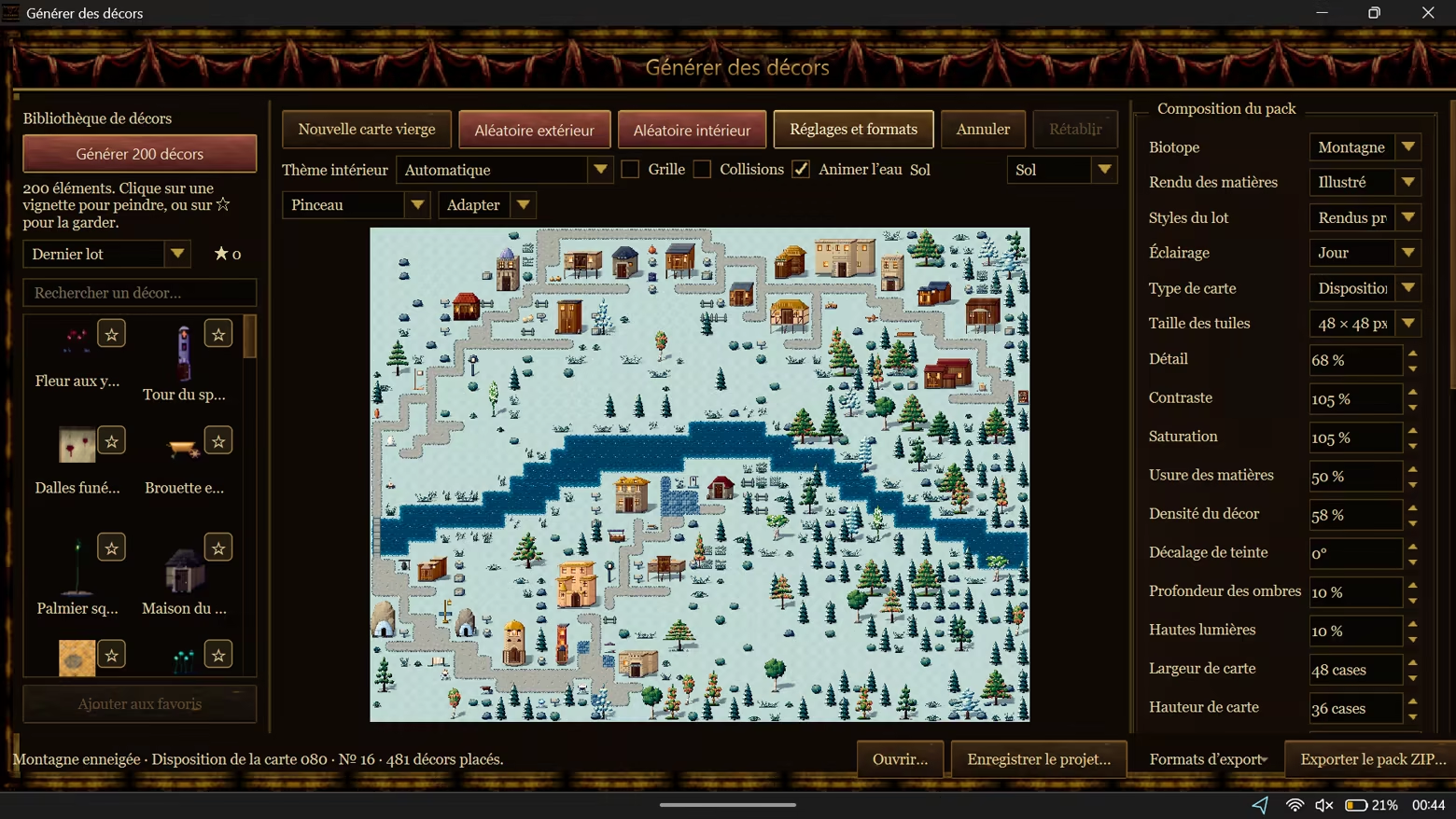
9. Generate Environments. Create complete 2D maps, both outdoor and indoor, from 16 to 96 px. Each generated map includes connected paths, rivers, bridges, districts, and scenery suited to its biome.

  • Random outdoor generation: 64 biomes × 1,986 layouts = 127,104 combinations, with approximately 560 objects per map (48 × 36).

  • Random indoor generation: 96 room types (taverns, shops, temples, castles, horror settings), approximately 410 objects, with rooms connected by doors.

  • Large-scale structures and environments: 1,200 castles, 600 mansions, 462 forts, 1,600 farms, 2,000 districts, 1,500 natural sites (cliffs, waterfalls, lakes, volcanoes, caves), and 300 bridges. Each is available in five sizes, selected automatically based on the map or manually.

  • Historical periods and settings: Medieval, Ancient, Renaissance and Pirates, Steampunk, Modern, Post-apocalyptic, and Galactic, each with its own horror variant. Buildings, districts, and objects match the selected setting.

  • Generate 200 environments: Create a consistent batch matching the biome, historical period, and atmosphere.

  • Similar Variant: Generate a variation of the selected environment with the same color palette, footprint, and collisions.

  • Interior of This Building: Create rooms corresponding to the selected building's exterior.

  • Brush, Fill Area, Erase Object, Eyedropper, New Blank Map: Freely edit maps manually.

  • Total: 73,074 archetypes, 276 million distinct designs, and 18.4 × 10¹⁸ possible maps.

10. Export (Ctrl+E). Export RPG Maker character sheets (charsets) and face sheets (facesets), front-facing characters, four directions, walking sprite sheets, portraits, PNG sheets, separate images, GIF, APNG, JSON atlases, and integrations for Godot 4, Unity 2D, and RPG Maker MV / MZ.

For environments, parallax mapping is exported in separate layers: ground, shadows, low objects, upper layer (allowing characters to walk behind roofs and trees), lighting, and passability.

An RPG Maker map file, Godot scene, and Unity prefab are provided, with collision data included.

Updates

The software will continue to receive regular updates for several years, according to my own schedule.

Demo

All features are available. The only restriction is that you can export once; after that, no further exports are possible in the demo.

The demo is intended for evaluating the software, not for actual production use.

Tested Game Engines

I have personally tested the software with RPG Maker MV and Godot, and it works. I have not yet tested it with MZ or Unity, but exports and animations should work in the same way. If you encounter a problem, contact me: I will fix it and keep you informed.

For RPG Maker MV and MZ, the EltarosMotion plugin is included free of charge when exporting. It bypasses the engine's three-frame limitation, allowing animations containing 500 to 2,000 frames.

In the export browser, select your project's root folder (ideally located in Documents or Downloads): the software will automatically organize all files. Enable the plugin, create an event, and display the animation.

System Requirements

    Minimum:
    • OS *: WINDOWS 7,8,9,10
    • Processor: intel Core i3
    • Memory: 4 GB RAM
    • Graphics: DirectX9
    • DirectX: Version 9.0
    • Storage: 2 GB available space
* Starting January 1st, 2024, the Steam Client will only support Windows 10 and later versions.