Play your own copies of Epic Pinball, Silver Ball, Silver Ball 2 Plus and Extreme Pinball in a new front end: the whole table on one tall screen with no scrolling, 2-4 players online or on your home network, and a full virtual pinball cabinet mode. The games are not included.

Sign in to add this item to your wishlist, follow it, or mark it as ignored

This game is not yet available on Steam

Planned Release Date: Dec 10, 2026

This game plans to unlock in approximately 3 weeks

Interested?
Add to your wishlist and get notified when it becomes available.
 

About This Game

PinDOS is a free front end for four classic DOS pinball games: Epic Pinball, Silver Ball, Silver Ball 2 Plus and Extreme Pinball. That's 24 tables, played exactly as the originals play them, in ways the originals never could: the whole table on one tall screen, with friends over the internet, and on a real virtual pinball cabinet.

The games are not included. PinDOS is the front end; you bring your own copy of each game you want to play. One is enough to start. See "Getting your games" below.

The whole table, no scrolling

The originals show a 4:3 window that scrolls up and down the table. PinDOS can show the whole table at once, top to bottom: on any monitor, and it's at its best on a portrait monitor or a cabinet's playfield screen. Prefer the original scrolling view? It's still there: switch to it in the settings.

The same tables, the same rules

Every table plays just as it did in the '90s: the original rules, scoring, physics and timing, quirks and all. PinDOS adds things around the tables and never changes how a table plays. Each game's own menus and options are there too, and your old DOS high scores come along. A save slot can start from your old high-score file and carry on from there; the file itself is never changed.

Play with friends

2 to 4 players, each on their own PC, over Steam or your home network. In the '90s, a multi-player game meant taking turns at one keyboard. In PinDOS, the host picks the table and the number of balls, everyone readies up, and each player takes their turn on their own PC while the others watch it in real time.

  • Invite Steam friends, or join a friend who's hosting

  • Chat, quick lines, a "you're up" card and a live scoreboard

  • Everyone types their own initials for a high score

  • A match's high scores go into the save slot the host picked

Each player needs their own copy of the game being played.

Cabinet mode

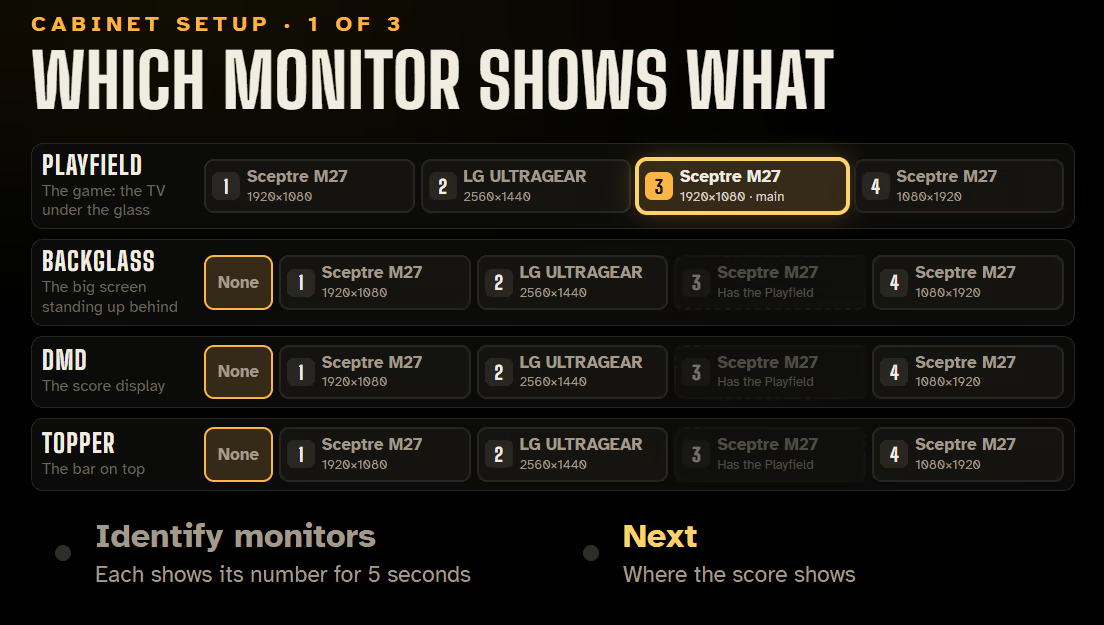
Built for virtual pinball cabinets: the playfield, backglass, DMD and topper each on their own monitor, the playfield turned whichever way your cabinet needs.

  • Your cabinet's real plunger: the plunger on screen moves one to one with yours as you pull it back and let go

  • Nudge the table with your cabinet's nudge buttons or its accelerometer

  • Your cabinet's own buttons for the flippers, Launch, Start and Back

  • A backglass with the table, the high scores and every player's score

  • The table's own score display on the DMD

  • Volume and your own backglass pictures

Attract mode

Every table on a wheel, each playing its own demo with its high scores. Pick one and play; after the game comes a results screen where each high score's initials are entered, then it's back to the wheel.

Also

  • Three save slots per game, each with its own high-score tables

  • Picture and sound settings; full screen, borderless or windowed, on any monitor

  • An operator menu for everything: picture, sound, controls, cabinet

  • English and Russian (the original games' own screens stay as the games draw them)

  • Everything lives in one folder.  Copy it to your cabinet and your setup comes along


Getting your games

PinDOS needs your own copy of at least one of these games. Any game you don’t have yet simply shows INSERT GAME.

  • Epic Pinball (13 tables): sold today on GOG as “Epic Pinball: The Complete Collection”. If you’ve installed it from GOG, PinDOS finds it for you.

  • Silver Ball (5 tables): your own copy of the full version.

  • Silver Ball 2 Plus (7 tables, Warbot and Duel included): your own copy.

  • Extreme Pinball (4 tables): your own copy of the full game.

Still have your copy from back in the day? A game folder from an old PC works, and so do the original floppy disks or CD once the game is installed from them (DOSBox can run the old installer). PinDOS checks your files against the versions it was made and tested with, and tells you if yours are different. Shareware versions aren’t enough: PinDOS plays the full games.

Setting up a game 

  • Start PinDOS and choose a game showing INSERT GAME.

  • Choose “Find my ... folder” and pick your game’s folder (the one with PINBALL.EXE, SILVER.EXE or MAIN.EXE). Its files are copied into PinDOS’s folder; your own folder is only read.

  • The game lights up on the menu. Pick it and play.

Or copy the files in yourself: in Steam, right-click PinDOS, then Manage, then Browse local files, open the games folder, and put them in epic, silver, silver2 or extreme.

Controls

Left and Right Shift (or the arrow keys) flip, Space is the plunger (hold to pull, let go to launch), Z and / nudge. In cabinet mode you set up your cabinet's own buttons, keyboard encoder or controller buttons.

About PinDOS

PinDOS is an unofficial, free fan project. It is not affiliated with or endorsed by the makers or publishers of Epic Pinball, Silver Ball, Silver Ball 2 Plus or Extreme Pinball; the games and their names belong to their owners. PinDOS contains none of their files: no program, picture, sound or music. Please don't share the games' files.

AI Generated Content Disclosure

The developers describe how their game uses AI Generated Content like this:

I used AI tools to help build PinDOS: its program code, its menu and help text, the Russian translation, and the store page text. The design and testing are my own. The pinball itself is not AI-generated: every table and all of its art, sound and music come from your own copy of the original games, and nothing is generated by AI while you play.

System Requirements

    Minimum:
    • Requires a 64-bit processor and operating system
    • OS: Windows 10 64-bit
    • Processor: Dual-core 2 GHz (Intel Core i3 / AMD Ryzen 3 or better)
    • Memory: 4 GB RAM
    • Graphics: Any DirectX 11 graphics, integrated is fine
    • DirectX: Version 11
    • Storage: 500 MB available space
    • Additional Notes: Needs your own copy of at least one of the games (not included). Keyboard, or a virtual pinball cabinet’s buttons.
    Recommended:
    • Requires a 64-bit processor and operating system
    • OS: Windows 10 or 11 64-bit
    • Processor: Quad-core (Intel Core i5 / AMD Ryzen 5 or better)
    • Memory: 8 GB RAM
    • Graphics: Any DirectX 11 graphics card
    • DirectX: Version 11
    • Network: Broadband Internet connection
    • Storage: 500 MB available space
    • Additional Notes: A portrait (tall) monitor or a virtual pinball cabinet to see the whole table at once. Broadband for playing with friends online.