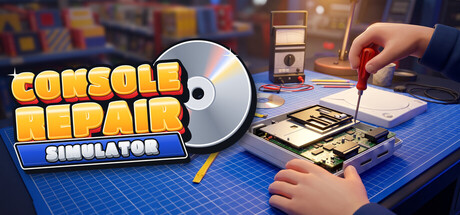
Inherit your uncle's dusty console shop on a Tokyo back street. Sell new hardware, haggle for used consoles, then open them up on the repair mat: unscrew every screw, find the fault, swap the part, power on. Restore, grade, resell, and turn the top floor into a 90s Game Saloon.

Sign in to add this item to your wishlist, follow it, or mark it as ignored

This game is not yet available on Steam

Coming soon

Interested?
Add to your wishlist and get notified when it becomes available.
 

About This Game

Your uncle's shop. Your repair bench.

Uncle Tetsu has left you the keys to his console shop on a quiet Tokyo back street. The shelves are thin, the workshop is dusty and the top floor is taped off. You have a little cash, a toolbox and one dead handheld on the bench.

Sell new consoles and games. Buy used ones from customers who may or may not be telling you everything. Fix what is broken, one screw at a time, and turn three cramped floors into the neighbourhood's favourite retro hangout.

Sell, buy and haggle

  • Run the counter. Stock the shelves from delivery boxes, set prices with the price gun (it shows cost, market price and margin) and ring customers up by card or by counting out the cash change yourself.
  • Buy used hardware. Customers bring in old consoles and games. Rotate the device, check its screws, run power, input and media tests, feel the weight, make sure it is complete.
  • Haggle for real. Every flaw you find is leverage. Each seller has a personality, a hidden bottom line and a limited patience: the attic cleaner, the broke student, the flipper who knows exactly what it is worth. Some will not mention the fault they already know about.
  • Know the risk. The counter tests only tell part of the story. Some faults only show up once the case is open on your bench.
  • Show off your best work. Put restored machines in the refurbished showcase and the street window, each with a condition grade on its card.

Repair, screw by screw

  • The repair mat. Sit down at the bench and the view drops to a top-down cutting mat. Rotate and zoom the device, lay the removed parts out around it and drop every screw into a magnetic tray.
  • A real order of work. Every part and every screw is its own object, and nothing comes off until what holds it is gone. If something is blocked, the game shows you what is in the way.
  • Four machines to open up. A handheld with a warranty seal, a CD home console with a laser and a power board, a 16-bit cartridge console with security screws, and a brick handheld with corroded battery contacts. Each has 13 to 23 parts and 14 to 19 screws.
  • Diagnose before you dismantle. Use visual inspection, power, input, media and audio tests and a multimeter to narrow down the fault before you replace anything. The catalogue holds 27 different faults, and you can set repair hints anywhere from Off to Full.
  • A proper toolbox. Screwdriver bits (Phillips, game bit, tri-wing), spudger, tweezers, magnifier, swab and isopropyl, brush, multimeter and soldering iron. Unlock the electric screwdriver to drive a whole tray of screws at once.
  • Hands-on fixes. Swab a dirty lens, brush oxidised cartridge pins, scrub battery corrosion, reflow a lifted solder joint, and bring yellowed plastic back to white with retrobright in the UV box.
  • The power-on moment. Reassemble, test it on the bench, hear the boot jingle, then read the before-and-after card with the final grade and what the machine is now worth.
  • Mistakes are cheap. Forget a screw and you lose points. Test a loose board and you get a harmless ZAP. Nothing blocks your progress.

Open the Game Saloon

The top floor is taped off with a "someday" sign. Earn it back and open a late-90s game cafe.
  • Booths and arcade cabinets. Sofa booths with a TV and a console, and a row of arcade cabinets. Customers sit down, play and pay by the hour at the token kiosk.
  • Try and Buy. Put a machine you restored into the Try and Buy booth. A customer who falls for it may take it home.
  • A shop that grows. Earn XP, level up and unlock new tools and repair skills as the shelves fill and the whole building comes to life.

90s nostalgia, played your way

  • Fictional hardware, familiar feelings. Kuroda, Hoshi and Vectra consoles on the shelves, and 16 invented game titles, every one with its own box, cartridge or disc case.
  • A chunky 90s look and sound. Bold primary colours, chrome and CD sparkle, lo-fi workshop beats, jazz-hop for the shop and chiptune for the Saloon.
  • The shop PC. Order stock and spare parts, check your price book and read Uncle's mails on a retro-style computer.
  • Play it your way. Mouse and keyboard or a gamepad, with rebinding. Hold-to-toggle, a relaxed clock, UI scale, reduced motion, reduced flashing and colour-safe grades are in the options.
  • Single-player. Text and interface in English.

Console Repair Simulator is a work of fiction. All companies, consoles, accessories, games and characters in it, including Kuroda, Hoshi, Vectra, PX Go, PX One, Super 16, PocketPal and every game title, are invented parodies. They are not affiliated with, authorised by or endorsed by any real console maker, publisher or brand, and no real logos or trademarks are used.

AI Generated Content Disclosure

The developers describe how their game uses AI Generated Content like this:

Generative AI tools were used during development to create some background artwork, to help write code (scripts), and for the logo. No AI generation happens while you play.

System Requirements

    Minimum:
    • OS: Windows 10 or 11, 64-bit
    • Processor: Intel Core i5-6400 / AMD Ryzen 3 1200
    • Memory: 8 GB RAM
    • Graphics: NVIDIA GeForce GTX 960 4 GB / AMD Radeon RX 560 4 GB
    • DirectX: Version 11
    • Storage: 8 GB available space
    • Sound Card: DirectX compatible
    • Additional Notes: 1080p, Low quality preset, 30 fps target.
    Recommended:
    • OS: Windows 10 or 11, 64-bit
    • Processor: Intel Core i5-9400F / AMD Ryzen 5 2600
    • Memory: 16 GB RAM
    • Graphics: NVIDIA GeForce GTX 1660 Super / AMD Radeon RX 5600 XT
    • DirectX: Version 11
    • Storage: 8 GB available space
    • Sound Card: DirectX compatible
    • Additional Notes: 1080p, High quality preset, 60 fps target. SSD recommended for faster loading. Gamepad optional.
Review Filters