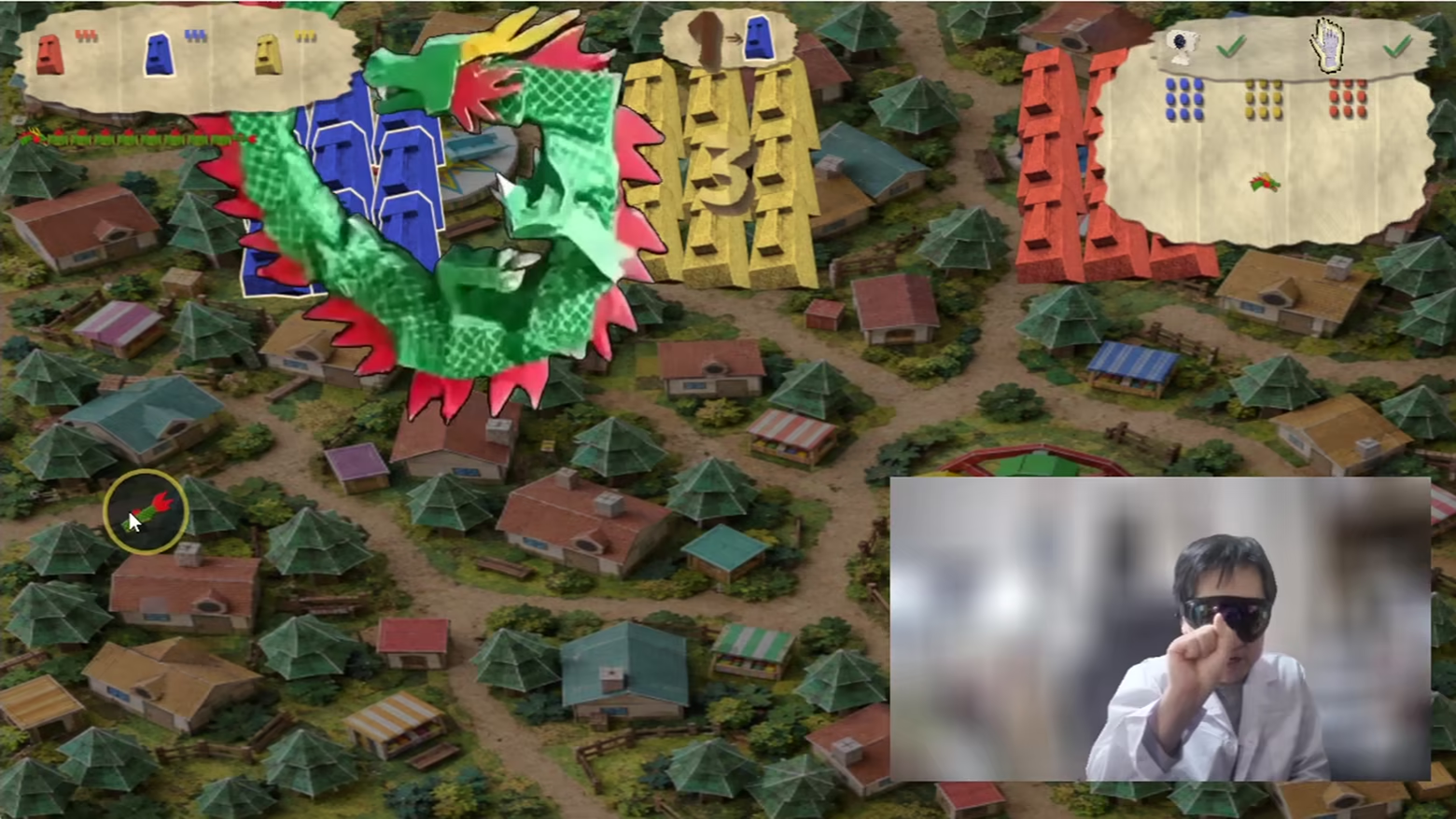
Whip a paper dragon's tail into Moai statues and send whole groups flying in same-colour chain reactions. Steer with your hand and a webcam, or play with a mouse. Fly through Edo-era Japan, prehistory and beyond in this papercraft arcade game.

Sign in to add this item to your wishlist, follow it, or mark it as ignored

Buy Battle SHIRYU

Buy SHIRYU & BATTLE SHIRYU BUNDLE (?)

Includes 2 items: Battle SHIRYU, ePaperCraft SHIRYU

34% off. $7.48 normally, discounted to $4.94
 

Reviews

“Gesture Controls With Only A Camera”
Hackaday — Feature (Nov. 10, 2026)

“A $5 game turns your ordinary webcam into a controller for a tail-whipping paper dragon”
LockerGnome — Feature (Nov. 11, 2026)

“Battle SHIRYU brings SHIRYU’s papercraft creatures to life”
Global by Design — guest article by Takahiro Yonemura (Oct. 15, 2026)

About This Software

Swing the dragon. Send the Moai flying!

Raise your hand in front of a webcam and the paper dragon follows. Swing it around and use the recoil to whip its tail into a crowd of Moai. Hit a group of the same colour and watch the chain reaction spread.

Make a fist and open your hand again to click. Lower your hand to pause, then raise it to get back to the action. You can play every stage with a mouse, too.

Chase the next chain through time

Fly from the present day through Edo-era Japan and back to prehistory, then see where the dragon takes you. Each stage gives you a new layout of Moai and obstacles. Steer around the tougher statues, line up your next swing and see how far you can keep the chain going.

Learn the moves as you play

Paper pictograms show you what to do. Leave the title screen idle for a moment and a tutorial starts automatically so you can see the controls in action. The interface supports 16 languages.

Paper pictogram showing an open hand, a webcam, and the paper dragon in a stage; hand movement can control the dragon.

A dragon 24 years in the making

In 2002, engineer Takahiro Yonemura, Ph.D., and his co-authors used a single camera to track fingertip and head movements. In 2026, he brought that idea back to steer a dragon through a world built around real paper models. Hackaday featured the game's camera controls and the research behind them.

Comparison of a 2002 CCD-camera study of finger and head recognition with a 2026 webcam hand-recognition demonstration.

Camera and mouse controls

  • Hand controls require a compatible webcam and camera access on Windows, macOS or Linux. Lighting and how your hand appears on camera can affect recognition.
  • Mouse controls are available throughout. Steam Achievements are available in the Windows version.

The Gaming Diary covered the Steam launch and highlighted how an ordinary webcam lets you steer the paper dragon with your hand.

AI Generated Content Disclosure

The developers describe how their game uses AI Generated Content like this:

Some visual assets and prerecorded animation sequences were created with generative AI tools, then selected and edited by the developer. The game does not generate content during play or connect to external AI services.

System Requirements

Windows
macOS
SteamOS + Linux
    Minimum:
    • Requires a 64-bit processor and operating system
    • OS: Windows 10 (64-bit)
    • Processor: 64-bit x86-64 processor (Intel or AMD)
    • Memory: 4 GB RAM
    • Graphics: DirectX 11-compatible integrated or virtual graphics; dedicated GPU not required
    • DirectX: Version 11
    • Storage: 2 GB available space
    • Additional Notes: Confirmed to run in a Windows 10 (64-bit) VMware virtual machine with 4 GB RAM. Mouse play requires no camera; webcam hand controls may need a faster CPU.
    Recommended:
    • Requires a 64-bit processor and operating system
    • OS: Windows 11 (64-bit)
    • Processor: 64-bit x86-64 processor (Intel or AMD)
    • Memory: 16 GB RAM
    • Graphics: NVIDIA GeForce GTX 1660 SUPER or equivalent DirectX 11 GPU
    • DirectX: Version 11
    • Storage: 2 GB available space
    • Additional Notes: USB webcam, including a Windows-compatible CCD camera, recommended for hand controls. No green screen required.
    Minimum:
    • OS: macOS 13 Ventura or later
    • Processor: 64-bit Intel processor; Apple Silicon requires Rosetta 2
    • Memory: 4 GB RAM
    • Graphics: OpenGL 4.1-compatible graphics
    • Storage: 2 GB available space
    • Additional Notes: Mouse play requires no camera. A webcam is required for hand controls. Intel 64-bit app; Rosetta 2 is required on Apple Silicon. Steam achievements are available in the Windows version.
    Recommended:
      Minimum:
      • OS: Ubuntu 22.04 or later (64-bit), or a compatible Linux distribution
      • Processor: 64-bit x86-64 processor (Intel or AMD)
      • Memory: 4 GB RAM
      • Graphics: OpenGL 4.1-compatible graphics
      • Storage: 2 GB available space
      • Additional Notes: Native Linux version. Mouse play requires no camera. A Linux-compatible webcam is required for hand controls. Tested on physical hardware via USB boot, including Zorin OS. XWayland is required on Wayland desktops. Steam achievements are available in the Windows version.
      Recommended: