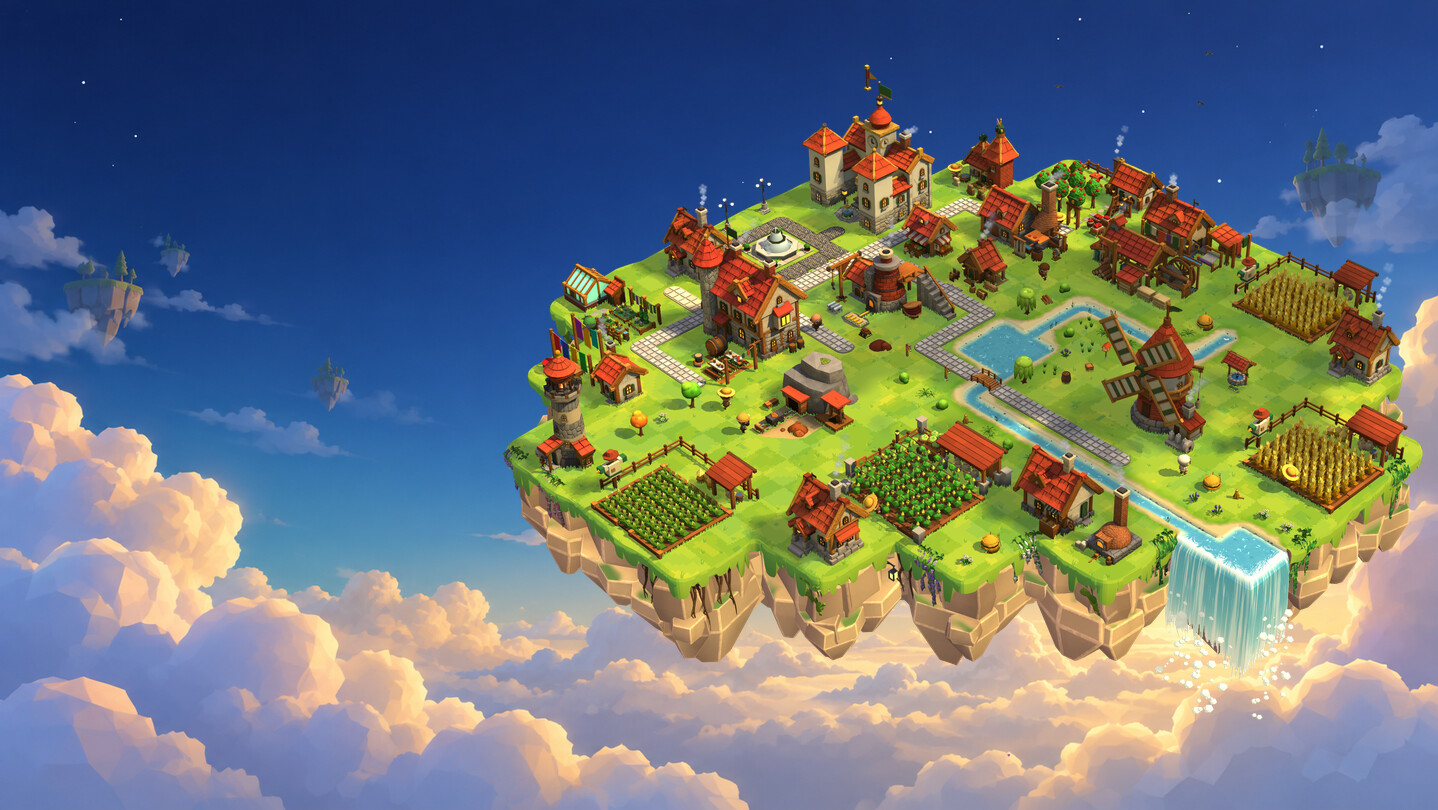
A cozy medieval village floating in the corner of your desktop. Peek in between emails, put up a new house, plant flowers or paint a river, then get back to work. The villagers take care of the rest: they bake bread, go fishing and build snowmen, even when the game is closed.

Sign in to add this item to your wishlist, follow it, or mark it as ignored

Coming Soon To Early Access

The developers of this game intend to release as a work in progress, developing with the feedback of players.

Note: Games in Early Access are not complete and may or may not change further. If you are not excited to play this game in its current state, then you should wait to see if the game progresses further in development. Learn more

What the developers have to say:

Why Early Access?

“Hoverwick is a game that lives alongside you: on your desktop, at your own pace, for weeks and months. That's why we want to grow it together with our players.

You already get a full, rich game today: dozens of hours of building, decorating, exploring the archipelago and spending time with the villagers. Early Access gives us something nothing else can: your islands, your ideas and the way you play. Based on that, we want to fine-tune the pace of the village's growth and its rewards, add new decorations, villager pastimes and events, and above all build a community around Hoverwick that will one day be able to play together.”

Approximately how long will this game be in Early Access?

“We plan for Early Access to last roughly six months to a year. The exact length will depend on the priorities we set together with you. We care about quality, not speed.”

How is the full version planned to differ from the Early Access version?

“We have big plans. Here are the directions we'd like to take. They are plans, not promises: their shape and order will depend on your feedback.

• Playing with others: visiting your friends' islands, admiring their villages and sending each other gifts
• Guilds: a shared archipelago where members build up one island together, split the work and raise shared buildings
• Trading between players: exchanging goods and decoration blueprints within a guild
• An arena with real rivals: rankings and duels against other players' armies
• Manor wings and great buildings raised by the whole village in stages
• A holiday calendar: seasonal events with their own decorations, music and villager festivities
• Steam Workshop: sharing mods and island blueprints in one click
• Full gamepad and Steam Deck support
• Even more decorations, villager pastimes, mini-games and languages”

What is the current state of the Early Access version?

“Hoverwick is already a full, feature-rich game. In the Early Access version you will find:

BUILDING AND ECONOMY
• 162 buildings, 184 goods and production chains from a field of grain all the way to winged hussar armour
• 6 kinds of islands: the Settlement, the Farm, the Castle, the Mine, the Town and the Masters' Workshops
• 50 manor levels, and buildings change their look up to 10 times as they grow
• Over 100 research projects in 9 fields
• Trade with 10 merchant islands, merchant balloons, contracts and ever-closer ties with the merchants
• The village keeps working even when the game is closed

VILLAGERS
• 24 characters with names, jobs and quirks of their own
• Over 70 pastimes: skating, sledding and sleigh rides, building snowmen, ice fishing, mushroom picking, swings, feeding the birds, stargazing and many more
• Villager requests, friendships and chats: the villagers talk to you while you work
• Follow any villager and watch their day up close
• A farm with 14 animal species: pick them up with your mouse, and if you throw one off the island, it always comes back in its own way

DECORATING WITHOUT LIMITS
• Over 150 decorations in many colours and sizes
• 18 path surfaces, painted freehand with a brush
• Rivers, ponds and waterfalls, plus lava, honey, acid and tar
• Fences in any shape, bridges that fit the water, decorations on walls and roofs, crates stacked on top of each other
• Blueprints: copy a decorated corner, rotate it, paste it elsewhere or send it to friends as a code
• Every island with its own roof colours, ground and cliff rock
• Undo with one shortcut and move buildings for free

17 MINI-GAMES AT THE BUILDINGS
• Minesweeper in the mine, smithing at the forge, potion brewing, fishing in the clouds, bridge building, archery, the tavern kitchen, defending the trail, minting coins, shearing sheep, milking a cow, gardens, woodturning, picking locks, master's caches, a timber run and the machine hall

THE WORLD
• Four seasons that change from day to day, rain, thunderstorms, snow, fog and wind
• A day cycle with sunsets, and lamps that light up on their own in the evening

ARMY (OPTIONAL)
• Live battles where you give the orders, and a tournament arena with 30 rivals

COMFORT
• A desktop widget, a window or full screen, and the whole village tucks into a small bubble with one shortcut
• Trade and production rules that work for you
• Quick buying of missing materials and upgrading several levels at once
• Up to 20 separate villages, Steam Cloud saves, offline play
• Custom key bindings, colour-blind filters, a contrast setting, gamepad support
• 15 languages and 30 Steam achievements

MODS
• A built-in creator kit: your own buildings, goods, decorations, translations, scripts and even mini-games”

Will the game be priced differently during and after Early Access?

“Buying in Early Access gets you the whole game: every update released during Early Access is included in this purchase. We plan to raise the price slightly once Early Access ends and will announce it well in advance, so joining now costs you less. There are no microtransactions in the game.”

How are you planning on involving the Community in your development process?

“We're making Hoverwick together with our players. On our Discord and in the Steam discussions we read your feedback and answer your questions. We plan:

• regular updates with notes on what changed
• votes on what comes to the game next
• events and contests: for the most beautiful island, the most interesting decoration blueprint or the funniest scene from the villagers' lives
• featuring the best islands and mods from the community

We will fine-tune the pace of the village's growth, its balance and rewards based on your experience. The game also has a “Report a bug” button that sends us a description and screenshots straight from the game.

Join us, we can't wait to see your island!”
Read more
This game is not yet available on Steam

Planned Release Date: Q1 2027

Interested?
Add to your wishlist and get notified when it becomes available.
 

Report bugs and leave feedback for this game on the discussion boards

See all discussions

About This Game

A medieval village on a floating island that lives in the corner of your desktop.

Hoverwick is a cozy game about building and decorating a village. You work, read or watch a film, and right next to you the villagers bake bread, go fishing and build snowmen. One click and you're in the village, another and you're back to your day.


The island floats above your desktop without taking over your screen. Click the empty sky next to it and you land right back in the program you were using.

  • Clicks next to the island go through to the windows underneath
  • Place the island anywhere on your screen
  • Tuck the whole village into a small bubble with one shortcut
  • On Windows, the island slips behind full-screen games and films on its own
  • The village keeps working even when the game is closed
  • Prefer a regular game? Hoverwick also runs in a window and in full screen


You choose the spot for every house, workshop and field, and when the village grows you can move them for free. Grain goes to the mill, flour to the bakery, and the production chains carry on across new islands, all the way to the most refined goods.

  • 162 buildings and 184 goods linked into production chains
  • 50 manor levels, and buildings change their look up to 10 times
  • Move buildings for free and upgrade several levels at once
  • Over 100 research projects at the merchants' guild and on the islands
  • Trade and production rules that sell your surplus and switch workshops for you


The season changes with every real day, while the village keeps its own clock, from dawn to starry night.

  • Spring, summer, autumn and winter change the colours of the whole island
  • Rain, downpours, thunderstorms, fog and windy days
  • Puddles after the rain, drips from the roofs and a frozen river in winter
  • Lamps light up at dusk, and fireflies circle the island at night
  • Lock the season, time of day and weather just the way you like them


The villagers aren't just scenery. Each has a name and a job, and in their free time they pick one of over 70 pastimes, depending on the season, the time of day and the weather.

  • In winter they skate on the frozen river, go on sleigh rides, build snowmen and fish through holes in the ice
  • In autumn they go mushroom picking, in summer they play on the swings, and at night they watch the stars
  • They ask you for small favours, become your friends and sometimes chat with you while you work
  • Follow any villager step by step and watch their day up close
  • Pick up farm animals with your mouse and carry them wherever you like. Throw one off the island and it always comes back in its own way: the cow in a superhero cape, the pig on angel wings, the rabbit riding a carrot rocket


You paint paths and water with a brush, so they run exactly where your hand leads them. Bring a stream to the edge of the island and it tumbles off as a waterfall.

  • 18 path surfaces, from packed earth to marble
  • Water, lava, honey, acid and tar, each with its own waterfalls. Winter changes each of them differently: water freezes, lava cools into obsidian, honey crystallises, tar thickens and acid steams

Bridges fit themselves to the water beneath them, and fences follow your cursor in any shape.

  • A low footbridge over a trickle, a tall bridge over a river
  • Bridges of wood, stone, brick and marble, just like the paths
  • Fences, walls and hedges with gates, on the grid or completely freehand

Put decorations wherever you want: on the ground, on roofs, on walls, and even stack crates and barrels on top of each other.

  • Over 150 decorations in many colours and sizes
  • Sow flowers with a scatter brush
  • Give every island its own roof colour, ground and cliff rock
  • Copy a decorated corner as a blueprint, paste it somewhere else or send it to friends as a code
  • Undo any mistake with one shortcut

Once the village has grown, the lighthouse sends expeditions to new islands. Each one makes something the others need.

  • The Farm, the Castle, the Mine, the Town and the Masters' Workshops, each with its own buildings and goods
  • Merchant balloons from ten merchant islands


  • 162 buildings, 184 goods and 6 kinds of islands
  • 50 manor levels and over 100 research projects
  • 17 mini-games at the buildings: minesweeper in the mine, smithing at the forge, potion brewing, fishing in the clouds, bridge building, archery, the tavern kitchen, defending the trail and many more
  • Over 70 villager pastimes, requests, friendships and chats
  • A farm with 14 animal species
  • Over 150 decorations, 18 path surfaces and 5 liquids with waterfalls
  • Decoration blueprints to copy and share
  • Trade with 10 merchant islands
  • Optional army: live battles and arena tournaments
  • Mods with a built-in creator kit
  • Up to 20 villages, Steam Cloud saves and offline play
  • 30 Steam achievements and 15 languages

Aren't idle games boring? When you feel like playing longer, 17 mini-games are waiting at the buildings. When you don't, the village manages on its own.

Do I have to keep an eye on it all the time? No. The first hours are the busiest, and after that a few visits a day are enough. If the game stays open next to your work, you'll reach the top manor level in about a month.

Will I lose anything if I disappear for a week? No. After a day, production simply stops and waits for you. Nothing spoils, animals don't run away, and new balloons and villager requests will arrive once you're back.

Does the island cover my windows? It doesn't have to. Clicks on the empty space around the island go through to the programs underneath. You can also turn off “Always on top” so the village sits behind your windows, or tuck it into a small bubble with one shortcut. The bubble keeps working and hardly taxes your computer.

I prefer a regular game. Is that possible? Yes. In the settings you can switch Hoverwick to a regular window or full screen, with a sky in the background instead of your desktop.

Can I set my own keys? Yes. The camera, rotation, brushes, undo and every other shortcut can be rebound, and so can the gamepad buttons.

Is the game noisy while I work? Up to you. Music, ambience, effects and interface sounds each have their own volume. While you work in another program, the game can sound as usual, turn itself down, speak up only for important events or go completely silent.

What happens when I step away from the computer? After a moment of inactivity the camera takes a tour of the island, stopping by its prettiest corners. Move the mouse and the view returns to where it was.

Is the game colour-blind friendly? Yes. There are colour filters for three types of colour blindness and a contrast setting, and you can turn off camera shake and island sway in the settings.

Can I have more than one village? Yes, up to 20, each with its own name and its own mods. All of them go into your Steam Cloud save.

Can I show off my island? Yes. Save a decorated corner as a blueprint and send it to friends as a code, and they can paste it onto their own island.

Does it drain the battery? It's a 3D game, so it works harder than a pixel pet on your taskbar. When you don't move the mouse it slows down on its own, and eco mode limits the frame rate and turns off shadows. On a laptop running on battery, eco mode is worth switching on.

Will it run on a weaker computer? You can set the graphics to high, medium or low, and the rendering resolution can adjust itself to keep the game smooth.

Does the game see what I do on my computer? Only as much as it needs to stay out of your way. It checks where the cursor is and whether you press a mouse button (to know if a click is meant for it), whether you press the shortcut that hides the village, how long it's been since you last touched the mouse or keyboard, and whether another program fills the whole screen. It doesn't read what you type, doesn't know window titles or the names of the programs you use, and sends nothing to us on its own.

Do I need an internet connection? Only to install the game and launch it through Steam for the first time. After that you can play offline, and achievements and cloud saves will sync when you are back online.

Will my progress from the demo carry over to the full game? Yes. Your village from the demo loads in the full version, even on another computer, thanks to the shared Steam Cloud save.

Are there mods? Yes, with a built-in creator kit: new buildings, goods, decorations, translations, scripts and even mini-games. Mods don't disable achievements.

Are there microtransactions? No. You buy the game once, and there is nothing to buy inside it.

What platforms does it run on? Windows and macOS. It plays best with a mouse, and in windowed or full-screen mode you can also use a gamepad. Steam Deck isn't supported yet.

AI Generated Content Disclosure

The developers describe how their game uses AI Generated Content like this:

We used generative AI as a helper: to make reference images that we then reworked by hand, to assist with translations, and to create sound effects and music. Everything in the game was chosen and edited by us. The game does not generate anything with AI while you play.

System Requirements

Windows
macOS
    Minimum:
    • Requires a 64-bit processor and operating system
    • OS: Windows 10 64-bit (version 21H1 or later)
    • Processor: Intel Core i3-6100 / AMD Ryzen 3 1200 (4 threads)
    • Memory: 8192 MB RAM
    • Graphics: DirectX 11 GPU with 2 GB VRAM (NVIDIA GeForce GTX 950 / AMD Radeon RX 460)
    • DirectX: Version 11
    • Storage: 1024 MB available space
    • Additional Notes: Runs as a transparent widget on your Windows desktop (desktop composition must be on — it is by default); can also run in a window or full screen. Minimum: 1920 × 1080, “Low” graphics, 30 fps limit. Works offline.
    Recommended:
    • Requires a 64-bit processor and operating system
    • OS: Windows 10 / 11 64-bit
    • Processor: Intel Core i5-8400 / AMD Ryzen 5 2600
    • Memory: 16384 MB RAM
    • Graphics: NVIDIA GeForce GTX 1060 6 GB / AMD Radeon RX 580 (4 GB VRAM)
    • DirectX: Version 11
    • Storage: 1024 MB available space
    • Additional Notes: Recommended: up to 2560 × 1440 (or ultrawide) on “High” at 60 fps. SSD recommended. Works offline.
    Minimum:
    • OS: macOS 12 Monterey or later
    • Processor: Apple silicon or 64-bit Intel
    • Memory: 8192 MB RAM
    • Graphics: Metal-compatible GPU
    • Storage: 1024 MB available space
    Recommended:
    • OS: macOS 12 Monterey or later
    • Processor: Apple M2 or better
    • Memory: 8192 MB RAM
    • Graphics: Apple M2 integrated GPU (Metal)
    • Storage: 1024 MB available space
    • Additional Notes: Tested on a MacBook Air M2: 60 fps on High graphics in a fully built late-game village. Works offline.