This content requires the base application Pixel Painter on Steam in order to run.

Sign in to add this item to your wishlist, follow it, or mark it as ignored

Downloadable Content

This content requires the base application Pixel Painter on Steam in order to run.

This content is not yet available on Steam

Coming soon

Interested?
Add to your wishlist and get notified when it becomes available.
 

About This Content

Make your own brushes

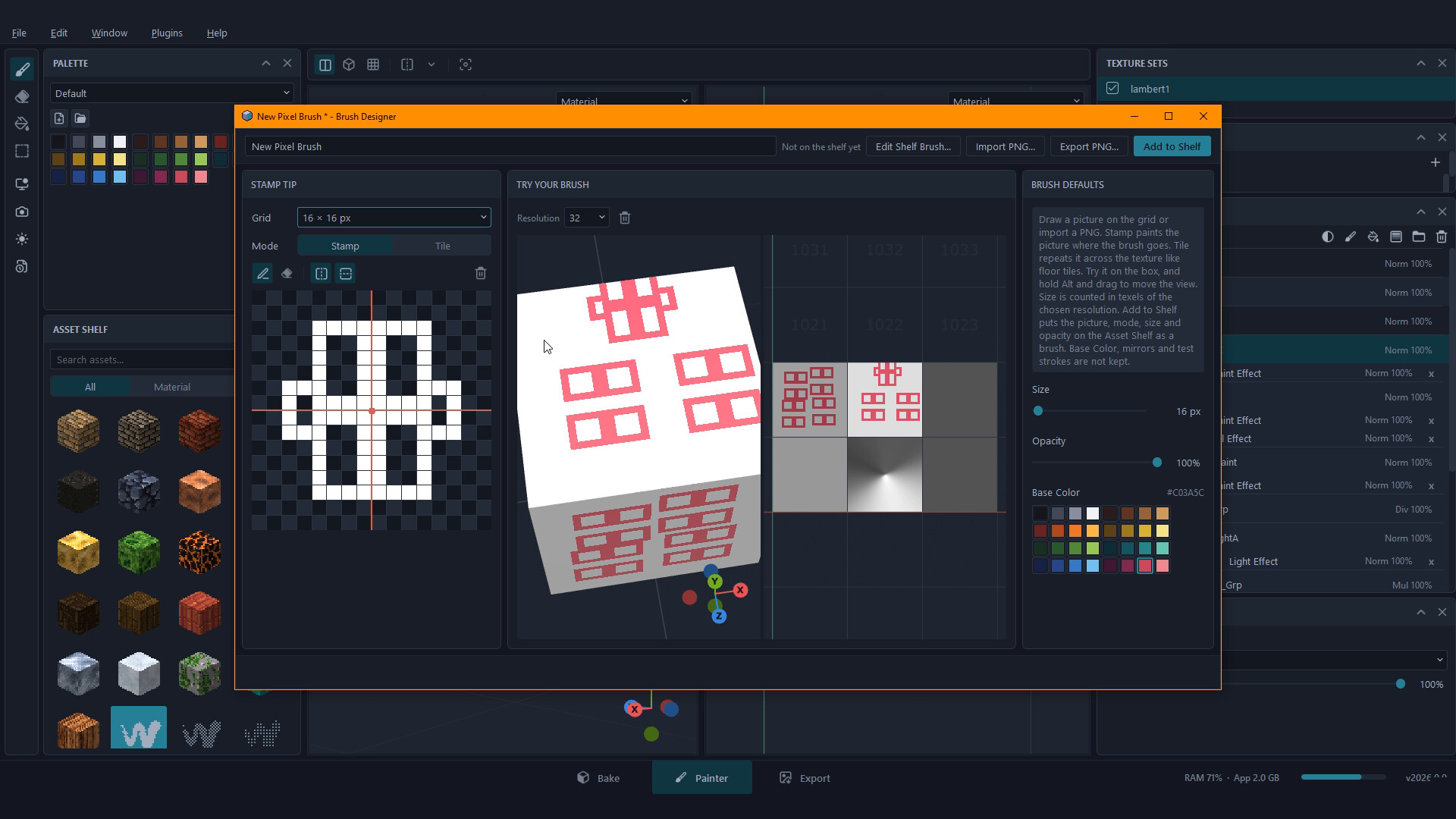
Brush Designer is a free official plugin for Pixel Painter. A brush is a small picture: draw it pixel by pixel, try it out, and add it to your Asset Shelf next to the brushes that come with Pixel Painter.

Draw the tip

  • A pixel grid from 2 x 2 up to 32 x 32
  • Pencil and Eraser, plus Mirror left-right and top-bottom - turn both on to paint all four corners at once
  • Stamp mode paints the picture wherever the brush goes; Tile mode repeats it across the texture like floor tiles, for painting patterns
  • Import a PNG as a tip, or export your tip as a PNG

Try it before you save it

Paint on a test box in a small 3D view and a UV view, with the same painting rules as the main viewport. Your test strokes never touch your project.

Straight to the Asset Shelf

Set the brush's default size and opacity, then Add to Shelf. Re-open any brush on your shelf to change it, or rename it to keep a variation.

Requires Pixel Painter. Open it from Plugins > Brush Designer.

System Requirements

    Minimum:
    • Requires a 64-bit processor and operating system
    • OS: Windows 10 64-bit
    • Processor: 4-core 64-bit CPU
    • Memory: 8 GB RAM
    • Graphics: OpenGL 3.3 GPU with 2 GB video memory
    • Storage: 500 MB available space
    Recommended:
    • Requires a 64-bit processor and operating system
    • OS: Windows 10/11 64-bit
    • Processor: 8-core 64-bit CPU
    • Memory: 16 GB RAM
    • Graphics: OpenGL 4.1 GPU with 4 GB video memory
    • Storage: 500 MB available space
Review Filters