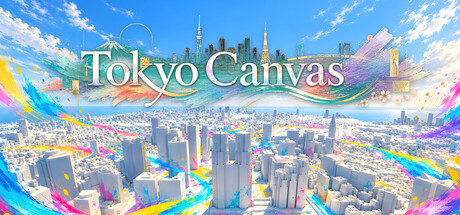
Walk, fly, and defy gravity as you paint Tokyo's 23 wards. Explore, take photos, and enjoy sunsets and stars as your favorite avatar. Share your creations through the Gallery, or paint together with 2–4 players and voice chat. Make Tokyo your own.

Sign in to add this item to your wishlist, follow it, or mark it as ignored

This game is not yet available on Steam

Planned Release Date: Oct 15, 2026

This game plans to unlock in approximately 11 days

Interested?
Add to your wishlist and get notified when it becomes available.
 

About This Game

What will you do in Tokyo today?

Paint on a rooftop. Take to the skies as your favorite avatar. Watch the sunset while chatting with friends.
Tokyo Canvas is a sandbox game set across Tokyo's 23 wards, where you can explore, paint, and capture the scenery. There are no scores to chase or matches to win. What you do and where you spend your time are up to you. Find your own Tokyo, at your own pace.

See Tokyo from a whole new angle.

Choose one of Tokyo's 23 wards, recreated using Project PLATEAU 3D city models, and set out to explore. Walk between skyscrapers, take off from the rooftops, and land wherever something catches your eye.
Change the direction of gravity, and walls and ceilings become places to stand. A familiar city turned on its side opens up new ways to explore and paint. Pick a destination on the map to warp high above it, or open your current in-game location in Google Maps in an external browser to compare it with the real city.

Let your ideas fill the city.

Draw a line along a road, paint a picture on a rooftop, or cover a building in patterns. With 25 drawing tools, including brushes, shapes, fills, and stamps, you can create anything from a small doodle to a sprawling work of art.
Draw with the included pictures or your own images, and use the Picture Tile tool to cover surfaces with repeating patterns. Mix painting tools with emotes, cameras, a clock, and more in nine slots to build a toolkit that suits the way you play. Save your painted city and come back another day to pick up where you left off.

Be yourself. Make a moment worth capturing.

Choose an avatar to suit your mood from 26 included standard avatars, and head into Tokyo. Link your VRoid Hub account to play as a model you have uploaded yourself.
Strike a pose or dance in front of your artwork. Switch between first-person, third-person, and Theater views to frame the city and your avatar just the way you like. In Theater mode, automate aerial shots, orbiting camera moves, and moves toward or away from your avatar. You can also combine these with automatic forward movement for your character. From a flight across the skyline to a carefully painted creation, find a scene you'll want to share on video.

Put down the brush. Look up at the sky.

Morning light, a sunset washing over the city, the moon in the night sky. Change the flow of time or pause it at your favorite hour to discover a different side of the same Tokyo.
The stars are placed using a real star catalog, while the moon's position and phases are based on astronomical calculations. Turn on constellation lines and names, and spend some quiet time exploring the sky from a rooftop. Some days, you might simply enjoy the view.

Share the city. Spend time your way.

Online, 2–4 players share the same ward and canvas. Use voice chat as you work on a picture together, or fly off to your own favorite spots. Every color you add is shared in real time.
Join a friend's session, or use an invite code to play with someone who isn't on your friends list. As the host, you choose who can join you in your city.

Your Tokyo can become someone else's playground.

Publish your painted city and chosen sky together as a work in the Gallery. Share its work code so someone far away can come and spend time in the Tokyo you've created.
Visit a friend's published creation, or enter a code to explore someone else's city. You can even play multiplayer inside a Gallery work. Creating in Tokyo Canvas means more than showing someone a picture: it means making a place where you can spend time together.

Videos & streaming

You are welcome to post videos and livestream Tokyo Canvas, including on monetized channels. If you do, we would appreciate a mention of "Tokyo Canvas" in the title or description.

AI Generated Content Disclosure

The developers describe how their game uses AI Generated Content like this:

Some background music and visual assets included with the game or used in its marketing materials were created using generative AI and selected or edited by the developer. Generative AI is not used during gameplay, and no player input is sent to an AI service.

System Requirements

Windows
macOS
    Minimum:
    • Requires a 64-bit processor and operating system
    • OS: Windows 10 64-bit (version 1909 or later)
    • Processor: Intel Core i5-10400 / AMD Ryzen 5 3600
    • Memory: 16 GB RAM
    • Graphics: NVIDIA GeForce RTX 2060 / AMD Radeon RX 6600 equivalent (6 GB VRAM, Shader Model 6 and hardware ray tracing support)
    • DirectX: Version 12
    • Storage: 12 GB available space
    Recommended:
    • Requires a 64-bit processor and operating system
    • OS: Windows 11 64-bit
    • Processor: Intel Core i7-10700 / AMD Ryzen 7 3700X
    • Memory: 16 GB RAM
    • Graphics: NVIDIA GeForce RTX 3060 / AMD Radeon RX 6700 XT equivalent (8 GB VRAM)
    • DirectX: Version 12
    • Storage: 12 GB available space
    • Additional Notes: SSD recommended.
    Minimum:
    • Requires an Apple processor
    • OS: macOS 14 Sonoma or later
    • Processor: Apple M1 Max (10-core CPU; Apple Silicon only)
    • Memory: 32 GB RAM
    • Graphics: Apple M1 Max 32-core GPU or equivalent or better
    • Storage: 12 GB available space
    • Additional Notes: SSD required. Apple Silicon only. Target: 1080p, Medium quality, 30 fps, with drawing distance 10 km, detail distance 25, and up to 25,000 displayed strokes. Performance varies with artwork complexity and viewpoint.
    Recommended:
    • Requires an Apple processor
    • OS: macOS 14 Sonoma or later
    • Processor: Apple M4 Max (16-core CPU; Apple Silicon only)
    • Memory: 32 GB RAM
    • Graphics: Apple M4 Max 40-core GPU or equivalent or better
    • Storage: 12 GB available space
    • Additional Notes: SSD required. Apple Silicon only. Target: 1080p, Medium quality, 60 fps, with drawing distance 10 km, detail distance 25, and up to 25,000 displayed strokes. Performance varies with artwork complexity and viewpoint.
Review Filters