Write a beat. Press RUN. Make it yours. A free Strudel music studio with a retro terminal look, beginner lessons, a piano roll, snippet previews and mouse-shaped sound controls. Customize your workspace and export WAV or lossless FLAC. Full release coming soon.

Sign in to add this item to your wishlist, follow it, or mark it as ignored

This game is not yet available on Steam

Coming soon

Interested?
Add to your wishlist and get notified when it becomes available.
 

About This Software

A few lines. Your own sound.

code for music is a free live coding music studio powered by Strudel. Start with a melody, change a rhythm, press RUN and hear your ideas take shape. Update your pattern while it plays, or stop and try something new.

The retro terminal brings together a real code editor, a visual piano-roll sketchpad and a guide for getting started. You can begin with an example and learn one change at a time.

Learn by making music

Coming Soon: The full Steam release is in development. Request beta access in the Playtest section when signups are visible. Access is limited and not guaranteed. Test versions may change; back up your projects.

  • Explore 12 lessons, 10 melody starters and 80 snippets, with notes, chords, scales and rhythm explained.
  • Find reusable snippets and preview them before adding them to your project.
  • Build notes, held chords and drum patterns in the piano roll, then create editable Strudel code.
  • Use search and undo/redo. Arrow keys choose autocomplete suggestions; Tab inserts or indents your code.

See the notes you play

Open the compact live piano to watch real Strudel note events light up its keys. Animated note bars follow pitches and the played instrument. A separate note view shows the timing of your evaluated pattern.

These views follow your music code; they do not automatically convert an audio recording into notes.

Keep your ideas and share your code

Work across several project tabs, save your projects and build a personal snippet library. Copy code or export projects and library files to share editable music with other users. Record your Strudel output and export WAV or lossless FLAC audio.

FLAC preserves the same stereo PCM16 recording as WAV. File-size savings depend on the music. Rights to external samples and any borrowed material still apply to your recordings.

Make the studio yours

Choose a theme or edit your own colors. Import and export theme files, customize keyboard shortcuts, pick panel fonts and choose ASCII companions for your terminal. Adjust text size, animation speed and CRT effects. Reduced-motion preferences are respected.

Control master volume and mute, monitor actual output levels and select an audio output on systems that support it.

Shape a sound with code and your mouse

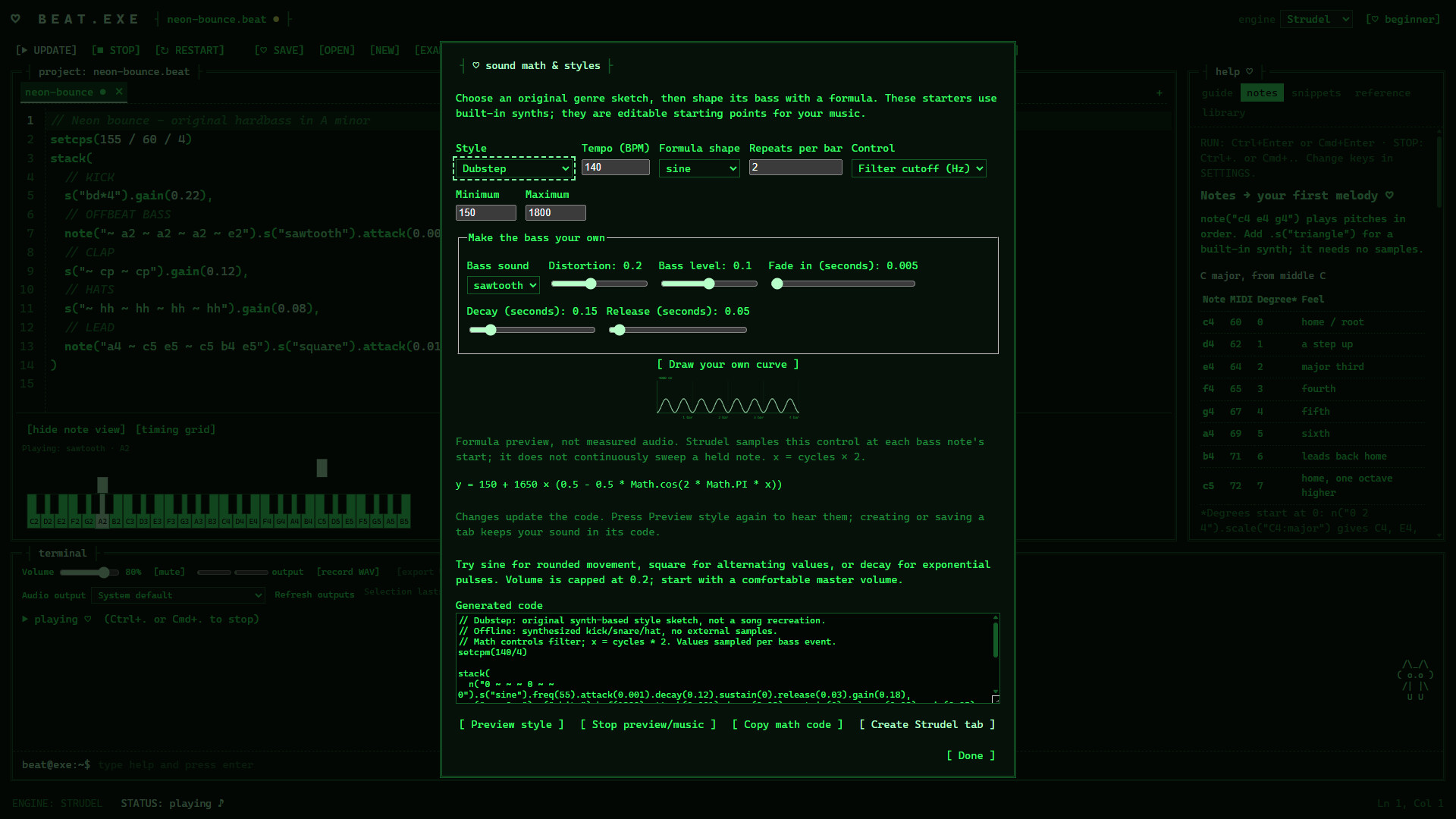
SOUND MATH offers ten original genre sketches, from hardstyle and techno to phonk and drum & bass. Adjust bass waveform, distortion and envelopes. Choose a mathematical curve or draw your own, preview it and create editable Strudel code. The graph previews a control formula, not measured audio; values are sampled at bass-note starts.

Start offline, explore further

The included piano and built-in synths work offline. Drum samples and additional sample sources need internet access when first downloaded. You can add and share sample-source loaders without an app update.

Windows also offers an experimental Sonic Pi engine. It requires a separate Sonic Pi 5.0.0 installation and consent to run trusted Ruby code. It is optional and replaces playback with a short gap when you run new code.

Free and open source

The app is free to use and its application source is available under AGPL-3.0-or-later. Matching source and third-party notices are included with distributions. Developer engine adapters can be added when rebuilding from source.

The interface is in English. A keyboard and mouse are recommended. Projects and settings are stored locally; sharing is through exported files or copied code.

AI Generated Content Disclosure

The developers describe how their game uses AI Generated Content like this:

Generative AI was used to create pre-generated content for MusiCo and its store/marketing materials, including written content, artwork and music-related material. Third-party libraries and samples retain their separately documented credits and licences. MusiCo does not include a built-in live generative AI service.

System Requirements

Windows
SteamOS + Linux
    Minimum:
    • OS: Windows 10 or Windows 11 (64-bit) 🙄
    • Processor: 64-bit dual coolCore™ X3 1337 Processor
    • Memory: 4 GB RAM
    • Graphics: Integrated graphics with up-to-date drivers
    • Storage: 1 GB available space
    • Sound Card: Windows-compatible audio device
    Minimum:
    • OS: 64-bit larpOs with Electron/Chromium-compatible system libraries
    • Processor: 64-bit dual coolCore™ X3 1337 Processor (x86-64)
    • Memory: 4 GB RAM
    • Graphics: Integrated graphics with up-to-date Linux drivers
    • Storage: 1 GB available space
    • Sound Card: Audio device supported by the system audio service
Review Filters