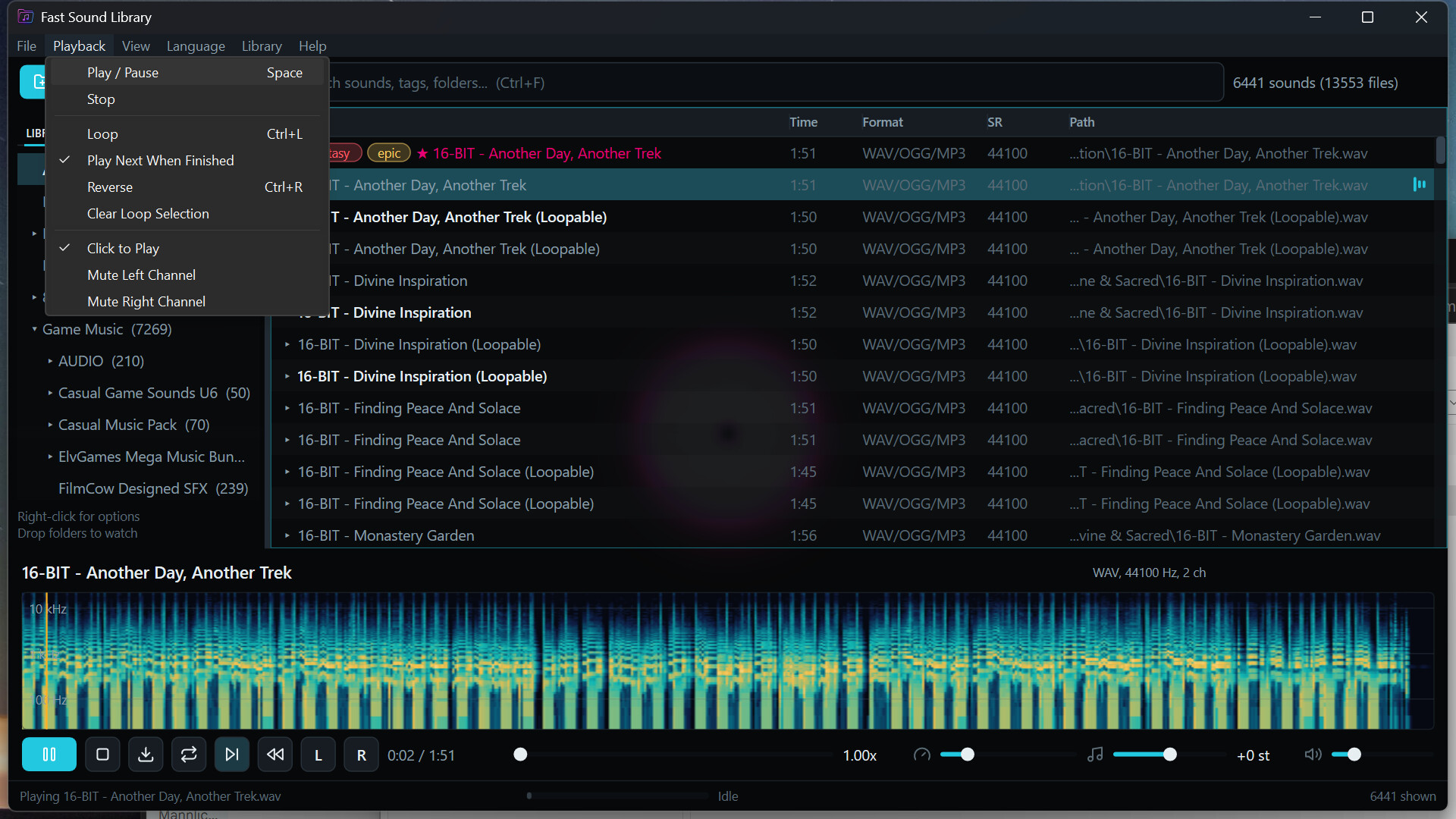
Fast Sound Library (FSL) is a professional sound library and audio editing suite for searching, tagging, categorizing, auditioning, organizing, repairing, and delivering music, samples, recordings, and sound effects. Includes Fast Sound Editor.

Sign in to add this item to your wishlist, follow it, or mark it as ignored

Buy Fast Sound Library (FSL)


About This Software

Professional Sound Library and Audio Editing Suite

Fast Sound Library (FSL) is a professional sound library manager and audio editing suite for sound designers, video editors, game developers, musicians, podcasters, and other creators who work with large collections of music, samples, field recordings, dialogue, and sound effects. It combines fast local search, keyboard-driven auditioning, detailed annotations, project organization, waveform editing, spectral repair, and audio analysis in one focused environment.

The Steam bundle includes Fast Sound Library (FSL) and Fast Sound Editor (FSE) for Windows, macOS, and Linux. FSE is available as a standalone application and as an integrated editing surface inside FSL. Existing sound folders remain in their original locations, and the library, annotations, edits, and exports remain under the user's control. The bundle is a one-time purchase with no account, cloud service, or subscription.

Library Management

FSL adds existing folders without importing, relocating, renaming, or modifying the source files. Folders can be added through the native file dialog or by dragging them directly into the application. Watched folders are monitored for files that are added, removed, renamed, or changed on disk, allowing the library index to remain synchronized with the actual collection without requiring a manual rebuild.

Large collections are presented through a virtualized results grid with configurable columns for name, tags, duration, format, sample rate, and path. Columns can be resized, reordered, shown, or hidden, and the configuration is restored across launches. Multiple formats of the same sound can be grouped into one result, with the best-quality version selected automatically for playback while every original file location remains available.

The local library index is durable and recoverable. Disconnected or unavailable folders remain visible as actionable states rather than disappearing from the collection. Annotations are stored separately from the source audio, allowing tags, notes, colors, favorites, and project organization to be maintained without writing metadata into original production assets.

Search and Discovery

Search begins as soon as the user types and covers file names, complete paths, categories, text tags, favorites, formats, duration, file size, sample rate, channel count, listened state, color tags, and other library properties. Free-text terms can be combined with structured predicates to narrow a large collection to a precise working set without building a separate database query or filter panel.

The sidebar provides direct access to all sounds, folders, favorites, text tags, color tags, Smart Collections, and Project Bins. Search and filter state remain stable while annotations change, and only affected results are updated. Quick Open locates sounds and open waveform documents, while Quick Commands provides searchable access to actions by name or keyboard shortcut.

Keyboard Auditioning and Transport

FSL is designed for rapid auditioning without repeated pointer movement. A selected sound can be played with Enter, Space, or a double-click. Up and Down move through the result set and audition each sound automatically, allowing a large group of candidates to be reviewed at the speed of keyboard navigation. Playback continues while the user changes folders, searches, filters, or prepares project organization.

The transport provides play, pause, stop, seeking, waveform scrubbing, complete-file looping, selected-range looping, speed adjustment, pitch adjustment, reverse playback, volume control, and individual stereo-channel isolation. Playback can begin from progressively decoded media before the entire source has loaded. The transport remains attached to the sound that is actually playing, even while another row is selected or the visible result set changes.

Waveforms, Spectrograms, and Visualizers

Every loaded sound is presented with a peak-based waveform that supports direct seeking and range selection. Progressive waveform loading keeps the transport useful while longer files are prepared. A spectrogram can be displayed beside the audition waveform when frequency content is more informative than amplitude alone.

Animated visualizers include waveform, frequency, stereo-phase, and audio-reactive views. Backdrop effects can respond to the active sound, while power-saving behavior suppresses unnecessary animation when it is not useful. Waveform, spectrogram, visualizer, and backdrop preferences are restored across launches, allowing the audition surface to remain consistent for the user's work.

Tags, Notes, and Annotations

Sounds can carry freeform text tags, color tags, multiline notes, favorite state, and listened state. Tags are created by using them and remain available as suggestions across the library. The dedicated Tags column keeps annotations visible in the results grid, while sidebar counts provide direct access to every tagged group. Complete cell values remain available through hover details when a path, tag list, or other field does not fit the visible column width.

Annotation tools support multi-selection and mixed states. A tag can be added to or removed from a complete selection, notes can be replaced or cleared in one operation, and colors or favorites can be applied as one transaction. Each change receives a meaningful Undo label. Undo restores the affected annotations together with selection, primary sound, keyboard anchor, hover state, scroll position, and the active sidebar filter.

Annotation changes are saved in the background through a durable local journal. Rapid edits are combined into recoverable checkpoints without blocking further work. If a save fails, the in-memory edit remains available and FSL presents a persistent Retry action rather than discarding the change or silently reporting success.

Smart Collections and Project Bins

Any active search can be saved as a Smart Collection and restored later with its search criteria intact. Smart Collections are useful for durable views such as unreviewed field recordings, stereo ambience above a selected duration, favorite music beds, high-resolution masters, or sounds associated with a recurring category.

Project Bins provide manual organization for videos, games, episodes, scenes, clients, or any other production structure. One or many sounds can be added to a bin without moving the files or changing their permanent annotations. Bins can be created from the current selection, assigned keyboard slots, searched through a bin picker, renamed, and removed independently from the source library. The same sound can participate in several projects without duplication.

Clip Export and External Workflow

A range can be selected directly on the audition waveform and exported as a new audio clip while preserving the original source. The selected loop range becomes the export range, and the destination is chosen through the native Save dialog. Clip export runs in the background with visible progress, allowing the user to continue searching and auditioning while a result is prepared.

Sounds can be revealed in Explorer or Finder, complete paths can be copied, and files can be dragged directly from FSL into a DAW, video editor, game-development tool, file manager, or other application. The library remains an index and organization layer over ordinary files rather than a proprietary container that must be exported before another tool can use the audio.

Fast Sound Editor (FSE)

Fast Sound Editor is included as both a standalone application and an integrated editor inside FSL. A library result can be opened for editing from its context menu or keyboard, and an already open document is focused instead of decoded a second time. The Library remains available as a pinned tab while multiple waveform documents are opened, reordered, edited, saved, or exported in the same window.

Each document has independent dirty state, selection, playhead, viewport, markers, history, and recovery information. Closing the application reviews every unsaved document and provides Save, Don't Save, and Cancel handling. Imported and untitled documents participate in crash recovery, including their edits, markers, metadata, selection, and playhead. Save operations use atomic file replacement rather than exposing a partially written destination.

Waveform Editing

FSE provides sample-accurate editing with exact integer sample positions and multichannel waveform display. Editing can be restricted to individual channels. Available operations include Cut, Copy, Paste, Paste to New, Mix Paste, Delete, Trim, Silence, Duplicate, Reverse, Invert, Fade In, Fade Out, and selection gain. Mix Paste provides independent source and destination gain with an edge crossfade for controlled layering.

At close zoom levels, the editor displays direct sample polylines and sample points. Selection boundaries can move inward or outward to zero crossings, reducing clicks at edit points. Gain controls and fade handles can be adjusted directly on the selection. Structural edits move markers correctly, and processing preserves audio outside the edited selection bit for bit.

Every edit creates one labeled History entry. Undo and Redo restore not only the audio data, but also the selection, viewport, playhead, and keyboard focus. The History panel can navigate directly to any visible document state, making exploratory repair and sound design work practical without losing the context of the edit.

Spectral Selection and Repair

The Spectral Frequency Display combines waveform and frequency views with a shared playhead, selection, pan, zoom, and time axis. Frequency can be displayed on linear or logarithmic scales, and the display range and analysis resolution can be adjusted for the material. Spectral tiles are delivered progressively from coarse results to refined background analysis, keeping the document available while detailed frequency data is prepared.

Time-frequency regions can be selected with a marquee, freeform lasso, or paintbrush. Selection geometry can be added to, subtracted from, feathered, and restricted to individual channels. Spectral gain and attenuation support partial repair, while the Spot Healing Brush reconstructs selected problems from surrounding temporal and frequency information. Audio outside the selected time-frequency region remains bit exact, and spectral selections are preserved through Undo and crash recovery.

Audio Analysis

The Frequency Analysis panel displays a logarithmic spectrum from the audible low-frequency range through the document's available bandwidth. Analysis can follow the playhead or average a selected range, identify the dominant frequency, and retain comparison snapshots for evaluating changes before and after processing.

Amplitude Statistics reports sample peak, oversampled true peak, RMS level, integrated loudness, maximum short-term loudness, DC offset, source or estimated bit depth, sample count, channel count, and an amplitude histogram. The Phase Meter provides a live stereo goniometer, correlation measurement, and clear descriptions of out-of-phase, wide, stereo, and mono material. Accessible summaries expose the same analysis without requiring interpretation of the graph alone.

Media and Format Support

FSL indexes and auditions common professional audio formats including WAV, MP3, M4A, AAC, FLAC, OGG, Opus, AIFF, and CAF. Progressive decoding allows supported files to begin playing before the complete source has loaded. Multiple encodings of the same sound can be grouped while retaining access to each underlying file and automatically preferring the highest-quality version for playback.

FSE exports PCM and floating-point WAV, AIFF, FLAC, MP3, AAC, Opus, and Ogg Vorbis. Bit-depth reduction can use TPDF dither with optional noise shaping. WAV cue and label information round-trips through the marker system, preserving point and range markers when a compatible file is opened, edited, and saved.

Workspaces and Interface

FSL uses a native, hardware-accelerated interface with one window for library and waveform work. The results grid, sidebar, transport, waveform, document tabs, properties, history, markers, selection tools, spectral tools, and analysis panels share one consistent interaction model. Library and waveform workspaces can be selected according to the task, and the interface restores open documents, panel state, and user preferences across launches.

Quick Open and Quick Commands provide searchable access to sounds, documents, and application actions. Keyboard shortcuts are searchable, customizable, persistent, and checked for assignment conflicts. Native menus, context menus, drag and drop, adjustable interface scaling, accessible names, status announcements, and designed empty, loading, unavailable, and error states support extended professional use.

Local-First Workflow and Agentic Accessibility

Library folders, audio files, annotations, waveform documents, recovery journals, preferences, and caches remain on the user's system. FSL does not require an account or cloud service, and the original audio collection is not uploaded or relocated. The library index and annotation journal use backup recovery, while caches are bounded and clearable.

Core library and editing workflows are available through the interface, command-line applications, and built-in local agent tools. Manual and automated operations call the same library and editor services, use the same files, and enter the same labeled history. Search, playback, annotations, project bins, waveform edits, markers, spectral repair, analysis, and export can therefore be incorporated into repeatable production workflows without maintaining a separate project representation.

The FSL bundle combines two professional tools that would otherwise require separate applications: a high-performance sound library manager for finding, auditioning, and organizing large collections, and a sample-accurate waveform and spectral editor for preparing those sounds for production. It provides a permanent local audio workflow for video, game, podcast, music, and sound-design work without an account, cloud dependency, or subscription.

System Requirements

Windows
macOS
SteamOS + Linux
    Minimum:
    • Requires a 64-bit processor and operating system
    • OS: Windows 10 version 1809 or later, 64-bit
    • Processor: 64-bit processor with 4 cores
    • Memory: 8 GB RAM
    • Graphics: DirectX 12 compatible GPU
    • DirectX: Version 12
    • Storage: 1 GB available space
    • Sound Card: Windows-compatible audio output device
    • Additional Notes: Additional storage is required for audio libraries, cache files, and exports.
    Recommended:
    • Requires a 64-bit processor and operating system
    • OS: Windows 11, 64-bit
    • Processor: Modern 64-bit processor with 6 or more cores
    • Memory: 16 GB RAM
    • Graphics: Recent DirectX 12 compatible integrated or discrete GPU
    • DirectX: Version 12
    • Storage: 2 GB available space
    • Sound Card: Low-latency audio output device
    • Additional Notes: Additional storage is required for audio libraries, cache files, and exports.
    Minimum:
    • Requires an Apple processor
    • OS: macOS 13 or later
    • Processor: Apple Silicon (M1 or better)
    • Memory: 8 GB RAM
    • Graphics: Apple Silicon integrated graphics with Metal support
    • Storage: 1 GB available space
    • Sound Card: macOS-compatible audio output device
    • Additional Notes: Additional storage is required for audio libraries, cache files, and exports.
    Recommended:
    • Requires an Apple processor
    • OS: macOS 14 or later
    • Processor: Apple M2 or later
    • Memory: 16 GB RAM
    • Graphics: Apple Silicon integrated graphics with Metal support
    • Storage: 2 GB available space
    • Sound Card: Low-latency audio output device
    • Additional Notes: Additional storage is required for audio libraries, cache files, and exports.
    Minimum:
    • OS: SteamOS or a 64-bit Linux distribution supported by Steam Linux Runtime 3.0
    • Processor: 64-bit x86 processor with 4 cores
    • Memory: 8 GB RAM
    • Graphics: Vulkan 1.3 compatible GPU with current drivers
    • Storage: 1 GB available space
    • Sound Card: PipeWire-compatible audio output device
    • Additional Notes: Steam Linux Runtime 3.0 (sniper) and a Wayland session are required. This is a native Linux build and does not require Proton.
    Recommended:
    • OS: SteamOS or a 64-bit Linux distribution supported by Steam Linux Runtime 3.0
    • Processor: Modern 64-bit x86 processor with 6 or more cores
    • Memory: 16 GB RAM
    • Graphics: Recent AMD, Intel, or NVIDIA GPU with Vulkan 1.3 support and current drivers
    • Storage: 2 GB available space
    • Sound Card: PipeWire-compatible low-latency audio output device
    • Additional Notes: Steam Linux Runtime 3.0 (sniper) and a Wayland session are required. This is a native Linux build and does not require Proton.
Review Filters