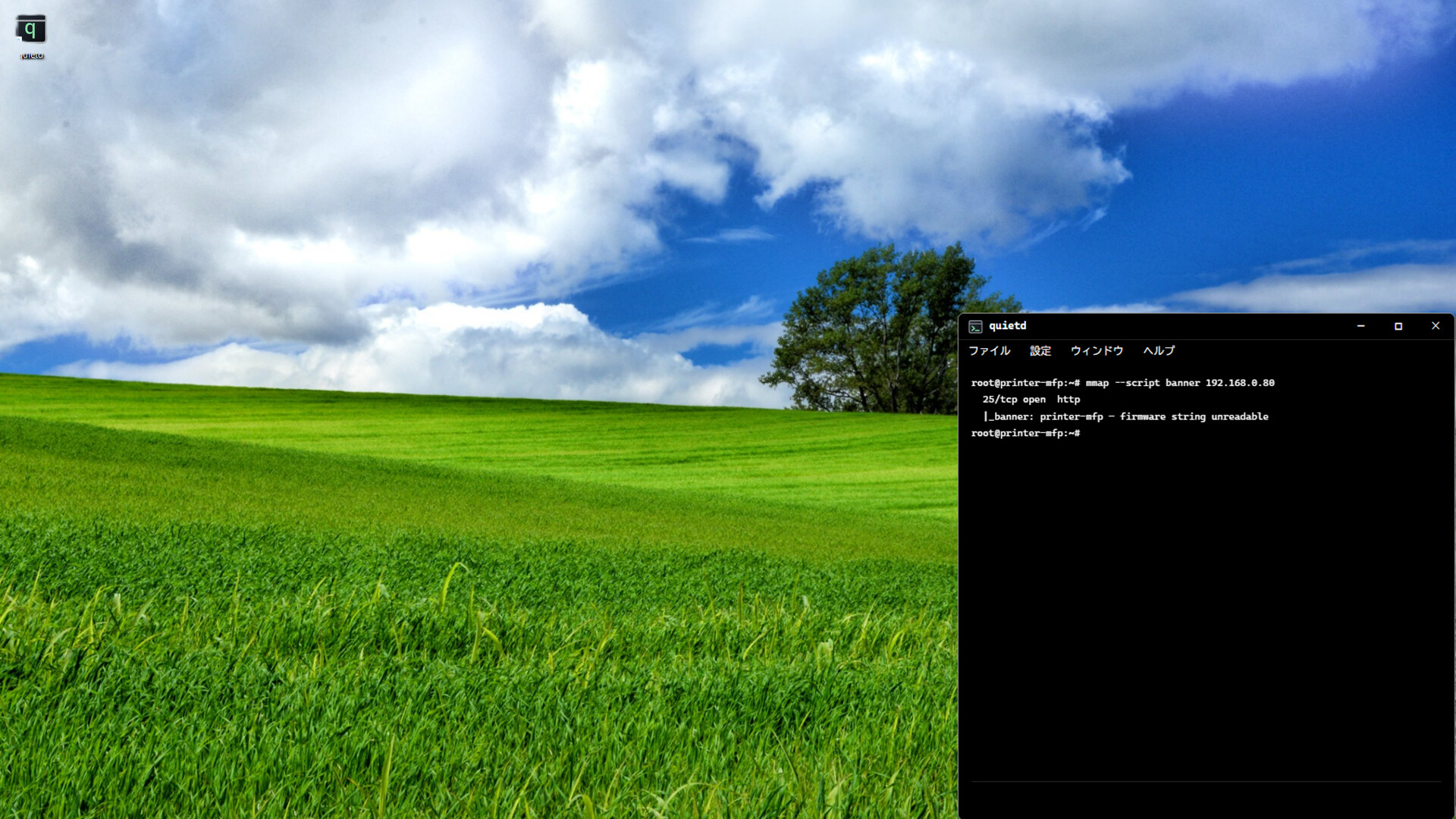
quietd is a no-input game you simply watch. A terminal hacks on its own across all 50 stages while you idle by. No commands, no clicks, no win, no score, no game over. Just chill, ambient cyberpunk: silent monospace text drifting in a corner of your desktop. Glance over and let it run.

Sign in to add this item to your wishlist, follow it, or mark it as ignored

This game is not yet available on Steam

Coming soon

Interested?
Add to your wishlist and get notified when it becomes available.
 

About This Game

The hacking runs itself. You just watch.

quietd is a «watch-only» game where hacking unfolds automatically in a terminal and clears itself to the very end while you do nothing but let it run.
You operate nothing.
A dark room, a single terminal.
All there is is total silence and time, as monospaced characters stream by without a single hand to guide them — and you simply witness it.

Leave it running, and all 50 stages clear themselves

Launch it, and after that just leave it be.
Stare at it intently, or let it run in the corner of your eye while you do something else — either is fine.
The main campaign progresses automatically from start to finish, conquering all 50 stages on its own.

  • Every stage cleared, hands-off.
    From a home router to corporate networks and on to the deepest core of critical infrastructure — the intrusion advances step by step, even when you do nothing.
  • No operation, no commands to type. The hacker on the screen (someone who isn't you) calmly works away at the keyboard.
    You can watch whenever, and look away whenever.
  • No win or loss, no score, no game over.
    Never rushed, never blamed for failing, just quietly moving forward.
    It's time freed from the pressure of «getting clears done».

This isn't a lack of substance — it's the very heart of what this game is after.
Like watching a video of a crackling fire, like surrendering to the sound of rain, you settle by watching the code flow by.
Like softly putting on some background music, you let it run in a corner of your desktop, glance over now and then, and return to work or to the night — it's a contemplative ambient experience made for exactly that.

Skill shows in the «touch» of the hands

Chill is a matter of tempo and quiet — it doesn't mean the content is empty.

The output streaming across the terminal — the results of commands like ls, ps, and ifconfig
scrolls by line after line with the texture of a real machine.
An immersion like peering at the screen over a real hacker's shoulder.
Without diluting that, we've shaped it into a «settling» experience through tempo and silence.

And the hacker on the screen gradually gets better.
Early on there are long pauses, as if searching for the keys; the typing is slow, and roundabout methods trip them up.
Before long the pauses vanish, the typing is fast, the methods are refined, striking weak points in a single blow.
Not through numbers — the very touch of the hands on screen tells the story of growth.
The more stages stack up, the more quietly that craft is honed — a single night's quiet improvement.

* Everything displayed is fictional.

A desktop companion

  • Window transparency (6 levels), always-on-top, fullscreen, and frame toggling. For your second monitor while you work, or a companion in the dead of night.
  • Duplicate as many windows as you like — progress is shared across all of them, while the look stays independent per window.
  • 8 color themes, 3 display sizes, and 5 line-count settings.
  • Total silence: no background music, no sound effects. Just characters, on purpose. Silence itself is the production.

Slash commands

A set of commands you can type straight into the terminal — a text UI that uses no popups.
Use them to change settings or display information.

  • /status — Show status
  • /mode — Toggle learning mode ON/OFF
  • /achievements — Show the achievement list
  • /config — Change settings
  • /help — Show the command list
  • /exit — Quit the game

A little extra: care to touch?

Watching is the default.
But if the mood strikes, you're welcome to type something into the flowing screen.
A command might go through — or it might not.
A modest bit of playfulness, a chance to quietly peek into a fictional machine.

Who this is for

  • Those who want something quietly moving in a corner of the screen alongside work or reading
  • Those who want time just to watch, freed from goals and the pressure to clear
  • Those who love the dark terminal aesthetic of cyberpunk

And — it isn't for those looking for a «game you play yourself».
There's no strategy here, no test of your skill, no victory to seize.
For those who know that, and still want to watch a quietly flowing night.

What's included

  • Single-player
  • 17 Steam achievements (5 of them hidden)
  • Steam Cloud support
  • Multilingual UI (11 languages)

Dim the lights, and just leave it running.
quietd doesn't need your hands. Just watch a single line that keeps running, quietly.

AI Generated Content Disclosure

The developers describe how their game uses AI Generated Content like this:

Generative AI tools were used as an aid in creating this store page description and its translations into each language (all reviewed and edited by the developer).
quietd does not generate any content using AI during gameplay, and it does not connect to any external AI services.

System Requirements

    Minimum:
    • Requires a 64-bit processor and operating system
    • OS: Windows 10 64-bit
    • Processor: Intel Core i3 / AMD equivalent (2.0 GHz)
    • Memory: 1024 MB RAM
    • Graphics: DirectX 11 compatible (integrated GPU acceptable)
    • DirectX: Version 11
    • Storage: 400 MB available space
    Recommended:
    • Requires a 64-bit processor and operating system
    • OS: Windows 10/11 64-bit
    • Processor: Intel Core i5 / AMD equivalent (2.5 GHz)
    • Memory: 1024 MB RAM
    • Graphics: DirectX 11 compatible
    • DirectX: Version 11
    • Storage: 400 MB available space
There are no reviews for this product

You can write your own review for this product to share your experience with the community. Use the area above the purchase buttons on this page to write your review.

Review Filters