Transform your Rust base into a gallery with RustForge. Convert and paint high-fidelity images directly onto in-game signs with extreme precision. Features adaptive palettes, session saving, and advanced painting methods, it makes creating professional in-game artwork fast and effortless.

想要将此项目添加至您的愿望单、关注它或标记为已忽略,请先登录

不支持简体中文

本产品尚未对您目前所在的地区语言提供支持。在购买请先行确认目前所支持的语言。

使用 RustForge Sign Painter

免费开玩
 

关于此软件

Transform Your Base Into a Gallery

RustForge is the ultimate automation tool for aspiring artists in the world of Rust. Gone are the days of spending hours manually pixel-painting a sign only to be raided mid-project. RustForge takes any image, from high-fidelity photos to pixel art, and automatically paints it directly onto your in-game canvas with machine precision.

Core Functionality (Free for All Users)

The foundation of RustForge provides everything you need to start creating:

  • Automated Precision Painting: Reproduce any image accurately onto in-game signs with automated mouse movements and color selection.

  • Configurable Painting Area: Use hotkey-driven overlays (F9/F10) to perfectly align your canvas and palette.

  • Standard Painting Methods: Methodical line-by-line painting and standard dithering for classic sign art.

  • VoidWeave Painting Method: Paints each pixel individually. This method produces the highest quality, most accurate results, with the limited 64 color in-game palette, especially for detailed images, gradients, and pixel art.

  • Input Stability Buffer (Safe Painting Mode): This is for "low-end" or low FPS PC's. This safe painting logic adds a few additional precision sleeps between each mouse move, and mouse input event, this ensures that every single pixel, even tiny details, gets processed by the game engine, eliminating unpainted "specks" on laggy servers, or if you have unstable FPS/low FPS.

  • Full Session Control: Pause, resume, or stop your painting at any time with customizable hotkeys. The new persistence engine ensures that when you resume, every pixel and palette color is exactly where you left it.

  • Adjustable Speed: Tailor the painting speed to match your PC performance and server lag.

  • Universal Aspect Ratio Support: Now featuring a high-precision mapping system. RustForge natively supports 16:9, 21:9 (Ultrawide), and 32:9 (Super Ultrawide) resolutions without "ghost lines" or alignment errors.

  • Native DPI Scaling Detection: Automatically detects if Windows is "stretching" your display (125%, 150%, etc.) and adjusts its internal math to ensure your painting and screen space/mouse input matches your display perfectly.

  • Painting Time Estimation: A completely overhauled time-calculation engine that provides accurate painting estimates based on your hardware, and speed settings.

Artistic Control & Filters

Fine-tune your masterpiece before the brush ever touches the sign:

  • Stylized Filters: Oil Paint, Charcoal Sketch, Comic Book, Watercolor, and more.

  • Technical Filters: Dithering, Pixel Art/Mosaic, and Line Art.

  • Image Enhancement: Gaussian Blur, Sharpening, and Median filtering to clean up noisy images.

  • Background Color Ignore: Tell RustForge to skip specific colors (like white borders or green screens) to save massive amounts of time.

How It Works

  • Load: Choose any image (JPG, PNG, WebP, SVG, ETC.) from your PC or a URL.

  • Capture: Use the hotkeys to quickly define your in-game palette and canvas area.

  • Configure: Select your painting speed, filter, and painting method.

  • Paint: Press Start and watch RustForge handle the rest.

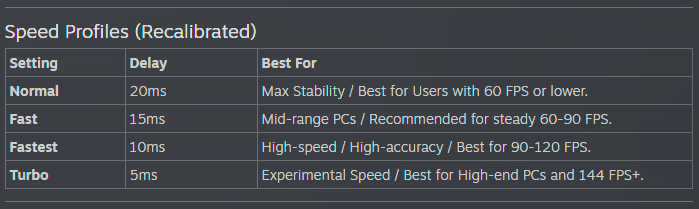
RustForge Sign Painter relies heavily on a stable framerate. The default settings are optimized for all systems, low-end or high-end. Higher FPS means you can have a faster Painting Speed, and a lower Precision Timing Delay value, Lower FPS means you should use lower Painting Speeds, and higher or the default Precision Timing Delay (20ms).

Below are the Recommended Painting Speed Settings based on your average FPS

⚠ Important Notes

• Supported aspect ratios: All standard and widescreen aspect ratios are now supported with built-in detection for Windows scaling. 

• Rust in-game UI Scale must be set to 1.0 for coordinate accuracy.

Other UI scales change element positions and will cause mis-clicks.

RustForge is built with stability in mind, featuring High-DPI Scaling Detection that automatically adjusts for Windows display scaling (125%, 150%, etc.), advanced painting methods, and tools, with optional Premium features available via DLC to unlock advanced high-fidelity painting methods and quality-of-life enhancements.

系统需求

    最低配置:
    • 操作系统: Windows 10 64-bit
    • 处理器: Dual-core 2.0 GHz (Intel i3 / AMD Ryzen 3)
    • 内存: 4 GB RAM
    • 显卡: Integrated Graphics
    • DirectX 版本: 11
    • 网络: 宽带互联网连接
    • 存储空间: 需要 3 GB 可用空间
    • 附注事项: Requires .NET Desktop Runtime 8.0
    推荐配置:
    • 操作系统: Windows 10 64-bit
    • 处理器: Quad-core 3.0 GHz+ (Intel i5 / AMD Ryzen 5)
    • 内存: 8 GB RAM
    • 显卡: Dedicated GPU (GTX 1050 or equivalent)
    • DirectX 版本: 12
    • 网络: 宽带互联网连接
    • 存储空间: 需要 4 GB 可用空间
    • 附注事项: Requires .NET Desktop Runtime 8.0

RustForge Sign Painter 的顾客评测 关于用户评测 您的偏好

总体评测:
好评 (11 篇评测)


要查看某个日期范围内的评测,请在上方图表中点击并拖动选定的范围或是点击某特定时间柱。


按用户的游戏时间筛选此评测撰写时的评测:


无最低限制无最高限制

按选择的显示顺序显示评测


了解更多
筛选条件
排除跑题评测活动
游戏时间:
大部分在 Steam Deck 上
操作系统:
CPU:
GPU:
设备类型:
无其他评测符合上述筛选条件
调整上方筛选条件以查看其它评测
加载评测中…