Transform your Rust base into a gallery with RustForge. Convert and paint high-fidelity images directly onto in-game signs with extreme precision. Features adaptive palettes, session saving, and advanced painting methods, it makes creating professional in-game artwork fast and effortless.

Войдите, чтобы добавить этот продукт в список желаемого или скрыть его

Не поддерживается русский язык

Этот продукт не поддерживает ваш язык. Пожалуйста, перед покупкой ознакомьтесь со списком поддерживаемых языков.

Эта игра ещё не доступна в Steam

Запланированная дата выхода: 27 янв. 2026 г.

До выхода этого приложения осталось приблизительно 8 дн.

Заинтересовала игра?
Добавьте её в список желаемого и получите уведомление, когда она выйдет
В желаемое

Дополнительный контент для этой программыПросмотреть все (1)


Об этом ПО

Transform Your Base Into a Gallery

RustForge is the ultimate automation tool for aspiring artists in the world of Rust. Gone are the days of spending hours manually pixel-painting a sign only to be raided mid-project. RustForge takes any image, from high-fidelity photos to pixel art, and automatically paints it directly onto your in-game canvas with machine precision.

Core Functionality (Free for All Users)

The foundation of RustForge provides everything you need to start creating:

  • Automated Precision Painting: Reproduce any image accurately onto in-game signs with automated mouse movements and color selection.

  • Configurable Painting Area: Use hotkey-driven overlays (F9/F10) to perfectly align your canvas and palette.

  • Standard Painting Methods: Methodical line-by-line painting and standard dithering for classic sign art.

  • VoidWeave Painting Method: Paints each pixel individually. This method produces the highest quality, most accurate results, with the limited 64 color in-game palette, especially for detailed images, gradients, and pixel art.

  • Full Session Control: Pause, resume, or stop your painting at any time with customizable hotkeys.

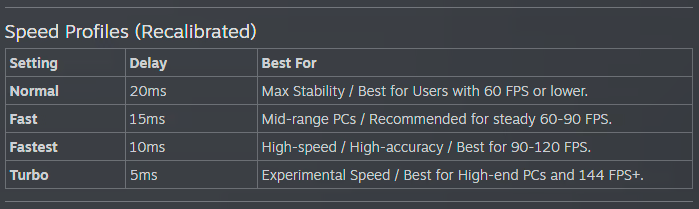
  • Adjustable Speed: Tailor the painting speed to match your PC performance and server lag.

Artistic Control & Filters

Fine-tune your masterpiece before the brush ever touches the sign:

  • Stylized Filters: Oil Paint, Charcoal Sketch, Comic Book, Watercolor, and more.

  • Technical Filters: Dithering, Pixel Art/Mosaic, and Line Art.

  • Image Enhancement: Gaussian Blur, Sharpening, and Median filtering to clean up noisy images.

  • Background Color Ignore: Tell RustForge to skip specific colors (like white borders or green screens) to save massive amounts of time.

How It Works

  • Load: Choose any image from your PC or a URL.

  • Capture: Use the hotkeys to quickly define your in-game palette and canvas area.

  • Configure: Select your painting speed, filter, and painting method.

  • Paint: Press Start and watch RustForge handle the rest.

RustForge is built with stability in mind, featuring high-DPI support, advanced painting methods, and tools, with optional Premium features available via DLC to unlock advanced high-fidelity painting methods and quality-of-life enhancements.

Системные требования

    Минимальные:
    • ОС: Windows 10 64-bit
    • Процессор: Dual-core 2.0 GHz (Intel i3 / AMD Ryzen 3)
    • Оперативная память: 4 GB ОЗУ
    • Видеокарта: Integrated Graphics
    • DirectX: версии 11
    • Сеть: Широкополосное подключение к интернету
    • Место на диске: 3 GB
    • Дополнительно: Requires .NET Desktop Runtime 8.0
    Рекомендованные:
    • ОС: Windows 10 64-bit
    • Процессор: Quad-core 3.0 GHz+ (Intel i5 / AMD Ryzen 5)
    • Оперативная память: 8 GB ОЗУ
    • Видеокарта: Dedicated GPU (GTX 1050 or equivalent)
    • DirectX: версии 12
    • Сеть: Широкополосное подключение к интернету
    • Место на диске: 4 GB
    • Дополнительно: Requires .NET Desktop Runtime 8.0
У этого продукта нет обзоров

Вы можете написать обзор этого продукта, чтобы поделиться своим опытом с сообществом. Для этого воспользуйтесь разделом над кнопками покупки.