Transform your Rust base into a gallery with RustForge. Convert and paint high-fidelity images directly onto in-game signs with extreme precision. Features adaptive palettes, session saving, and advanced painting methods, it makes creating professional in-game artwork fast and effortless.

Connectez-vous pour ajouter cet article à votre liste de souhaits, le suivre ou l'ignorer

Français non disponible

Ce produit n'est pas disponible dans votre langue. Veuillez consulter la liste des langues disponibles ci-dessous avant de l'acheter.

Utiliser RustForge Sign Painter

Free-to-play
 

À propos de ce logiciel

Transform Your Base Into a Gallery

RustForge is the ultimate automation tool for aspiring artists in the world of Rust. Gone are the days of spending hours manually pixel-painting a sign only to be raided mid-project. RustForge takes any image, from high-fidelity photos to pixel art, and automatically paints it directly onto your in-game canvas with machine precision.

Core Functionality (Free for All Users)

The foundation of RustForge provides everything you need to start creating:

  • Automated Precision Painting: Reproduce any image accurately onto in-game signs with automated mouse movements and color selection.

  • Configurable Painting Area: Use hotkey-driven overlays (F9/F10) to perfectly align your canvas and palette.

  • Standard Painting Methods: Methodical line-by-line painting and standard dithering for classic sign art.

  • VoidWeave Painting Method: Paints each pixel individually. This method produces the highest quality, most accurate results, with the limited 64 color in-game palette, especially for detailed images, gradients, and pixel art.

  • Full Session Control: Pause, resume, or stop your painting at any time with customizable hotkeys.

  • Adjustable Speed: Tailor the painting speed to match your PC performance and server lag.

Artistic Control & Filters

Fine-tune your masterpiece before the brush ever touches the sign:

  • Stylized Filters: Oil Paint, Charcoal Sketch, Comic Book, Watercolor, and more.

  • Technical Filters: Dithering, Pixel Art/Mosaic, and Line Art.

  • Image Enhancement: Gaussian Blur, Sharpening, and Median filtering to clean up noisy images.

  • Background Color Ignore: Tell RustForge to skip specific colors (like white borders or green screens) to save massive amounts of time.

How It Works

  • Load: Choose any image from your PC or a URL.

  • Capture: Use the hotkeys to quickly define your in-game palette and canvas area.

  • Configure: Select your painting speed, filter, and painting method.

  • Paint: Press Start and watch RustForge handle the rest.

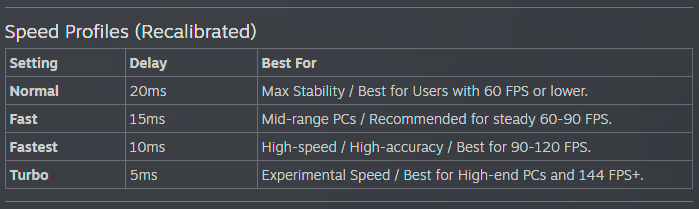
RustForge Sign Painter relies heavily on a stable framerate. The default settings are optimized for all systems, low-end or high-end. Higher FPS means you can have a faster Painting Speed, and a lower Precision Timing Delay value, Lower FPS means you should use lower Painting Speeds, and higher or the default Precision Timing Delay (20ms).

Below are the Recommended Painting Speed Settings based on your average FPS

⚠ Important Notes

• Supported aspect ratios: 4:3 and 16:9 only (standard 1080p / 1440p / 4K).

Ultrawide and other widescreen ratios are not supported.

• Rust in-game UI Scale must be set to 1.0.

Other UI scales change element positions and will cause mis-clicks.

RustForge is built with stability in mind, featuring high-DPI support, advanced painting methods, and tools, with optional Premium features available via DLC to unlock advanced high-fidelity painting methods and quality-of-life enhancements.

Configuration requise

    Minimale :
    • Système d'exploitation : Windows 10 64-bit
    • Processeur : Dual-core 2.0 GHz (Intel i3 / AMD Ryzen 3)
    • Mémoire vive : 4  GB de mémoire
    • Graphiques : Integrated Graphics
    • DirectX : Version 11
    • Réseau : connexion internet haut débit
    • Espace disque : 3 GB d'espace disque disponible
    • Notes supplémentaires : Requires .NET Desktop Runtime 8.0
    Recommandée :
    • Système d'exploitation : Windows 10 64-bit
    • Processeur : Quad-core 3.0 GHz+ (Intel i5 / AMD Ryzen 5)
    • Mémoire vive : 8 GB de mémoire
    • Graphiques : Dedicated GPU (GTX 1050 or equivalent)
    • DirectX : Version 12
    • Réseau : connexion internet haut débit
    • Espace disque : 4 GB d'espace disque disponible
    • Notes supplémentaires : Requires .NET Desktop Runtime 8.0

Évaluations pour RustForge Sign Painter À propos des évaluations Vos préférences

Évaluations globales :
5 évaluations (5 évaluation(s))


Pour consulter les évaluations publiées lors d'une période spécifique, cliquez et faites glisser votre sélection sur un graphique ci-dessus ou cliquez sur une barre.


Filtrer les évaluations en fonction du temps de jeu des utilisateurs au moment de leur publication :


Pas de minimum à pas de maximum

Afficher les évaluations dans l'ordre sélectionné


En savoir plus
Filtres
Activité d'évaluation hors sujet exclue
Temps de jeu : 
A joué surtout sur Steam Deck
Plus aucune évaluation ne correspond aux filtres définis ci-dessus
Ajustez les filtres ci-dessus pour voir d'autres évaluations
Chargement des évaluations...