Do you play a game that always needs extra tools running alongside it? Maybe you launch a racing sim with a live telemetry map, or fire up an ARPG with trade helpers, currency overlays, or macro scripts? Echo makes that seamless.

로그인하셔서 게임을 찜 목록에 추가하거나, 팔로우하거나 또는 제외로 지정하세요.

한국어(을)를 지원하지 않습니다

이 제품은 귀하의 로컬 언어를 지원하지 않습니다. 구매하기 전에 아래에 있는 지원하는 언어 목록을 확인해주세요.

Echo 구매


소프트웨어 정보

With Echo, you can automatically monitor for when specific programs or games launch, and have your favorite helper tools or scripts start automatically alongside them.

Do you play a game that always needs extra tools running alongside it?

Maybe you launch a racing sim with a live telemetry map, or fire up an ARPG with trade helpers, currency overlays, or macro scripts?

Echo makes that seamless.

Instead of manually opening multiple programs each time—or juggling batch files and Task Scheduler—Echo automatically launches all your chosen helper tools the moment your game (or any program) starts.

Just tell Echo which game or app to watch for, and what you want to run with it: apps, scripts, websites, files, folders and more, all can be automatically launched.

When you're done playing? Echo can optionally close all those extra tools automatically when the main game exits. 

Features

  • Monitor any programs

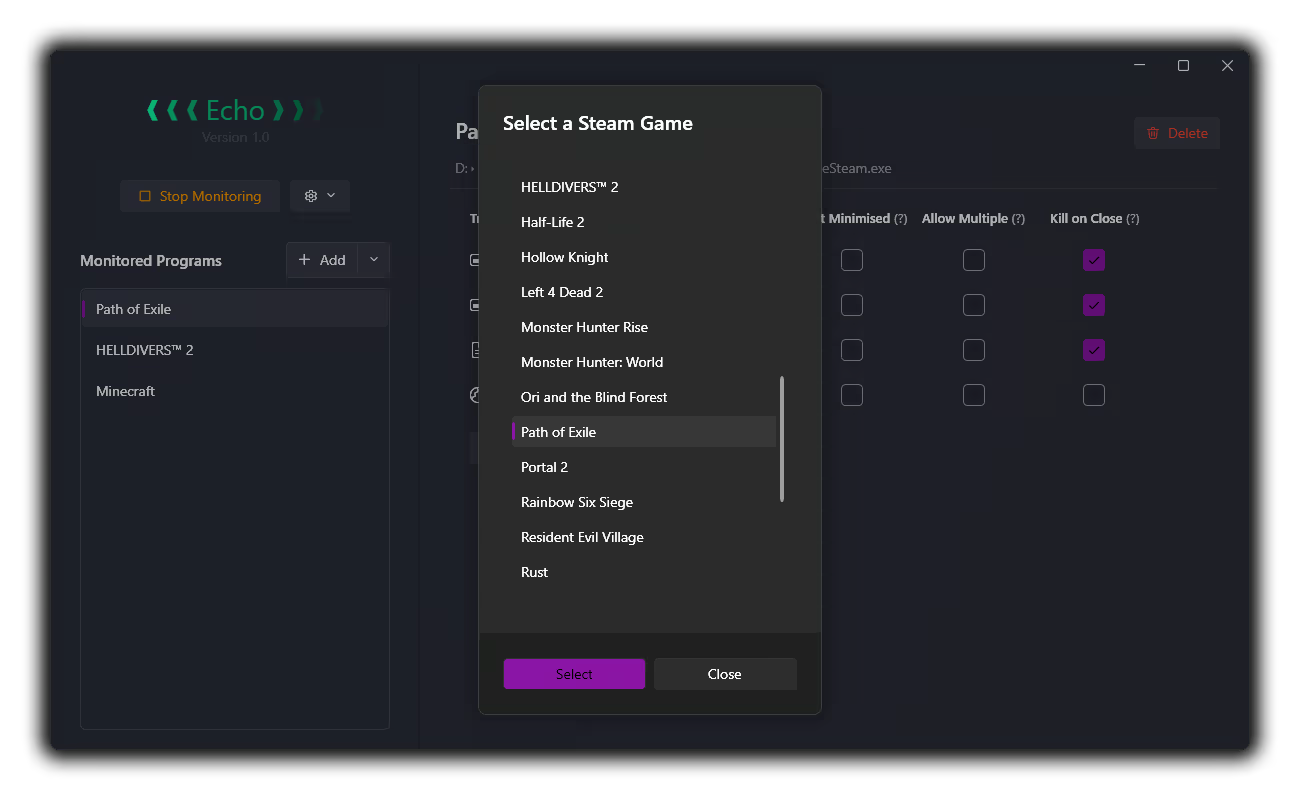
  • Automatically finds and lists all Steam Games for easy adding

  • Any of the following can be added as a triggered launch for each program:

    • Other applications

    • Autohotkey / AutoIt scripts

    • Website URLs

    • Folders

    • Any other files will be launched using whatever the filetype default is set to in Windows. e.g. a Word Document will open in MS Word

    • You can also specify multiple programs to listen for under each heading:

      • For example, you can specify `PathOfExileSteam.exe` and `PathOfExileSteam_64.exe` and both will fire all the helpers specified under the `Path of Exile` entry

  • Config Options

    • Add to Windows Start Menu

    • Run automatically on Windows Startup

Caveats

  • Programs that require admin rights cannot be tracked unless Echo is also run in admin mode

  • Most programs and games can be detected / launched, but some helper programs can't be automatically closed. Specifically, if the triggered process launches sub-processes or redirects to a UWP application, they may not automatically close on exit of the primary program.

  • Websites and folders, which launch through redirection pathways (by opening your browser or Windows Explorer), also can't be automatically closed on exit to avoid causing problems. 

This is why an option to run programs in `Hidden` mode is not included; you will always be able to manually close any programs that are run

Planned (for triggered processes)

- [ ] Run as Admin

- [ ] Delay start

- [X] Custom arguments - (added!)

- [ ] Run triggered process on program exit instead of program startup

시스템 요구 사항

    최소:
    • 운영 체제: Windows 10
    • 프로세서: Any
    • 메모리: 80 MB RAM
    • 그래픽: Any
    • 저장 공간: 10 MB 사용 가능 공간
    • 사운드카드: N/A

Echo에 대한 사용자 평가 사용자 평가 정보 환경 설정

종합 평가:
사용자 평가 2개 (평가 2개)


특정 날짜 범위에 속하는 평가를 보려면, 위의 그래프에서 선택 항목을 클릭한 후 드래그하거나 원하는 바를 클릭하세요.


평가를 작성한 시점의 사용자 플레이 시간을 기준으로 평가를 필터링:


최소 시간 없음 ~ 최대 시간 없음

선택한 표시 순서로 평가 보기


자세한 정보
필터
게임과 관련없는 평가 활동 제외
플레이 시간:
주로 Steam Deck에서 플레이
운영 체제:
CPU:
GPU:
기기 유형:
위에서 설정한 필터 조건에 맞는 평가가 없습니다
다른 평가를 보려면 위에서 필터를 조정해주세요
평가 불러오는 중...