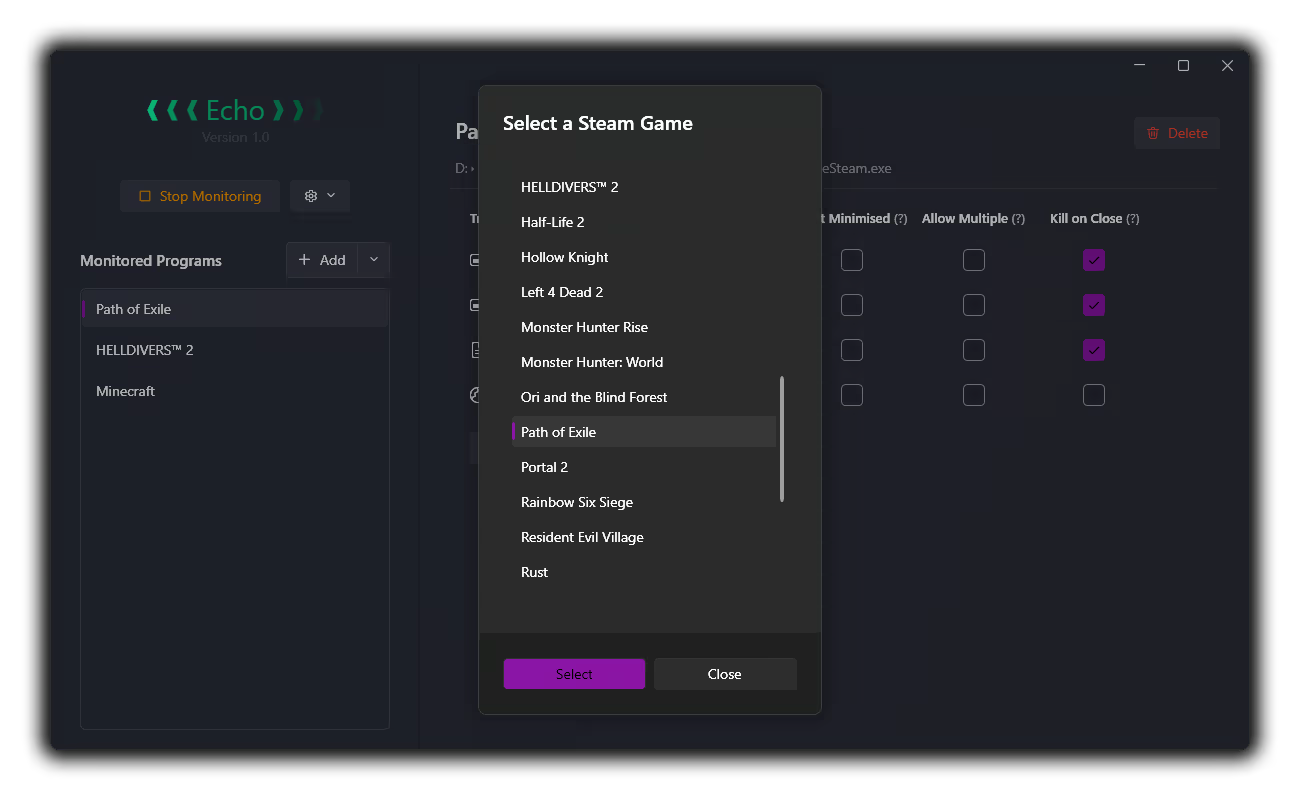
Do you play a game that always needs extra tools running alongside it? Maybe you launch a racing sim with a live telemetry map, or fire up an ARPG with trade helpers, currency overlays, or macro scripts? Echo makes that seamless.

Connectez-vous pour ajouter cet article à votre liste de souhaits, le suivre ou l'ignorer

Français non disponible

Ce produit n'est pas disponible dans votre langue. Veuillez consulter la liste des langues disponibles ci-dessous avant de l'acheter.

Acheter Echo


À propos de ce logiciel

With Echo, you can automatically monitor for when specific programs or games launch, and have your favorite helper tools or scripts start automatically alongside them.

Do you play a game that always needs extra tools running alongside it?

Maybe you launch a racing sim with a live telemetry map, or fire up an ARPG with trade helpers, currency overlays, or macro scripts?

Echo makes that seamless.

Instead of manually opening multiple programs each time—or juggling batch files and Task Scheduler—Echo automatically launches all your chosen helper tools the moment your game (or any program) starts.

Just tell Echo which game or app to watch for, and what you want to run with it: apps, scripts, websites, files, folders and more, all can be automatically launched.

When you're done playing? Echo can optionally close all those extra tools automatically when the main game exits. 

Features

  • Monitor any programs

  • Automatically finds and lists all Steam Games for easy adding

  • Any of the following can be added as a triggered launch for each program:

    • Other applications

    • Autohotkey / AutoIt scripts

    • Website URLs

    • Folders

    • Any other files will be launched using whatever the filetype default is set to in Windows. e.g. a Word Document will open in MS Word

    • You can also specify multiple programs to listen for under each heading:

      • For example, you can specify `PathOfExileSteam.exe` and `PathOfExileSteam_64.exe` and both will fire all the helpers specified under the `Path of Exile` entry

  • Config Options

    • Add to Windows Start Menu

    • Run automatically on Windows Startup

Caveats

  • Programs that require admin rights cannot be tracked unless Echo is also run in admin mode

  • Most programs and games can be detected / launched, but some helper programs can't be automatically closed. Specifically, if the triggered process launches sub-processes or redirects to a UWP application, they may not automatically close on exit of the primary program.

  • Websites and folders, which launch through redirection pathways (by opening your browser or Windows Explorer), also can't be automatically closed on exit to avoid causing problems. 

This is why an option to run programs in `Hidden` mode is not included; you will always be able to manually close any programs that are run

Planned (for triggered processes)

- [ ] Run as Admin

- [ ] Delay start

- [X] Custom arguments - (added!)

- [ ] Run triggered process on program exit instead of program startup

Configuration requise

    Minimale :
    • Système d'exploitation : Windows 10
    • Processeur : Any
    • Mémoire vive : 80 MB de mémoire
    • Graphiques : Any
    • Espace disque : 10 MB d'espace disque disponible
    • Carte son : N/A

Évaluations pour Echo À propos des évaluations Vos préférences

Évaluations globales :
2 évaluations (2 évaluation(s))


Pour consulter les évaluations publiées lors d'une période spécifique, cliquez et faites glisser votre sélection sur un graphique ci-dessus ou cliquez sur une barre.


Filtrer les évaluations en fonction du temps de jeu des utilisateurs au moment de leur publication :


Pas de minimum à pas de maximum

Afficher les évaluations dans l'ordre sélectionné


En savoir plus
Filtres
Activité d'évaluation hors sujet exclue
Temps de jeu : 
A joué surtout sur Steam Deck
Plus aucune évaluation ne correspond aux filtres définis ci-dessus
Ajustez les filtres ci-dessus pour voir d'autres évaluations
Chargement des évaluations...